
Free POS app for shops, cafés & restaurantsSell faster.
Track stock.
See your profit.

Salesmaster is a point-of-sale app for phone, tablet and laptop: record sales, print receipts and track stock with one account, even without internet.

See pricing
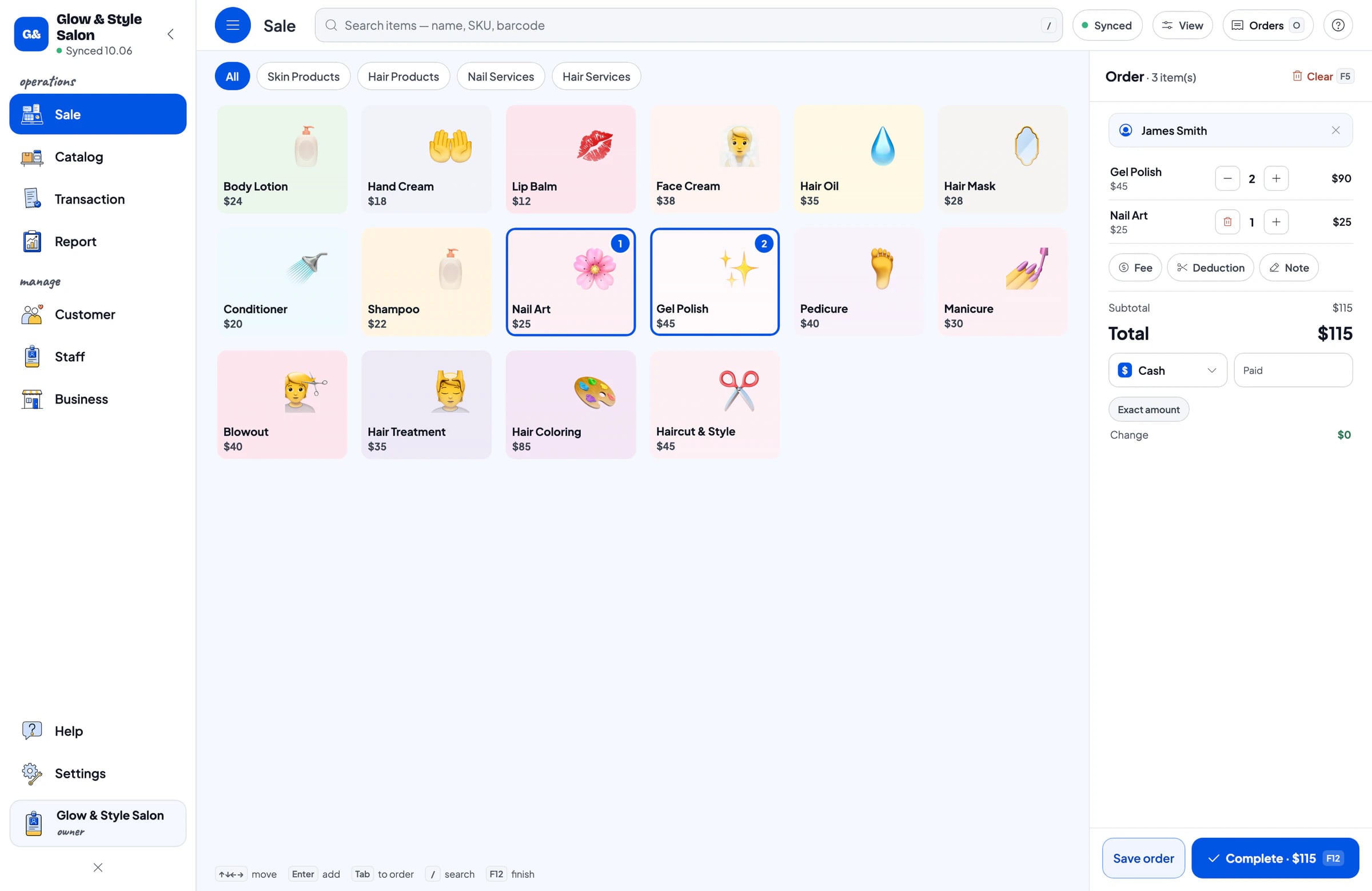
The Salesmaster Sale screen on Mac: a salon product catalogue and cart
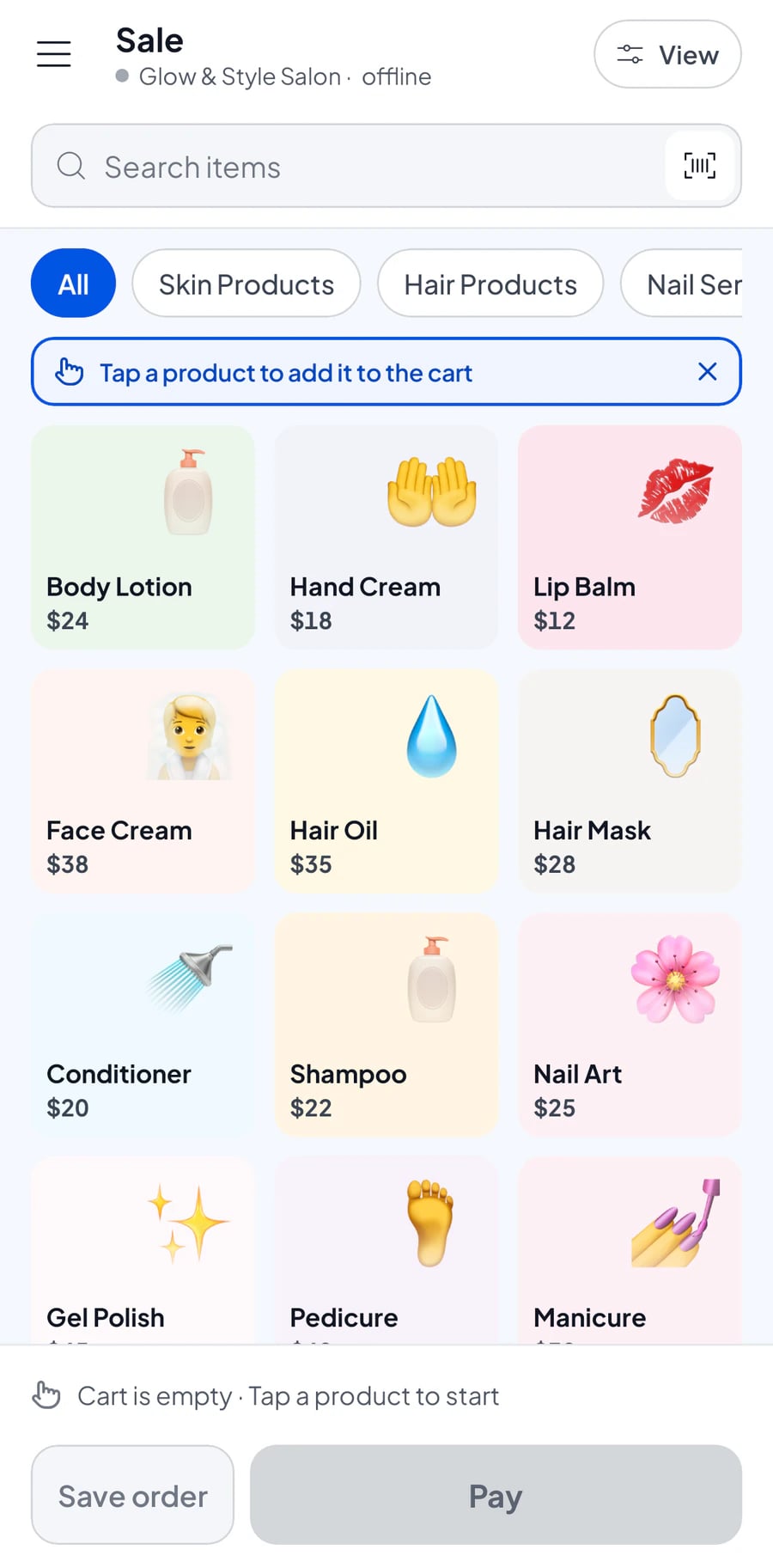
The Salesmaster Sale screen on a phone
  • 4 platforms, 1 account

  • works offline
  • Printed & WhatsApp receipts
  • free to start

ついにシンプルで使いやすいPOSアプリを見つけました。支払いに本当に役立ち、すべてが記録されます。開発者の皆さん、素晴らしい… — Ochikame, App Store

What is Salesmaster?

Salesmaster is a point-of-sale (POS) app for small businesses such as shops, cafés, restaurants, minimarkets and salons. Record sales, print or send receipts, track stock and customers, and see reports on a phone, tablet or laptop with one account. It keeps working offline, and you can use it for free.

Devices
Android, iPhone & iPad, Windows, Mac
Price
Free; Pro from $4.90/month
Offline
Up to 7 days, syncs by itself
Receipts
Thermal printer, WhatsApp, email, web link
Part 1A day in your shop

From opening to closing, everything is recorded.

Salesmaster does more than record sales. It works with you from the morning until you see how the day went.

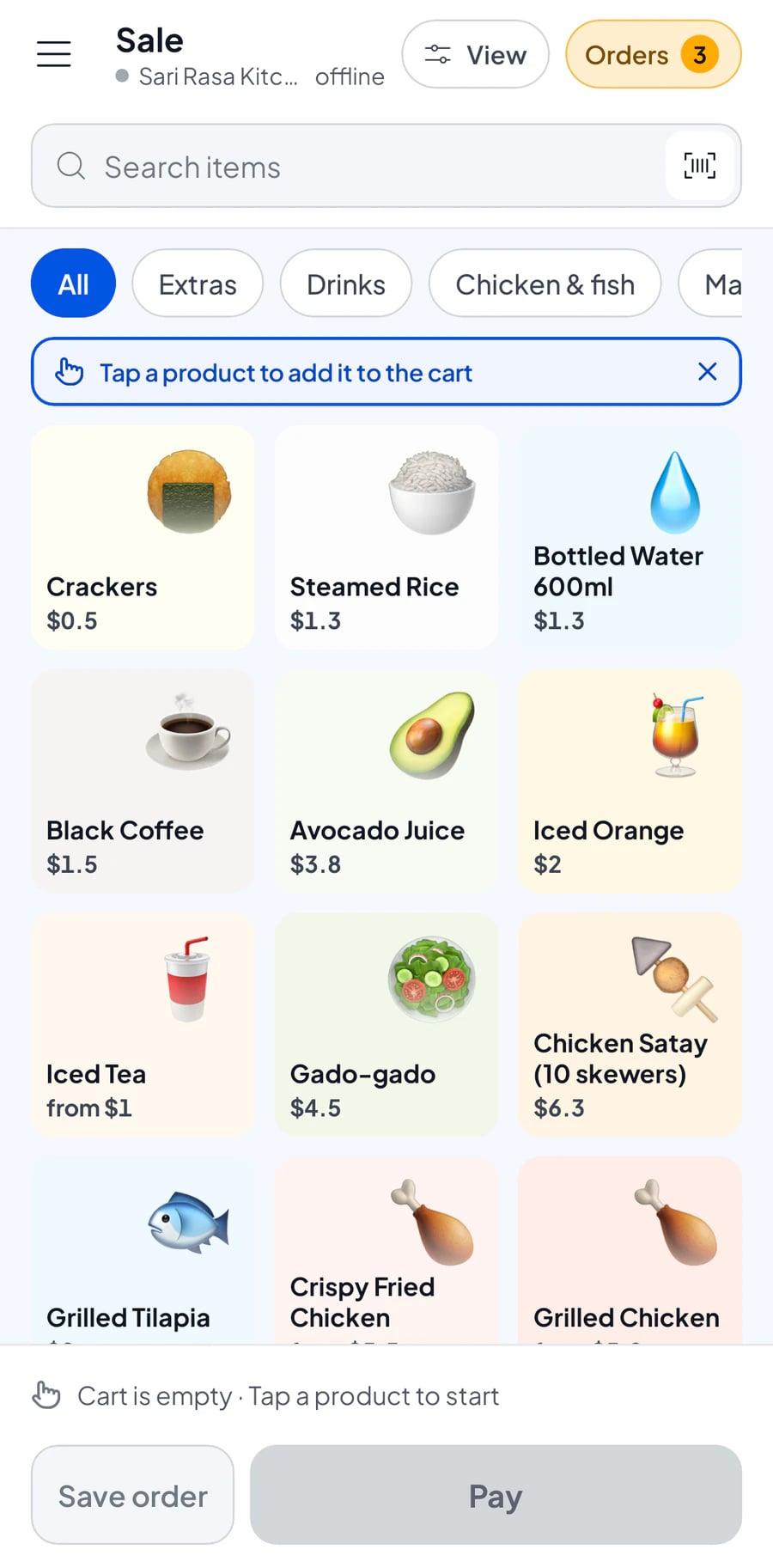
The Sale screen on a phone with a food catalogue
Morning

Open the till, stock is ready

Your catalogue, prices and stock are on whichever phone or tablet you pick up. Staff sign in with their own accounts.

  • Catalogue and prices synced across devices
  • Staff accounts with their own permissions

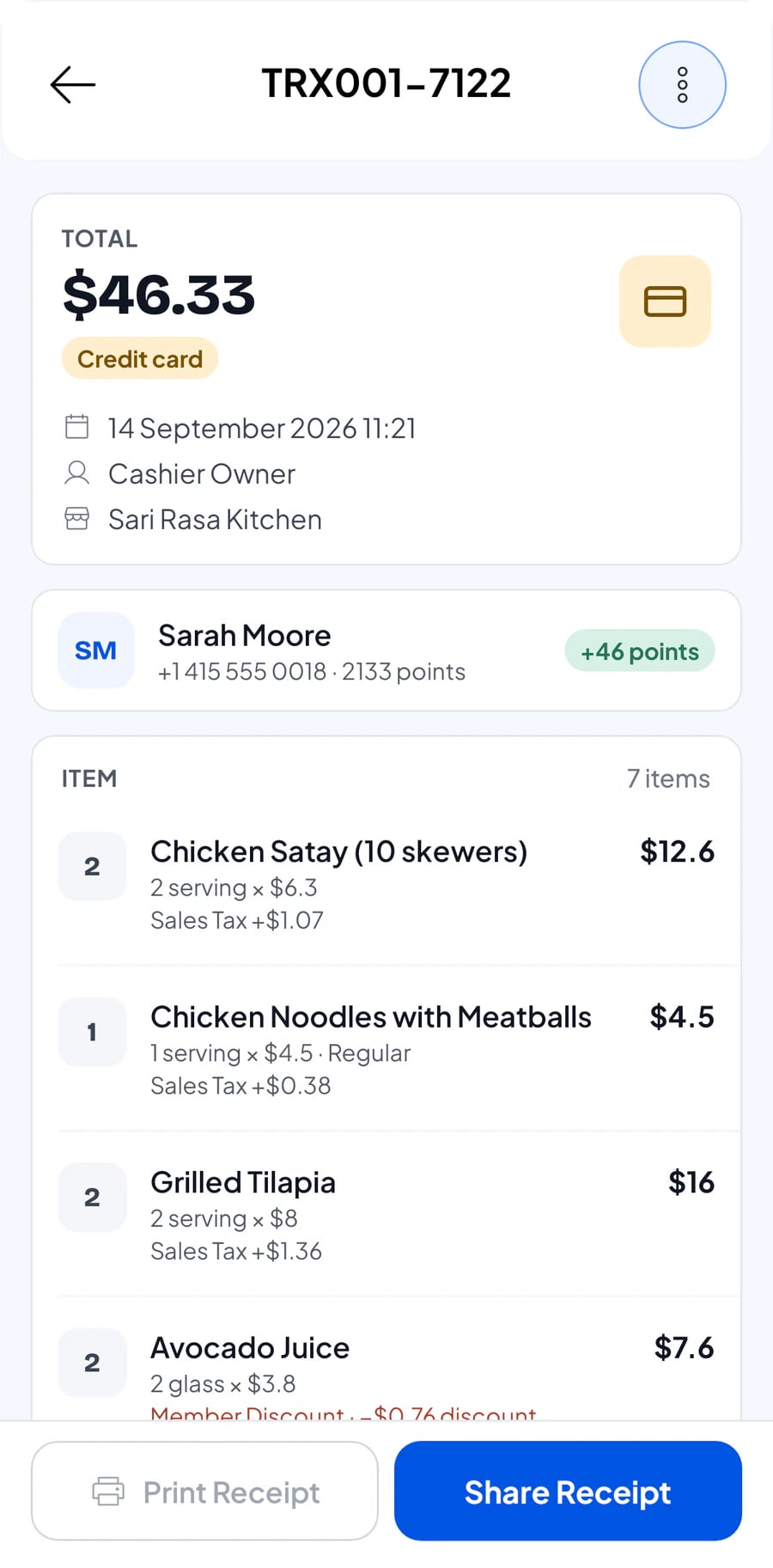
Transaction detail with the total and items
Midday

Sell fast, send the receipt

Scan or tap items, choose how the customer pays, done. Print the receipt or send it, even when the internet is down.

  • Bluetooth & USB thermal printers
  • Receipts by WhatsApp, email or web link
  • Sales saved offline and synced later
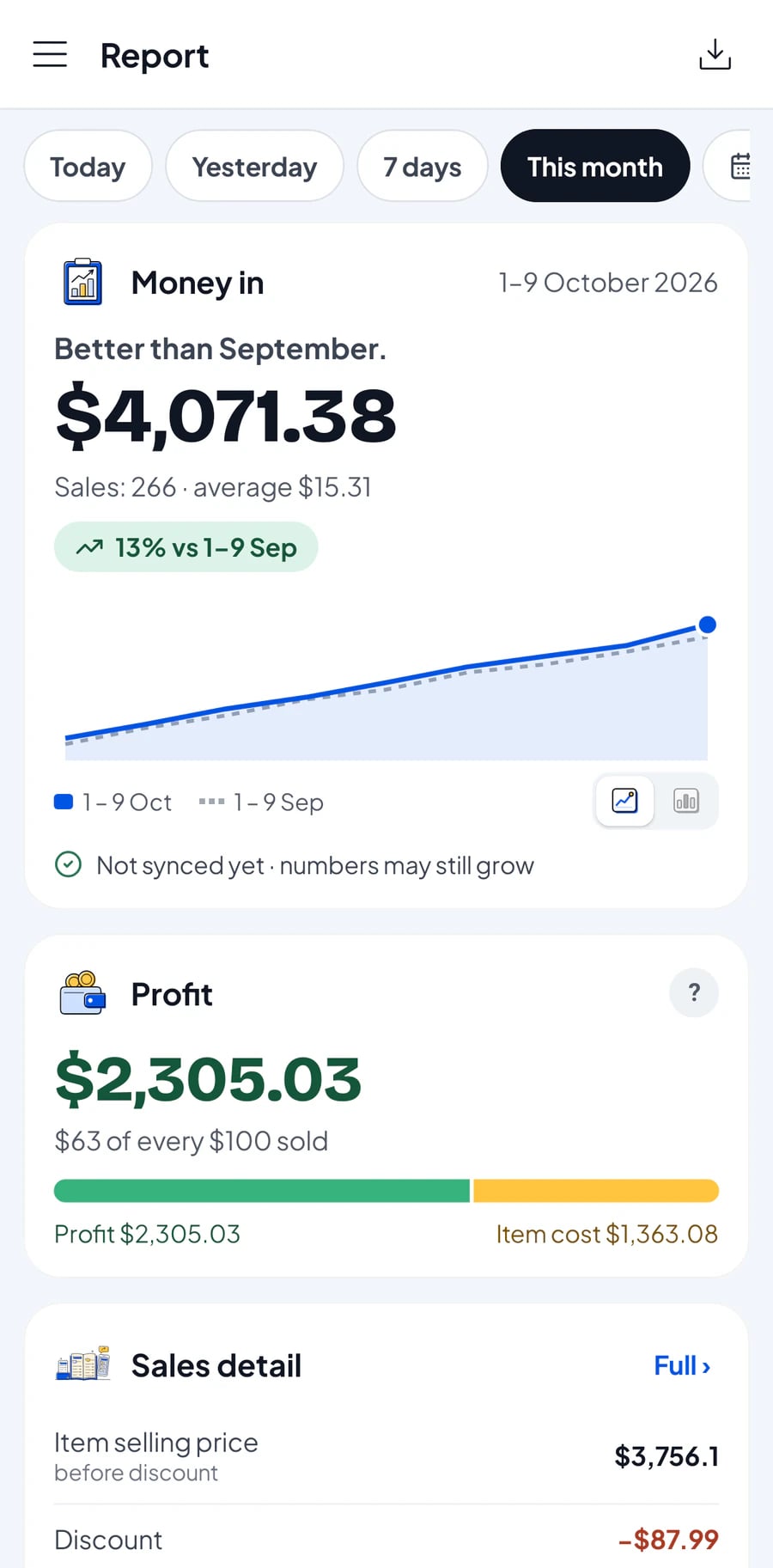
The Reports screen: revenue and profit this month
Evening

Today's profit, not just revenue

Ingredient purchases, wages and rent are already recorded. You see what really stays in your pocket.

  • Gross and net profit worked out for you
  • Tax collected kept apart from profit
  • Export reports to Excel & PDF
Part 2What sets it apart

Three things shop owners mention most.

New

Ingredient stock counts itself

Write the recipe once: an iced coffee uses coffee, milk and sugar. Every cup sold takes its ingredients off stock. Add-ons like an extra shot too.

Receipts reach the customer, paper optional

Print on a thermal printer, or send a web receipt by WhatsApp or email with your shop's logo, colours and social links.

Lost signal? Keep selling.

Sales are saved on the device and sync by themselves when the internet is back. No queue waiting for a signal.

Part 3Made for your business

One POS app, many kinds of business.

Salesmaster sells products, services and made-to-order items. Here are some of the businesses it suits.

Restaurants & food stalls

Menus with variants and add-ons, printed or sent receipts, and best sellers right in your reports.

Food & drink stands

For stalls, carts and food-court tenants: quick orders at rush hour, variants and toppings as add-ons, and the day's takings at a glance.

Minimarkets & grocery shops

Scan barcodes, stock goes down with every sale, and thousands of items stay tidy by category.

Cafés & coffee shops

Drink recipes take coffee, milk and sugar off stock by themselves. Extra shots and toppings are add-ons.

Fashion & boutiques

Size and colour variants for every product, stock recorded with each sale, and discounts for promotions.

Bakeries & cake shops

Price per slice or per whole cake with variants, and flour, sugar and butter counted from recipes.

Cosmetics & skincare shops

Scan product barcodes, shade and size variants, and member points for regular customers.

Staple-food shops

Sell by the kilo, litre or sack with variants, with supplier records and stock history.

Phone & electronics shops

Phones, electronics, accessories and repair services on one till, barcode scanning, and each customer's purchase history.

Salons & spas

Services and products in one sale, customer records kept, and member points for regulars.

Motorcycle & car workshops

Service work and spare parts on one bill, customer records kept, and customers can pay later.

Laundries

Record loads by the kilo or by the piece, let customers pay on pickup, and send receipts by WhatsApp.

Hardware & building supplies

Sell by the sack, length or metre with variants, record suppliers, and keep stock of thousands of items.

Nail art & nail salons

Manicures, nail art and nail products in one sale, customer records kept, and member points for regulars.

Barbershops

Cuts, shaves and hair products on one till. Barbers sign in with their own staff accounts.

See all 57 business types

Not on the list? If you sell products or services, Salesmaster works for you.

Part 4Money & customers

The numbers that matter, clearly.

FinanceNew

Real net profit, not a guess

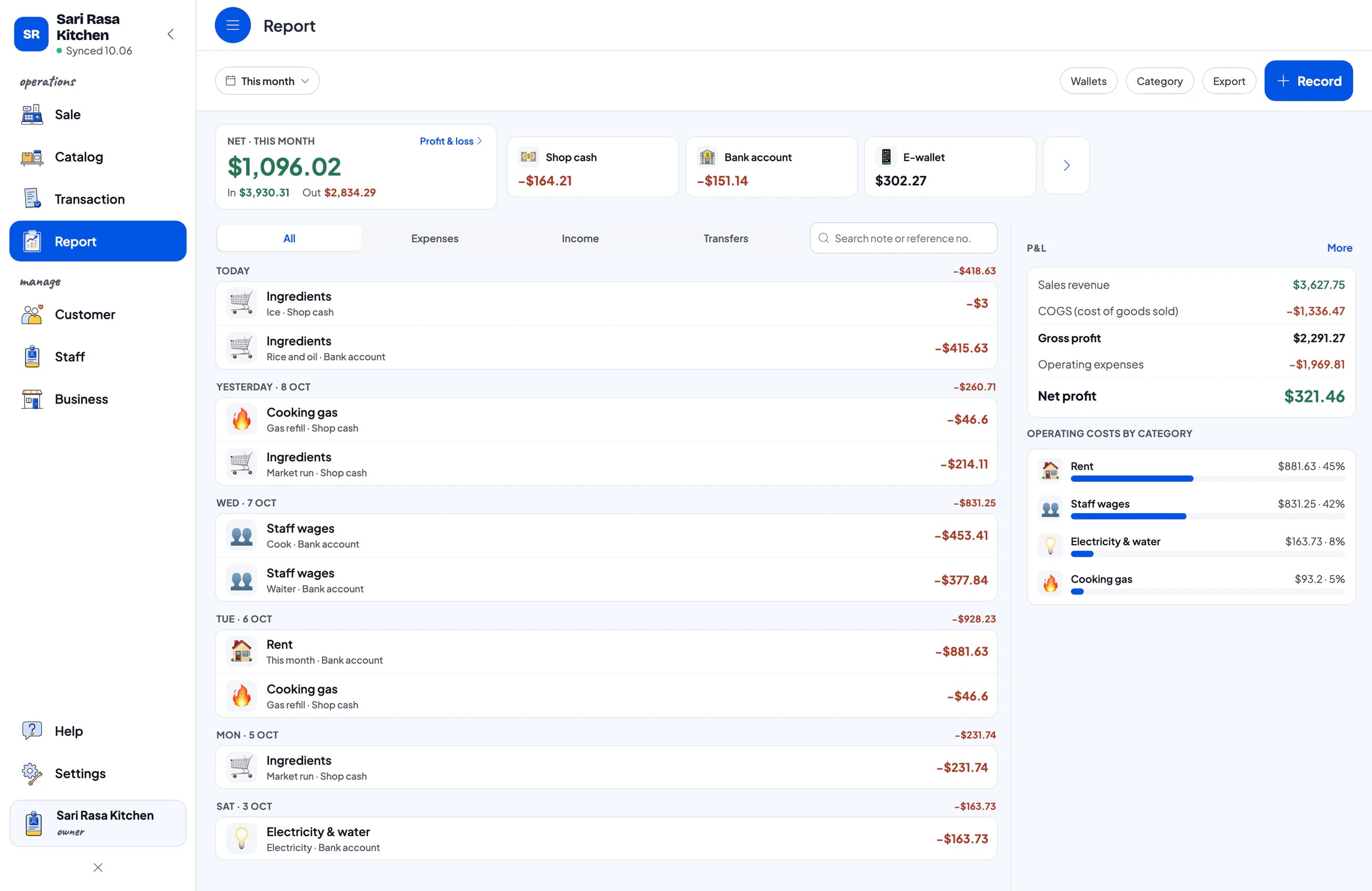
Record expenses by category and by wallet: cash drawer, bank account, e-wallet. Revenue minus cost of goods and operating costs gives your actual profit.

  • Expense categories: ingredients, wages, rent, power
  • Money in and out per wallet
  • Tax kept apart from profit
The Finance screen on Mac: cash, expenses and profit
Points & member cardsNew

Customers come back

Points from every sale, redeemed as discounts, and member cards in their name. You set the rules.

ReportsNew

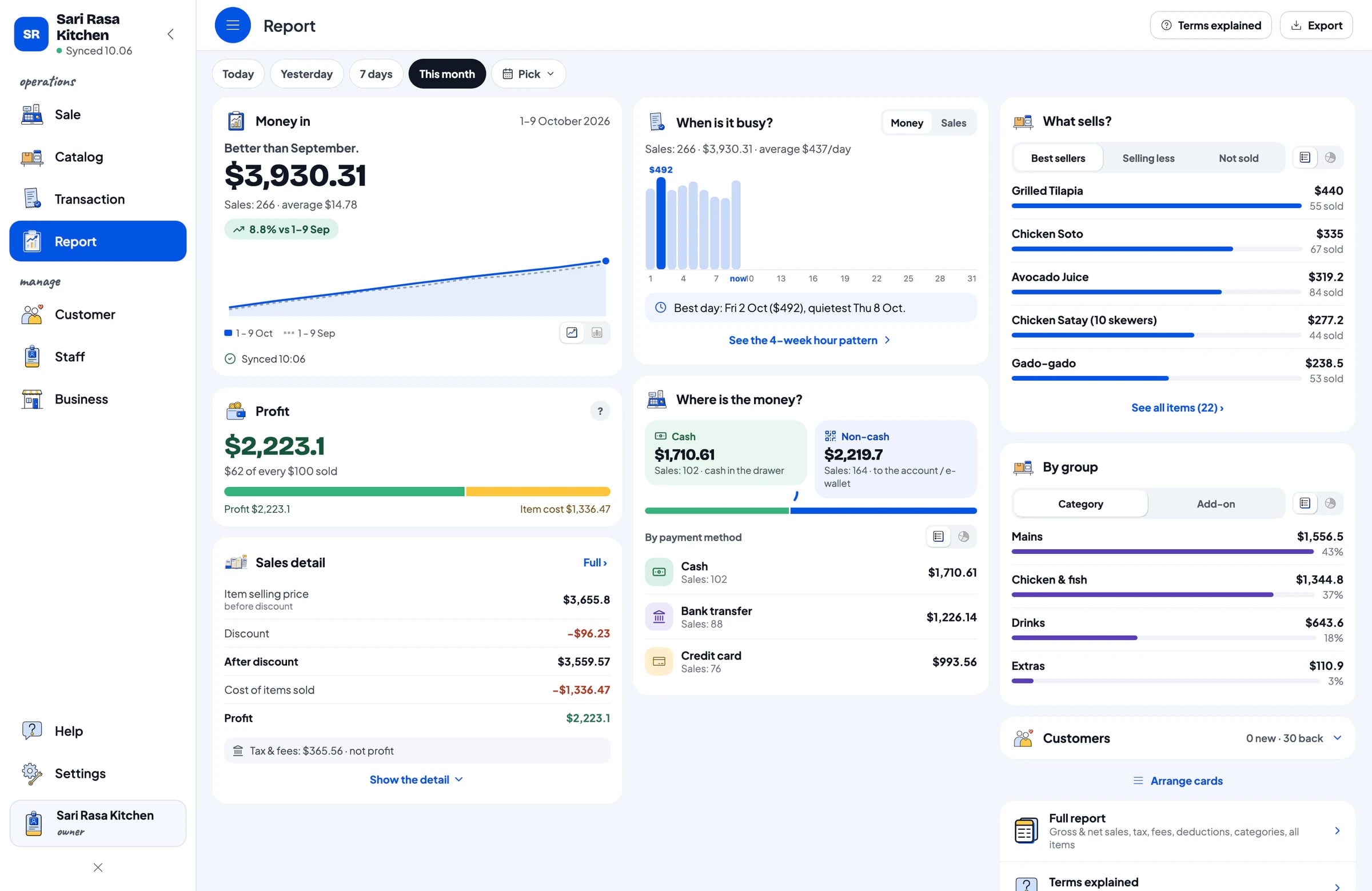
Full reports, Excel & PDF export

Daily, weekly, monthly, yearly. Best sellers, payment methods, tax. Send to your accountant in one tap.

The Reports screen on Mac with transaction charts
Part 5Feature list

Every feature, no exceptions.

Selling

5 features
  • Fast checkout, search or scan barcodes
  • Printed, WhatsApp, email & web receipts
  • Discounts, tax, service & delivery fees
  • Cash, transfer & other payment methods
  • Pay later: save an order, take payment later

Stock & catalogue

5 features
  • Stock goes down with every sale
  • Variants for size, flavour & colour
  • Categories, suppliers & stock history
  • Ingredients & recipesNew
  • Add-ons with their own recipesNew

Customers

3 features
  • Customer records & purchase history
  • Loyalty pointsNew
  • Member cardsNew

Money & reports

4 features
  • Daily, weekly, monthly, yearly reports
  • Best sellers & payment methods
  • Finance: cash, expenses & profitNew
  • Export reports to Excel & PDFNew

Team & devices

5 features
  • Staff accounts with permissions

  • Works without internet
  • Android, iPhone & iPad, Windows, Mac
  • Bluetooth & USB thermal printers
  • Cloud backup of your data
Part 6Devices

One account, every device.

Use it on a phone, tablet or laptop. Add cashier devices for your staff, and your shop's data syncs by itself.

Part 7Pricing

Start free, upgrade when you need to.

Every plan includes checkout, stock, receipts, reports and offline mode.

Free

$0.00forever


Salesmaster plan comparison: Free
Transactions per month30
Items (products, services, recipes)250
Customers100
Staff accountsOwner only
Start free

Solo Pro

$4.90/month

$49.90/year

Salesmaster plan comparison: Solo Pro
Transactions per month3,000
Items (products, services, recipes)1,000
Customers5,000
Staff accountsOwner only
Choose Solo

Bronze Pro

$6.90/month

$69.90/year

Salesmaster plan comparison: Bronze Pro
Transactions per month5,000
Items (products, services, recipes)2,000
Customers10,000
Staff accounts1 staff
Choose Bronze

Silver Pro

$9.90/month

$99.90/year

Salesmaster plan comparison: Silver Pro
Transactions per month8,000
Items (products, services, recipes)3,000
Customers20,000
Staff accounts2 staff
Choose Silver
See the full comparison
Part 8Customer stories

Written by shop owners, not by us.

Real App Store reviews, translated from Indonesian.

“ついにiPhone用の素晴らしいPOSアプリを見つけました。直接印刷もできます!Salesmasterのますますの成功を祈っています!”
fyanss.id · 2025年7月11日App Store
“アプリはとてもシンプルで分かりやすく、レポートも完全で詳細です。”
Raka auliaaa · 2025年6月1日App Store
“素晴らしいサービスです — 問題があれば管理者がWhatsAppで助けてくれて、返信も早いです。”
doniwing · 2026年3月14日App Store
“ついにシンプルで使いやすいPOSアプリを見つけました。支払いに本当に役立ち、すべてが記録されます。開発者の皆さん、素晴らしい仕事です!”
Ochikame · 2025年9月29日App Store
“アプリはとても便利で、価格もお手頃です。最新のアップデートではクラウドバックアップも追加されました”
niaarism · 2025年11月29日App Store
“アプリは素晴らしく使いやすいです。サポートチームはとても親切で対応が早いです。すべての質問に明確に答えてもらえました。”
Tasyasin · 2025年5月30日App Store
Part 9Questions

Frequently asked.

Step-by-step guides are in the Help Center.

Open the Help Center

Is Salesmaster free?

Yes. Salesmaster has a Free plan you can use with no time limit, within monthly quotas. Upgrade to a Pro plan whenever your business needs more.

Does Salesmaster work without internet?

Yes. Sales in Salesmaster are saved on the device and sync by themselves when the internet is back. Offline mode works for up to 7 days before the app needs to connect.

Which printers work with Salesmaster?

Salesmaster supports Bluetooth and USB thermal printers. Receipts can also be sent to customers by WhatsApp, email or a web receipt link.

Can I use Salesmaster on several devices?

Yes. The owner's account signs in on one device at a time, and extra cashier devices are added through staff accounts on Bronze Pro (1 staff) and Silver Pro (2 staff). Your shop's data stays in sync across Android, iPhone & iPad, Windows and Mac.

What if I change phones?

Download Salesmaster on the new phone and sign in with the same account. Your shop's data comes along because it is stored in your account, not on the phone.

Can my staff use Salesmaster?

Yes, on Bronze Pro (1 staff) and Silver Pro (2 staff). Each staff member signs in with their own account and the permissions you set.

Open your till today. For free.

Download, sign up and record your first sale in a few minutes. Upgrade any time.