
Salesmaster is a point-of-sale app for packaging and plastics suppliers on Android, iPhone & iPad, Windows and Mac. Each product is one item with its sizes as variants, such as small, medium and large bags or 12, 16 and 22 oz cups, and every variant has its own price, cost and stock. Single-pack and case prices are separate variants, orders from cafés and caterers are kept with Save order until they're paid, regulars earn loyalty points, and restocking, wages and rent go into Finance so you can see real net profit.
Problems every packaging supplier knows
A packaging store rarely lacks products. It has too many sizes. The hard part is finding the right one, charging the right price, and knowing when it's about to run out.
- 01
Thousands of sizes, thousands of prices
T-shirt bags in three sizes, zip bags in six, deli containers from 16 to 32 oz, cups from 12 to 22 oz. A new employee takes weeks to learn what everything costs.
- 02
One size sells out without warning
The 16 oz cups are gone just as your coffee-shop regular walks in, while the 12 oz cups pile up. Without stock per size, reorders always come too late.
- 03
Single-pack and case pricing
A household buys one pack; a business buys a six-pack of tape or a full roll of bubble wrap. Different prices for different buyers are easy to mix up at the counter.
- 04
Orders that arrive by text message
Cafés, caterers and food vendors text a list and pick it up later or want it delivered tomorrow. An order that only lives in a chat thread is easy to miss.
Building your catalog: bags, food containers, cups and shipping
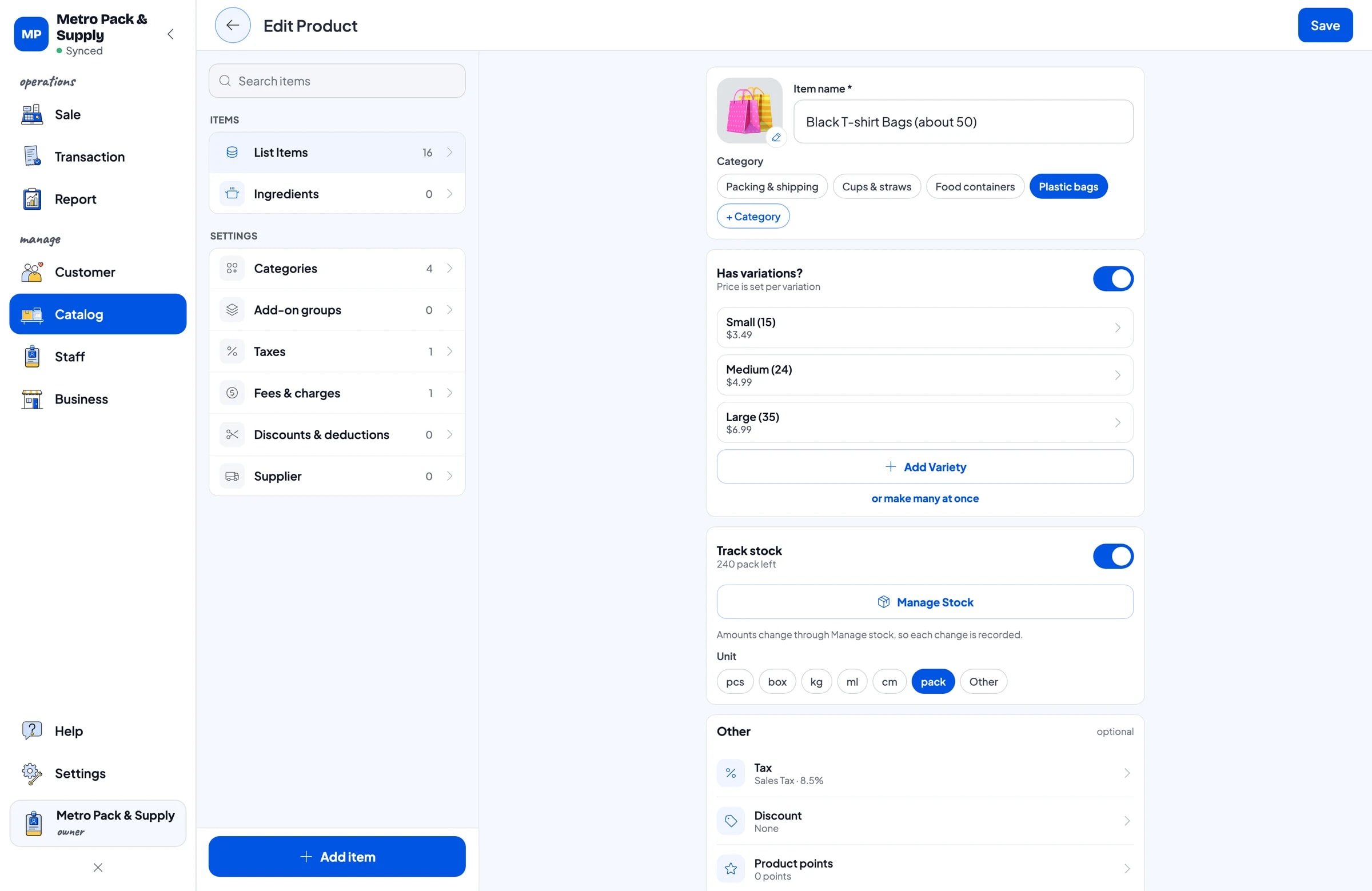
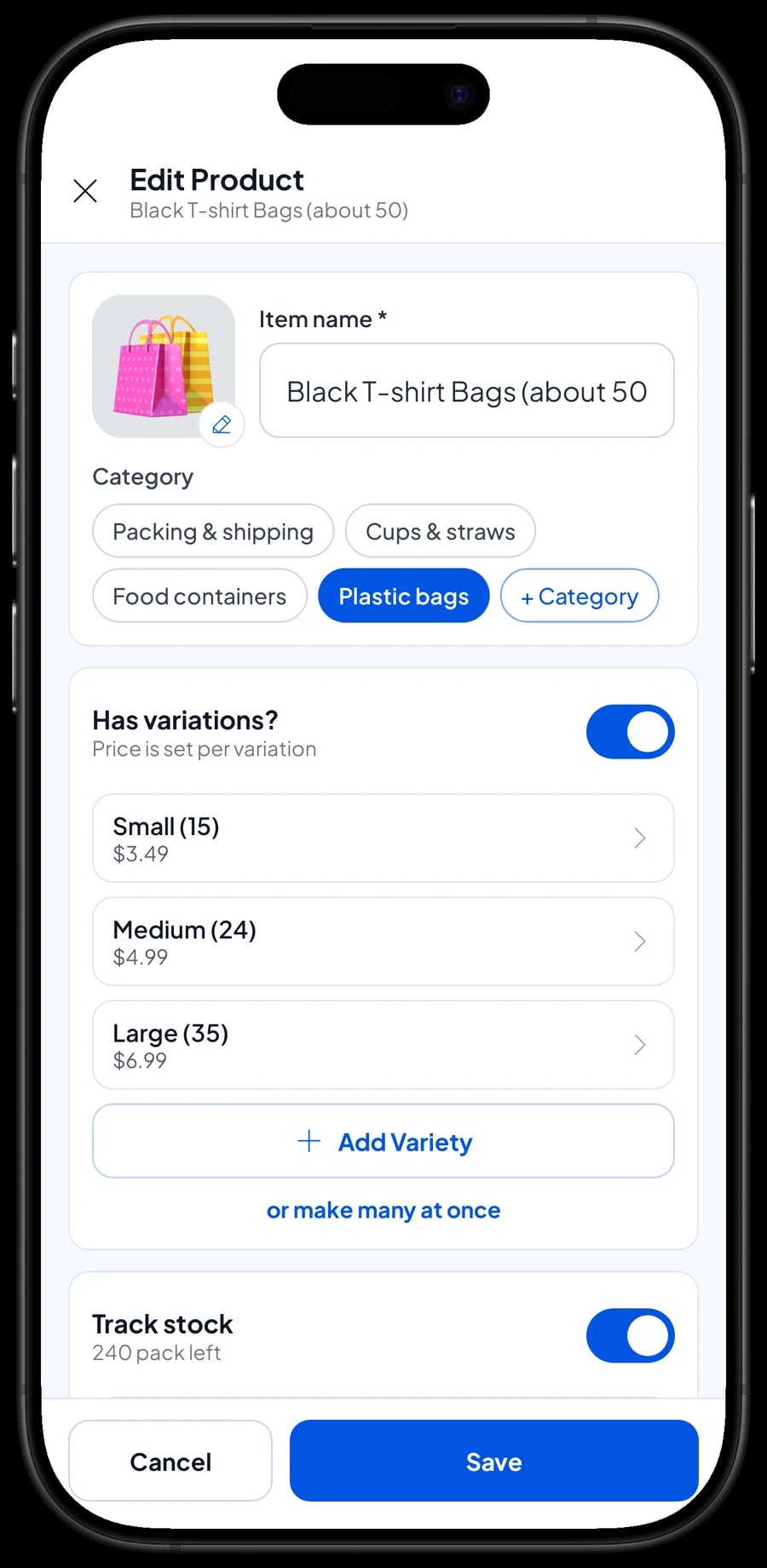
The key to a packaging catalog is one item per product, with its sizes as variants. In Salesmaster, Black T-shirt Bags is a single item with Small (15), Medium (24) and Large (35) variants. Plastic Deli Containers, 25-pack is one item with 16 oz, 24 oz and 32 oz variants. That keeps the catalog short even when you stock hundreds of sizes.
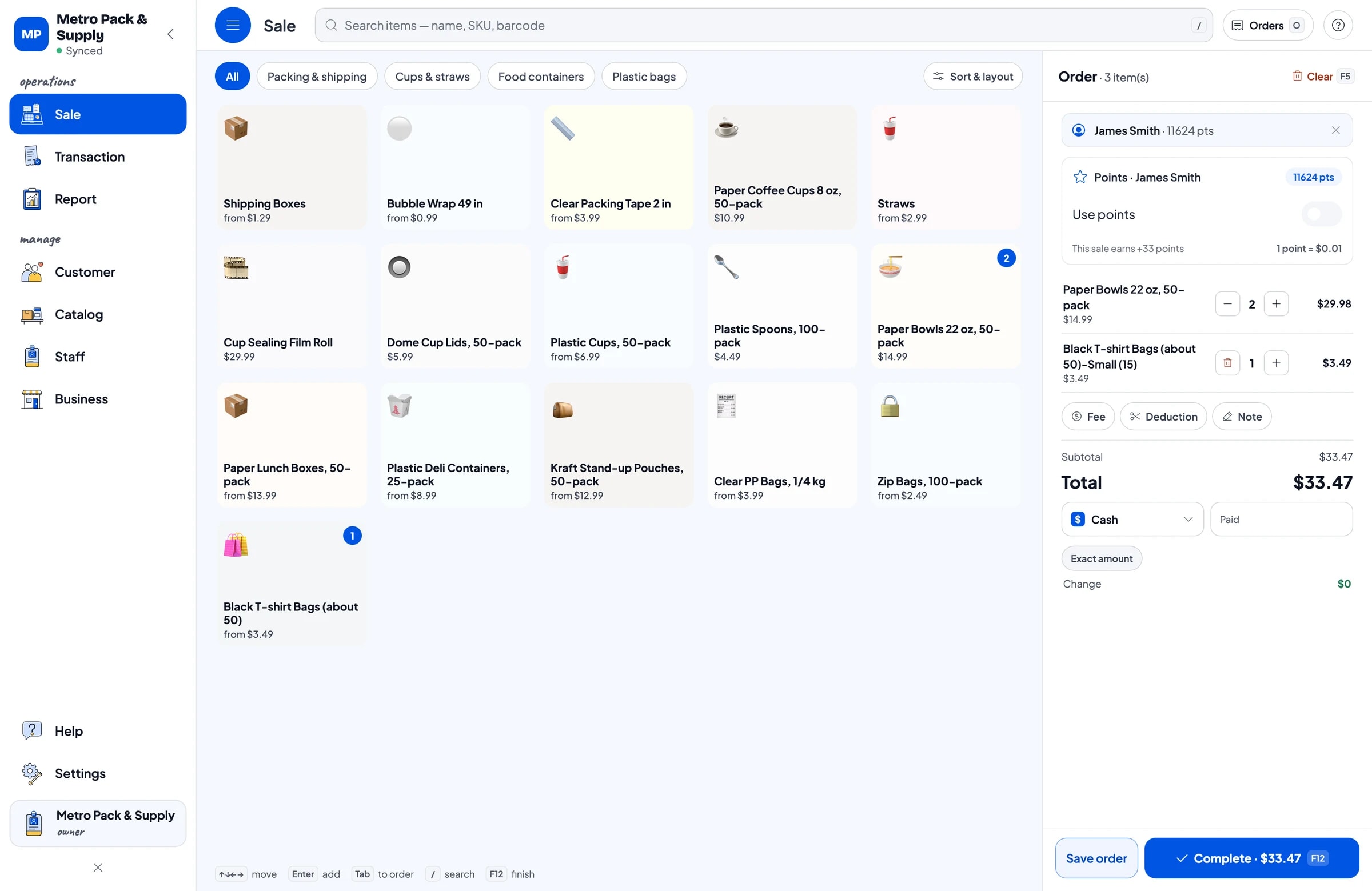
Group items into categories such as Plastic bags, Food containers, Cups & straws, and Packing & shipping. On the Sale screen, the cashier taps a category and then the item, or types the name into search. Products with a manufacturer barcode can be scanned with a barcode scanner and go straight into the cart.
If you carry a lot of products, enter the catalog on a laptop first (Windows or Mac), where typing is faster, then use it on the phone or tablet at the counter. The catalog syncs to every cashier device in your store.
- Step 1: Open Catalog → Categories and create Plastic bags, Food containers, Cups & straws, and Packing & shipping.
- Step 2: Open Catalog → List Items and add each product as one item.
- Step 3: Enter the barcode for manufacturer-packed products so they can be scanned at checkout.
- Step 4: Open the Sale screen and try finding a few products by name and by barcode.
Sizes as variants, each with its own price and stock
Every variant has its own selling price, its own cost and its own stock. Small, Medium and Large T-shirt bags are priced separately, and each size is counted separately. When a Medium pack sells, only the Medium stock goes down. That's exactly what a packaging store needs: you can see which size is running low without walking the shelves.
Name variants the same way every time, for example "6 x 10 cm" for zip bags or "16 oz" for cups. The cashier picks the size on the Sale screen and the price follows.
Cups, lids and straws are often bought together, but they stay separate items with their own stock. If you sell a bundle, such as 50 cups with 50 lids, create it as a bundle item at its bundle price.
- Step 1: Open Catalog → List Items and pick an item, such as Black T-shirt Bags.
- Step 2: Add a variant for each size, such as Small (15), Medium (24) and Large (35).
- Step 3: Enter the price and cost for each variant, then save.
- Step 4: Turn on stock tracking and enter the opening stock for each size in Inventory → Stock.
Single-pack prices and case or roll prices
Packaging suppliers serve two kinds of buyers: households that need one pack, and businesses that buy by the case, the six-pack or the roll. In Salesmaster, each way of selling is its own variant with its own price. Clear Packing Tape has a Single roll and a 6-pack variant. Bubble Wrap has Per yard and Roll, 55 yd.
Salesmaster doesn't change prices automatically based on quantity. If you give business customers a wholesale price, create separate variants such as "Retail" and "Wholesale" and have the cashier choose the right one. Extra discounts can be applied from the cart with Add Discount.
Keep in mind that each variant's stock is counted on its own, with no automatic conversion. Opening a 6-pack of tape doesn't add six single rolls to stock. If you break cases down for single sales, record the change as a stock adjustment.
Orders from cafés and caterers with Save order
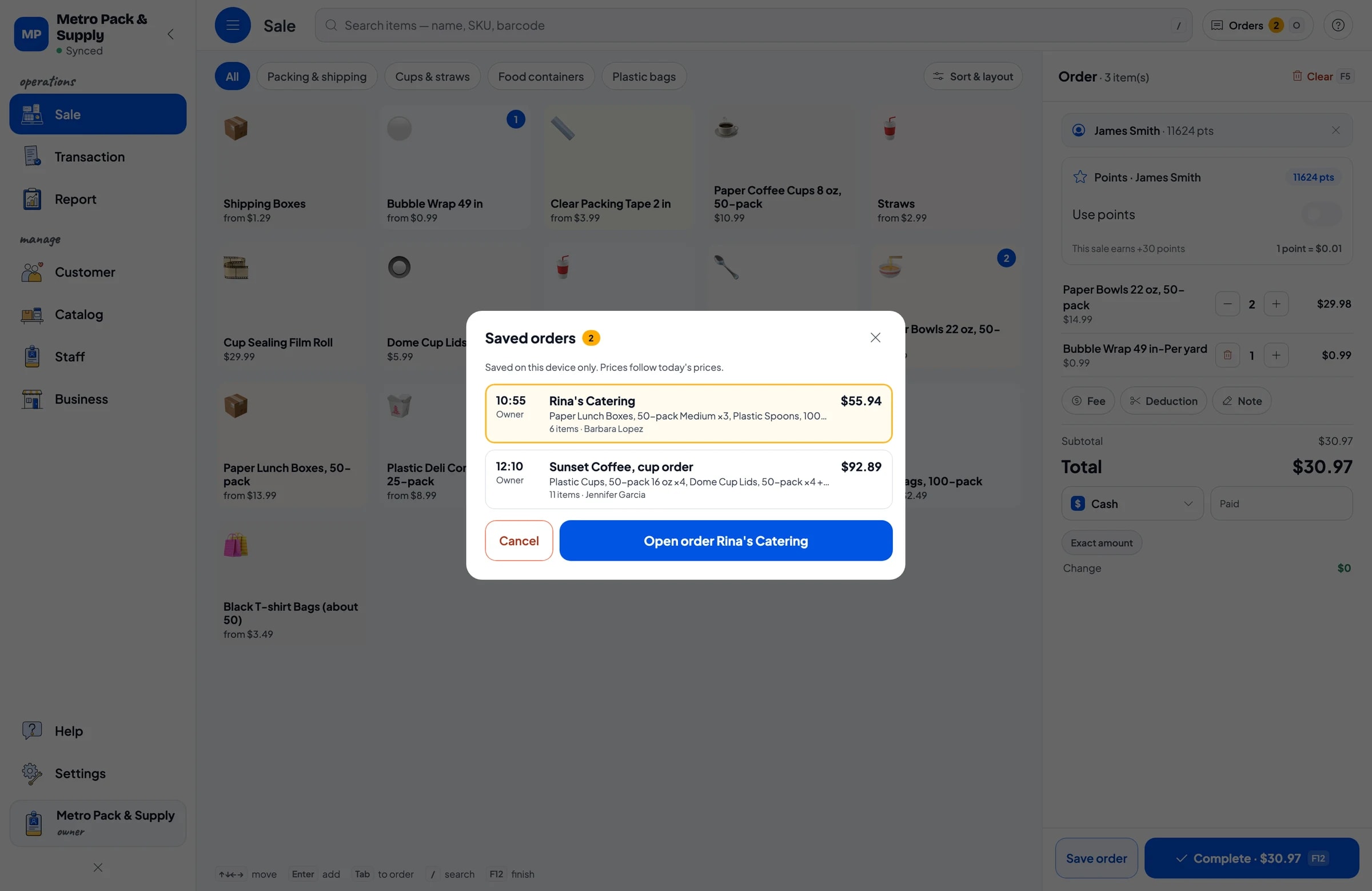
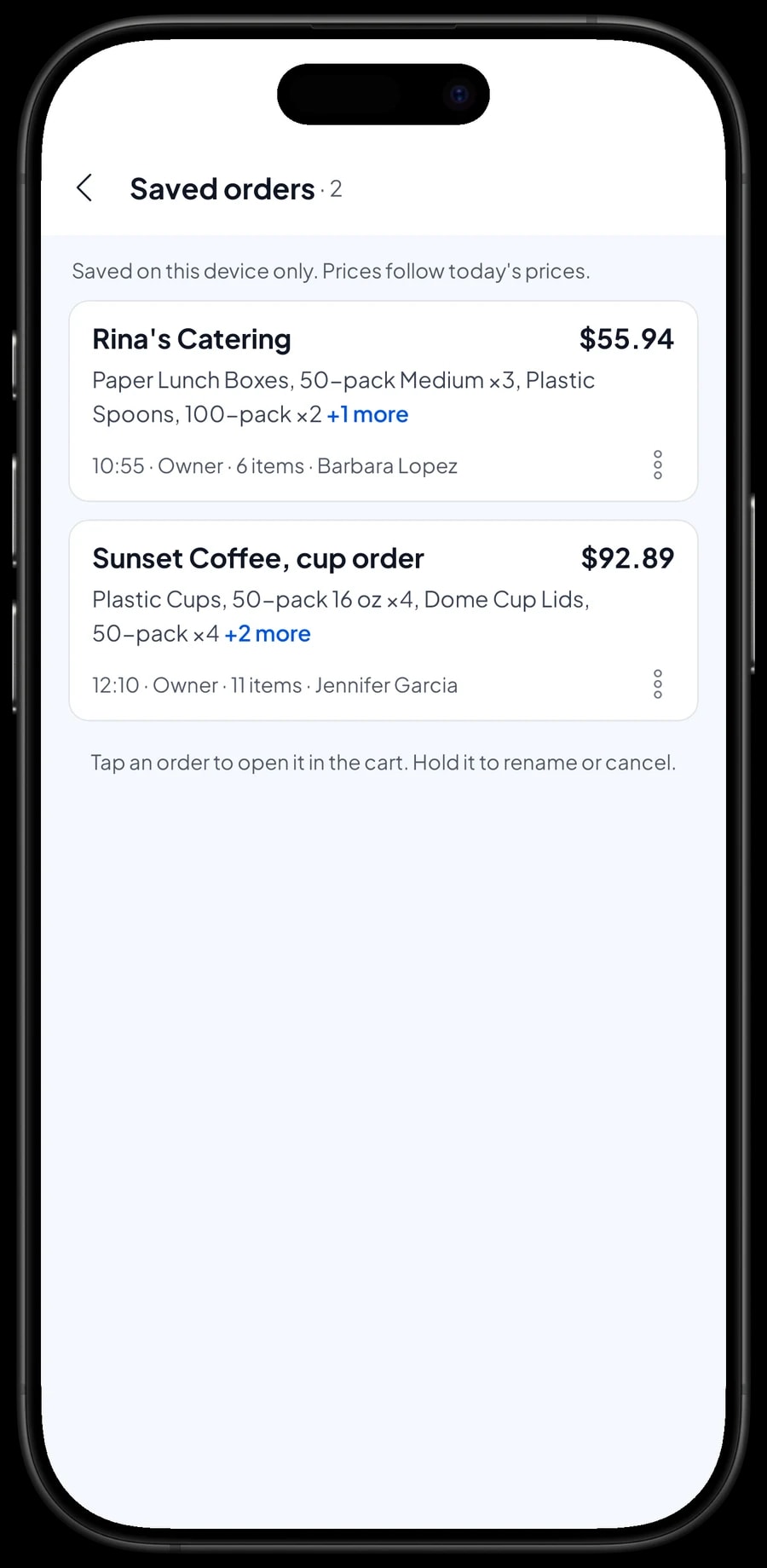
Business customers often text a shopping list and pick it up later. Add the products to the cart, tap Save order, and name the order, for example "Sunset Coffee, cup order" or "Rina's Catering". Put the pickup time or delivery day in the order note.
Every saved order shows up in Saved orders, so staff can pull them together during quiet hours. When the customer arrives or the driver comes back, open the order, add anything extra, and complete the payment.
A saved order is just a stored cart, not a customer account or a tab. It isn't counted as a sale and doesn't take stock off until it's paid, and it's saved on the device where it was created, so finish the payment on that same device.
Bring business regulars back with loyalty points
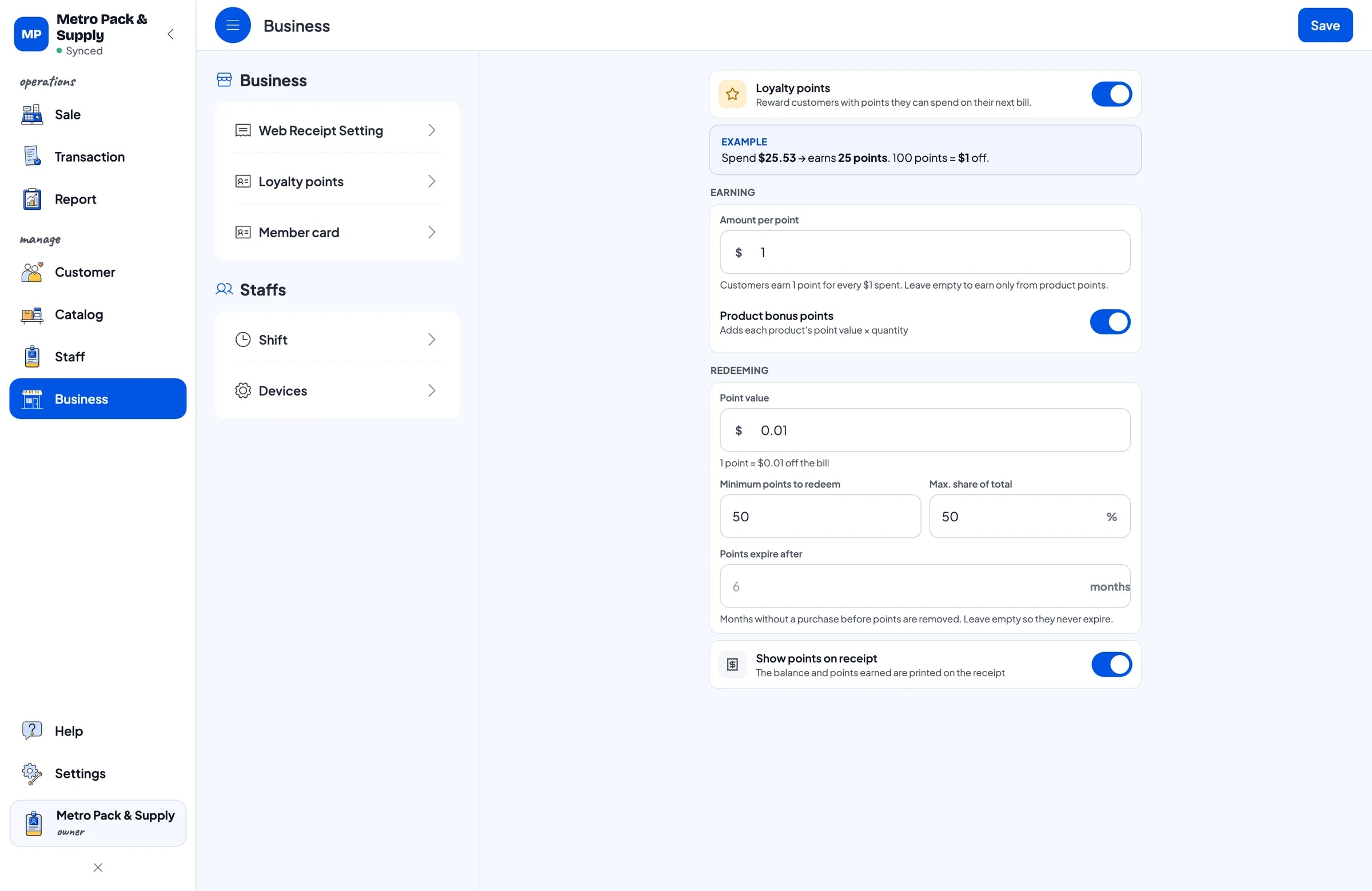
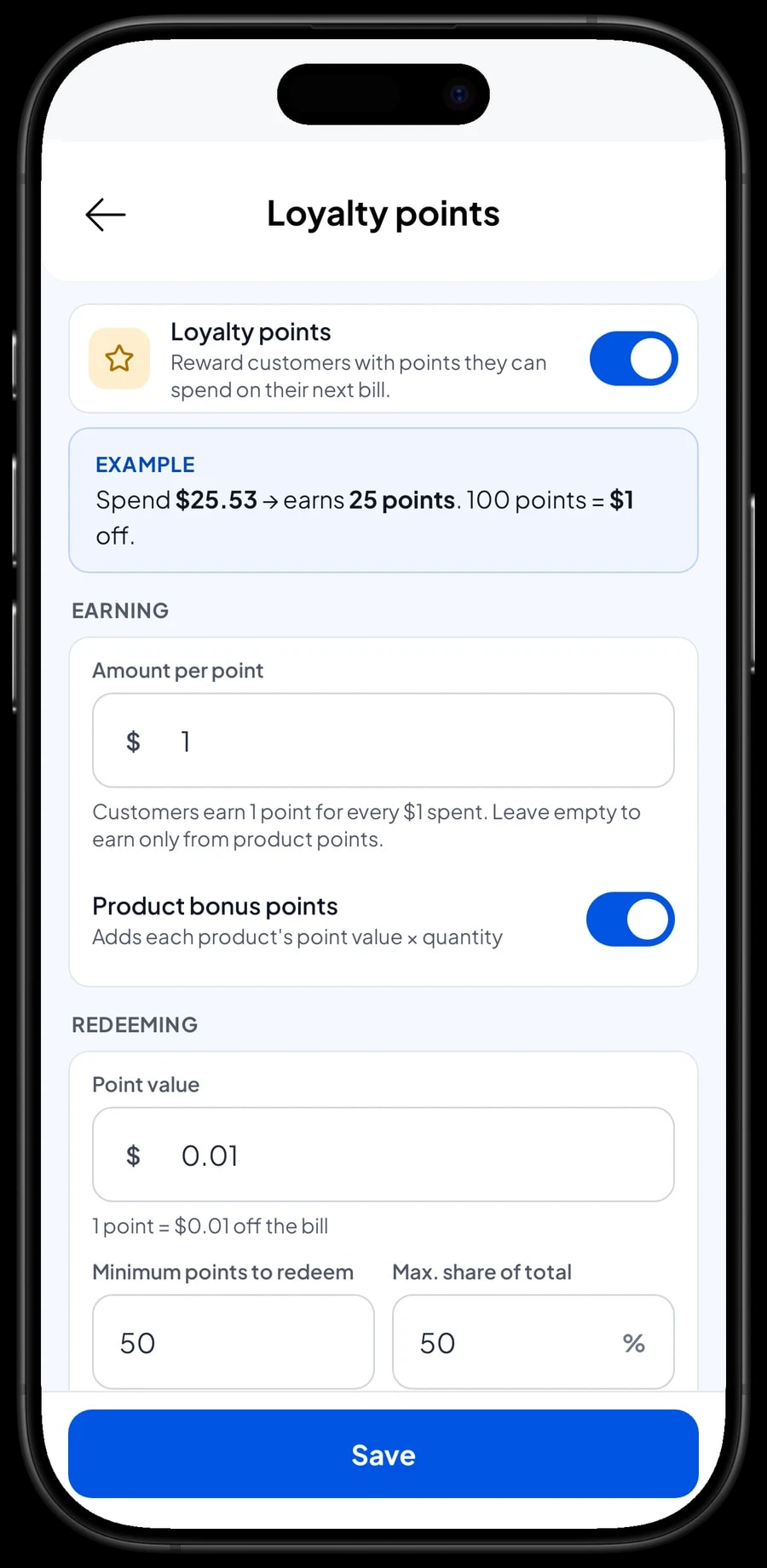
A packaging store's best customers are small businesses that buy every week. Save their name and phone number in Customers and turn on Loyalty points under Business. You set the rules: how much a customer spends per point, what a point is worth, the minimum points to redeem, and the largest share of a bill points can cover.
Points are added automatically with every sale that has the customer attached. Their purchase history is kept too, so you know which café always buys 16 oz cups and can have them ready before the owner arrives. Your most loyal customers can also get a member card in their name.
Payments, sales tax and receipts for business buyers
Create the payment methods you accept: cash, card, bank transfer, e-wallets, or any other method you set up. Salesmaster records which method was used; it doesn't connect to a card terminal, so the card payment runs on your terminal as usual and the cashier picks Card in the app. If you collect sales tax, set it once and it's calculated on every sale and shown separately in reports.
Once paid, the receipt can print on a Bluetooth or USB thermal printer, or go to the customer as a web receipt link. Business customers who need records for their own books get every product, size and price listed. Every sale is also kept in Transactions, where you can look it up later.
Staff and cashier devices
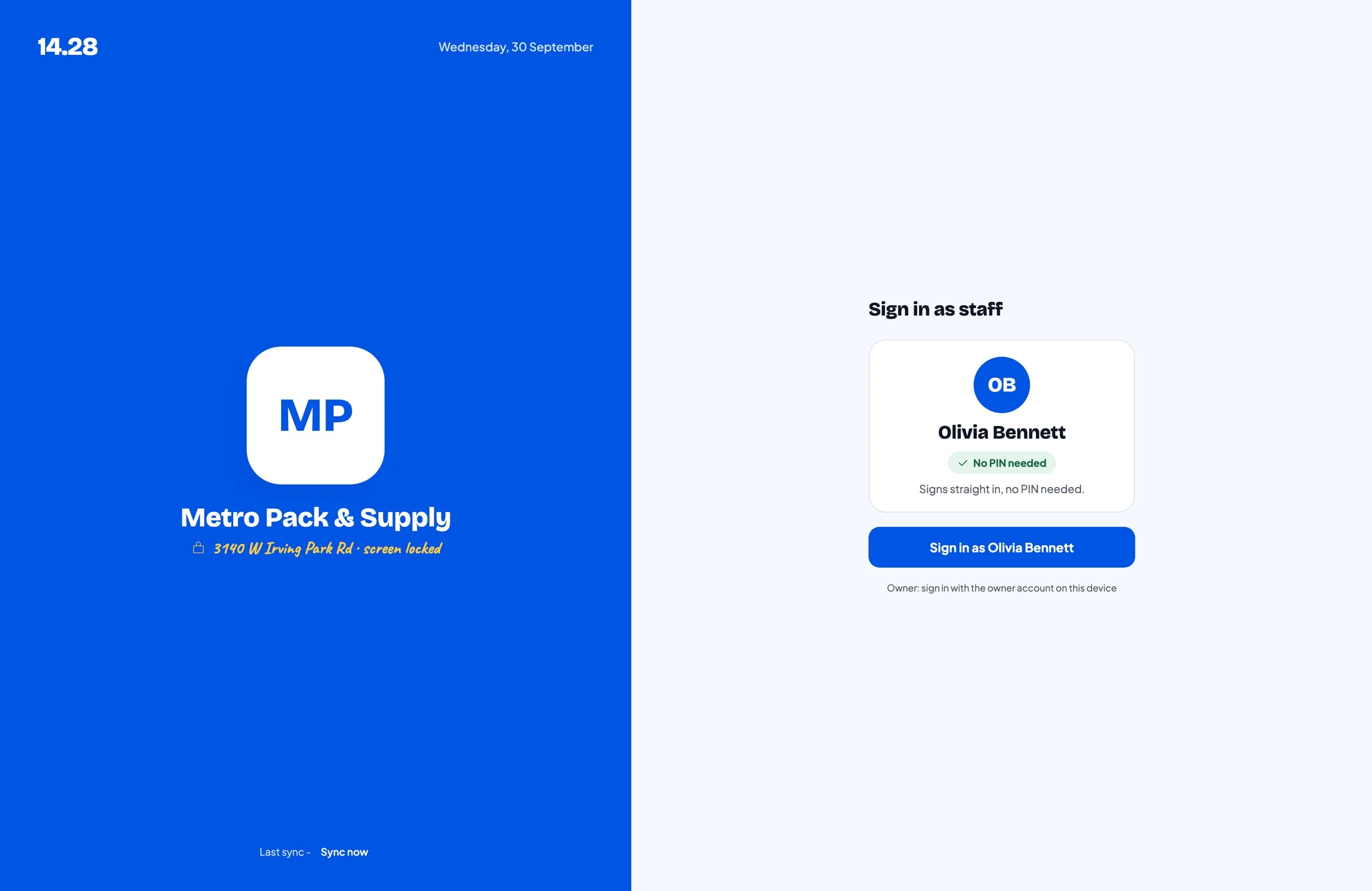
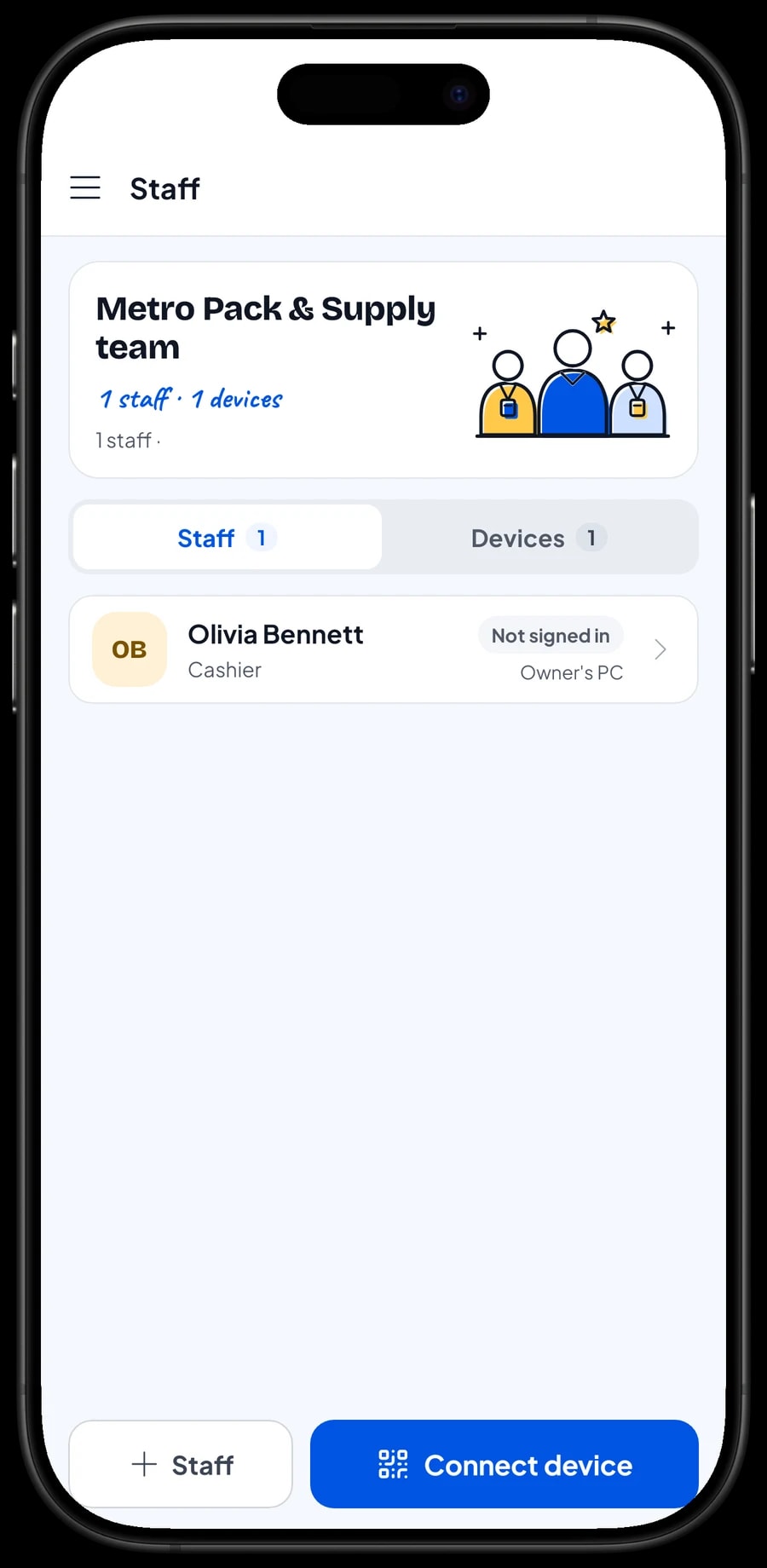
The owner signs in with the main account, and an account can be signed in on one device at a time. Employees who run the register on another device are added as staff, and that device is registered as a staff device. Staff sign in with a PIN, and you decide what they can see and change. Staff accounts come with Bronze Pro (1 staff) and Silver Pro (2 staff).
Restocking, rent and real net profit
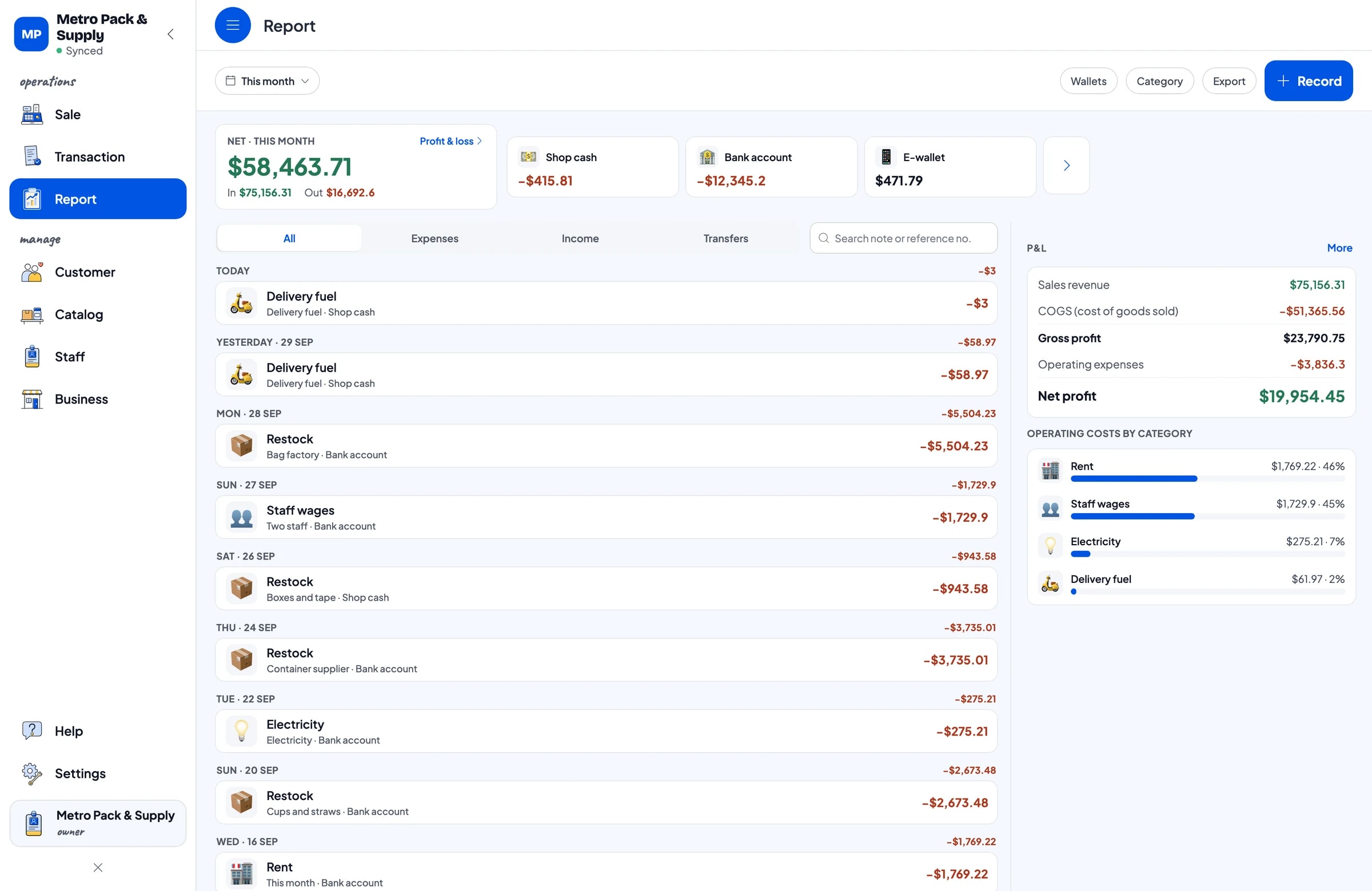
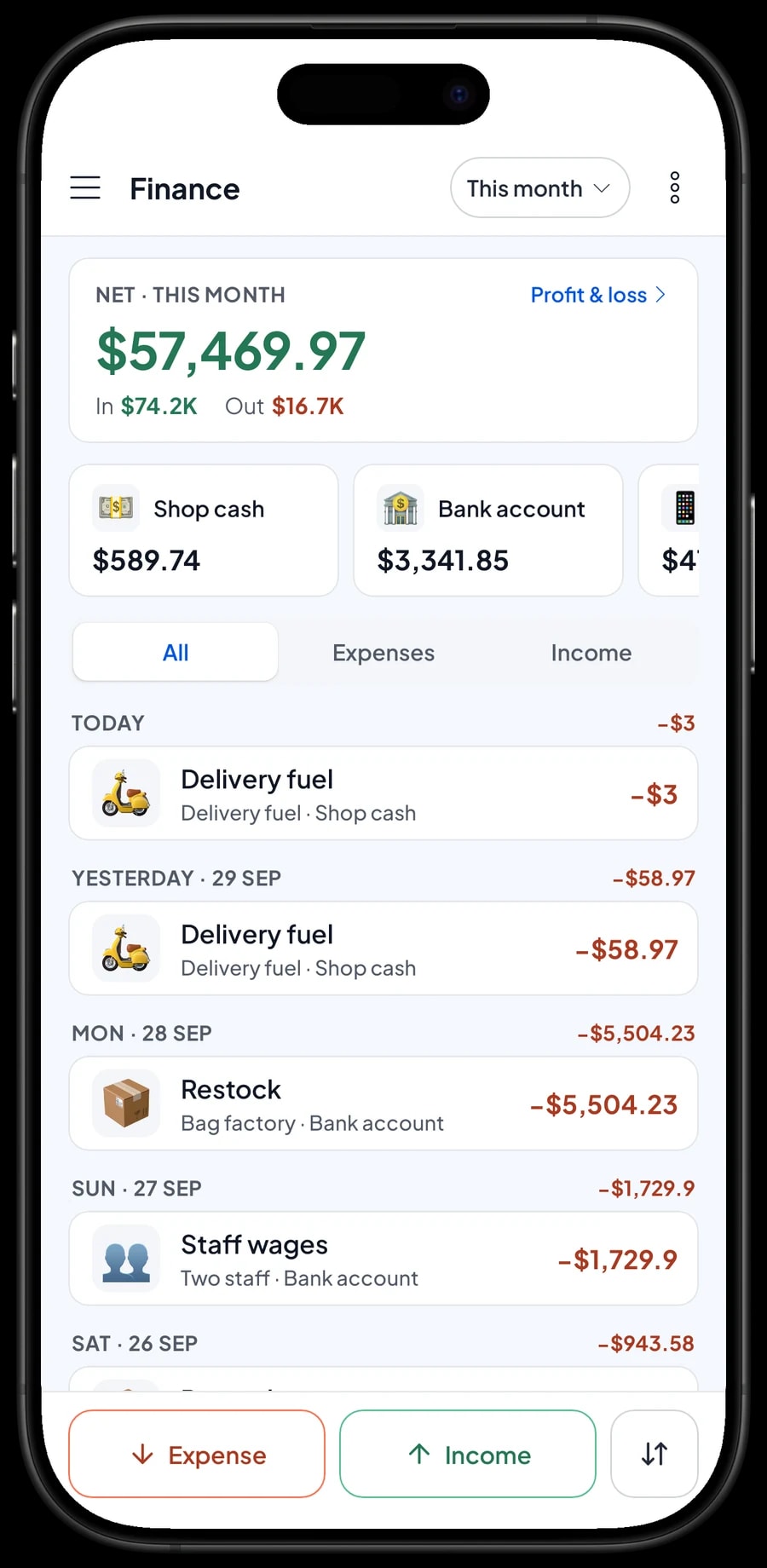
In Finance, record every expense with a category and the wallet it came from: restocking from the bag factory, the container supplier, cups and straws, boxes and tape, plus staff wages, rent, electricity and delivery fuel. The Finance report then shows revenue, cost of goods, operating costs and net profit.
Sales reports are available by day, week, month and year, with revenue broken down by item and variant. You can see which sizes really sell and which just take up shelf space, so your next factory order matches demand. Reports export to Excel or PDF.
If the internet drops, the register keeps working. Sales are saved on the device and sync when the connection is back. Offline mode works for up to 7 days, and the first sync after signing in needs an internet connection.
- Step 1: Open Finance and set up wallets such as Shop cash, Bank account and E-wallet.
- Step 2: Create expense categories such as Restock, Staff wages, Rent, Electricity and Delivery fuel.
- Step 3: Record each expense with its amount, category, wallet and a note.
- Step 4: At the end of the month, open the Finance summary to see your net profit.
An example packaging catalog
One product, one item. Sizes and selling units are variants.
| Category | Product | Variants | Unit |
|---|---|---|---|
| Plastic bags | Black T-shirt Bags (about 50) | Small (15), Medium (24), Large (35) | pack |
| Plastic bags | Zip Bags, 100-pack | 6 x 10 cm, 10 x 15 cm, 15 x 22 cm | pack |
| Plastic bags | Kraft Stand-up Pouches, 50-pack | 12 x 20 cm, 16 x 24 cm | pack |
| Food containers | Plastic Deli Containers, 25-pack | 16 oz, 24 oz, 32 oz | pack |
| Food containers | Paper Lunch Boxes, 50-pack | Medium, Large | pack |
| Cups & straws | Plastic Cups, 50-pack | 12 oz, 16 oz, 22 oz | pack |
| Cups & straws | Straws | Regular 100-pack, Jumbo 50-pack | pack |
| Packing & shipping | Clear Packing Tape 2 in | Single roll, 6-pack | roll |
| Packing & shipping | Bubble Wrap 49 in | Per yard, Roll 55 yd | roll |
Each variant has its own stock with no automatic conversion. If you break a case or roll down for single sales, record the change as a stock adjustment.
Which plan fits your packaging store
Start by counting sales per day. A packaging store serving about 60 customers a day records roughly 1,800 transactions a month.
| Plan | Price | Transactions / month | Staff accounts | Good for |
|---|---|---|---|---|
| Free | Free | 30 | Owner only | To try the checkout flow and size variants before using it for real. |
| Solo Pro | $4.90/month | 3,000 | Owner only | Small packaging shops where the owner runs the register. |
| Bronze Pro | $6.90/month | 5,000 | 1 staff | Stores with one cashier on their own device while the owner handles purchasing. |
| Silver Pro | $9.90/month | 8,000 | 2 staff | Busy suppliers with a cashier and a stockroom employee on separate devices. |
Every plan includes checkout, catalog, receipts, reports and offline mode. You can change plans at any time. See pricing →
Frequently asked questions
- Can Salesmaster track stock for each size separately?
- Yes. Create sizes as variants and turn on stock tracking. Each variant has its own stock, so you see how many 12, 16 and 22 oz cups are left, each on its own.
- How do I charge different prices for single packs and cases?
- Create each selling unit or wholesale price as its own variant, such as Single roll and 6-pack, or Retail and Wholesale. Salesmaster doesn't change prices automatically by quantity, so the cashier picks the right variant.
- Does opening a case add single units to stock?
- Not automatically. Each variant's stock is separate. When you break a case down, lower the case stock and raise the single-unit stock with a stock adjustment in Inventory → Stock.
- Can I scan barcodes at checkout?
- Yes. Enter the barcode on the item, then scan it with a barcode scanner when you ring up a sale. The product goes straight into the cart at its price.
- Can a café text an order and pay when it picks up?
- Yes, with Save order. Save the cart under the customer's name and open it from Saved orders at pickup. The order is saved on the device where it was created and isn't counted as a sale until it's paid. Salesmaster doesn't keep customer tabs or accounts receivable.
- Can employees run the register on their own devices?
- Yes, with staff accounts. An account signs in on one device at a time, so employees sign in as staff with a PIN on their cashier device. Staff accounts come with Bronze Pro (1 staff) and Silver Pro (2 staff).
Need help setting up your catalog? Chat with our team on WhatsApp →



