
Salesmaster is a point-of-sale (POS) app for staple-food and grocery shops on Android, iPhone & iPad, Windows and Mac. You can sell one product in several pack sizes with variants, such as rice per kg, in a 5 kg sack or a 10 kg sack, track stock, hold customer orders with Save order, and see net profit after restocking and running costs. A Free plan lets you try it first.
Problems every staple-food shop knows
If any of these sound familiar, this page is for you.
- 01
One product, many sizes and prices
Rice goes by the kilo, the 5 kg sack and the 10 kg sack. Oil comes in pouches and bottles. If prices live in the cashier's head or on a cardboard sign, mistakes happen, especially the week your supplier raises prices.
- 02
Running out without noticing
Gas, rice and eggs are bought every day. You find out they're gone when a customer is already at the counter, and that customer walks to the shop down the road.
- 03
Morning and evening rushes, messy records
People shop for breakfast and again before dinner. In those rushes the notebook gets skipped, and the cash in the drawer never quite matches what was sold.
- 04
Big turnover, thin and unclear margins
Staples earn a small margin on each sale. After paying the rice mill, the porter, the pickup truck and your shop assistant, what is left? Without recorded expenses, profit is a guess.
One product, several pack sizes: using variants
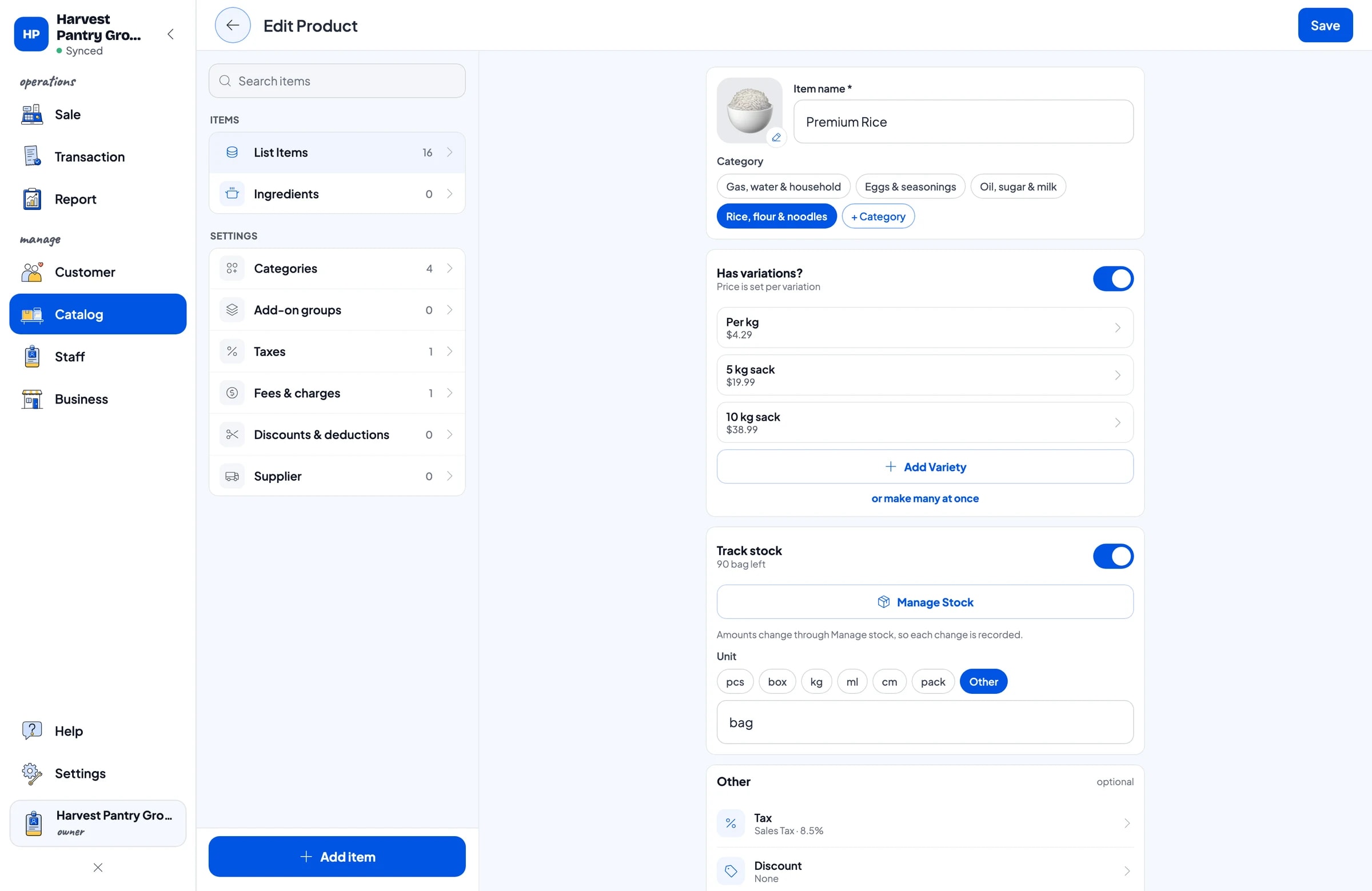
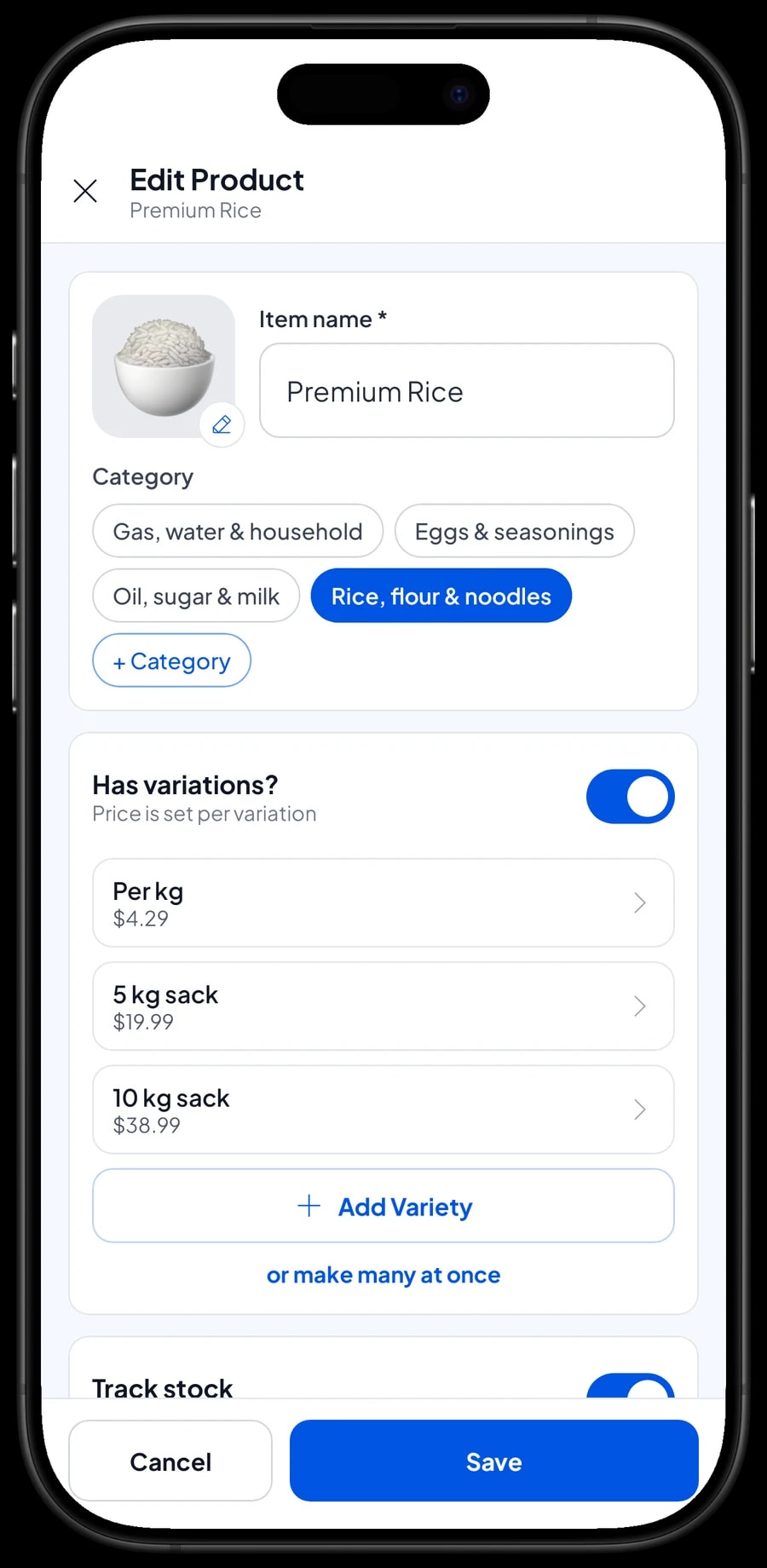
A staple-food shop rarely sells anything in just one size. Premium rice might be bought per kg for tonight's dinner, or in a 5 kg or 10 kg sack for the week. In Salesmaster, create one item called Premium Rice and add variants: Per kg, 5 kg sack and 10 kg sack, each with its own price.
The same works across the shop. Cooking Oil 1 L has Pouch and Bottle variants. LPG Refill has 3 kg and 12 kg variants. On the Sale screen, the cashier taps the item, picks the variant, and the right price follows. Nobody has to work out a sack price from the per-kilo price in their head.
Variants also make price changes simple. When your supplier's price goes up, change the price on that variant and the next sale uses it. Products that only come in one size, such as Granulated Sugar 1 kg or Sweet Soy Sauce 520 ml, are ordinary items without variants.
- Step 1: Open Catalog → List Items and add a new item, for example Premium Rice.
- Step 2: Fill in the unit, such as bag, and turn on stock tracking.
- Step 3: Add the variants Per kg, 5 kg sack and 10 kg sack, each with its price.
- Step 4: Save the item, then open the Sale screen and tap it to check the variants appear.
Setting up your catalog
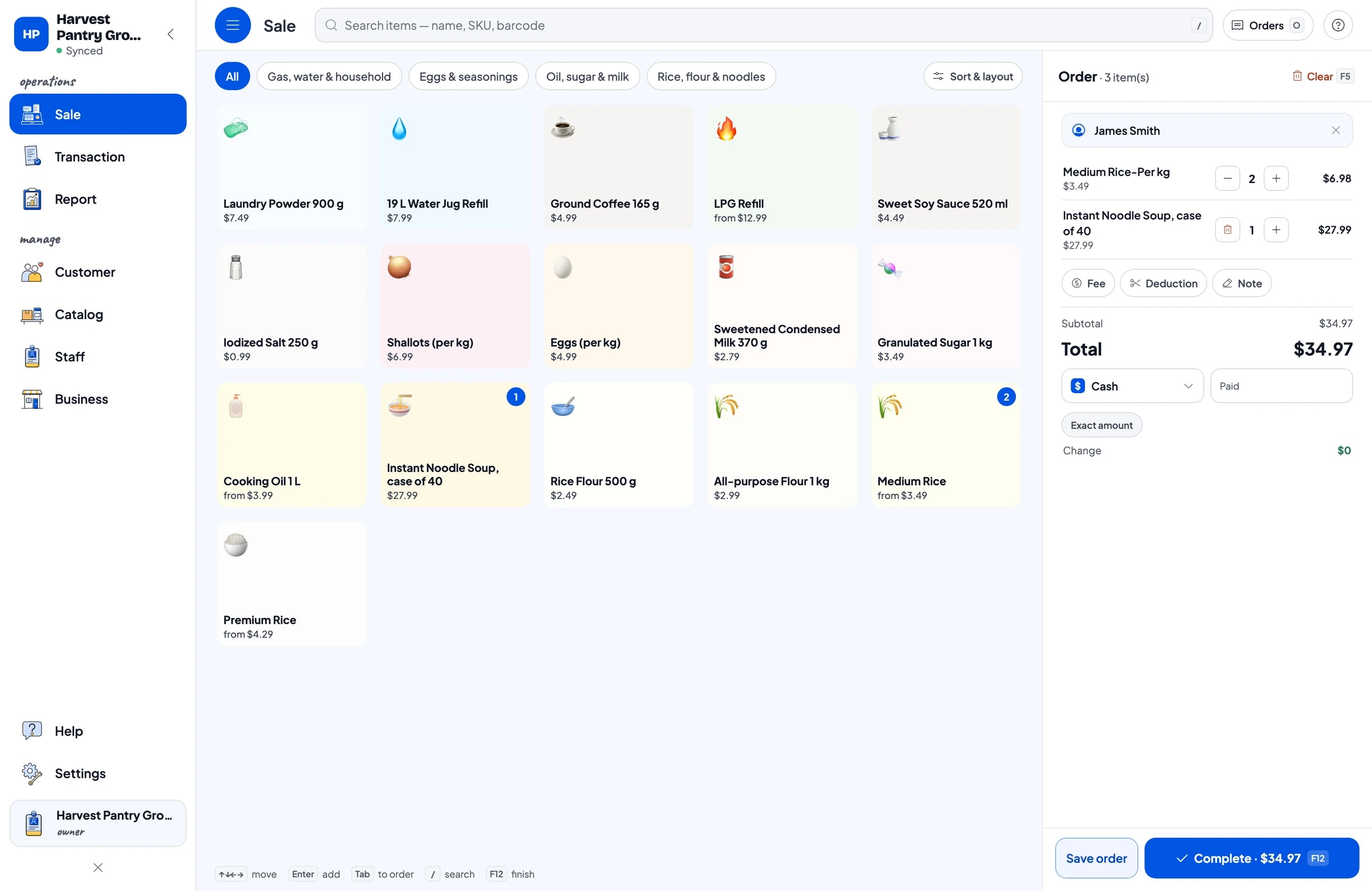
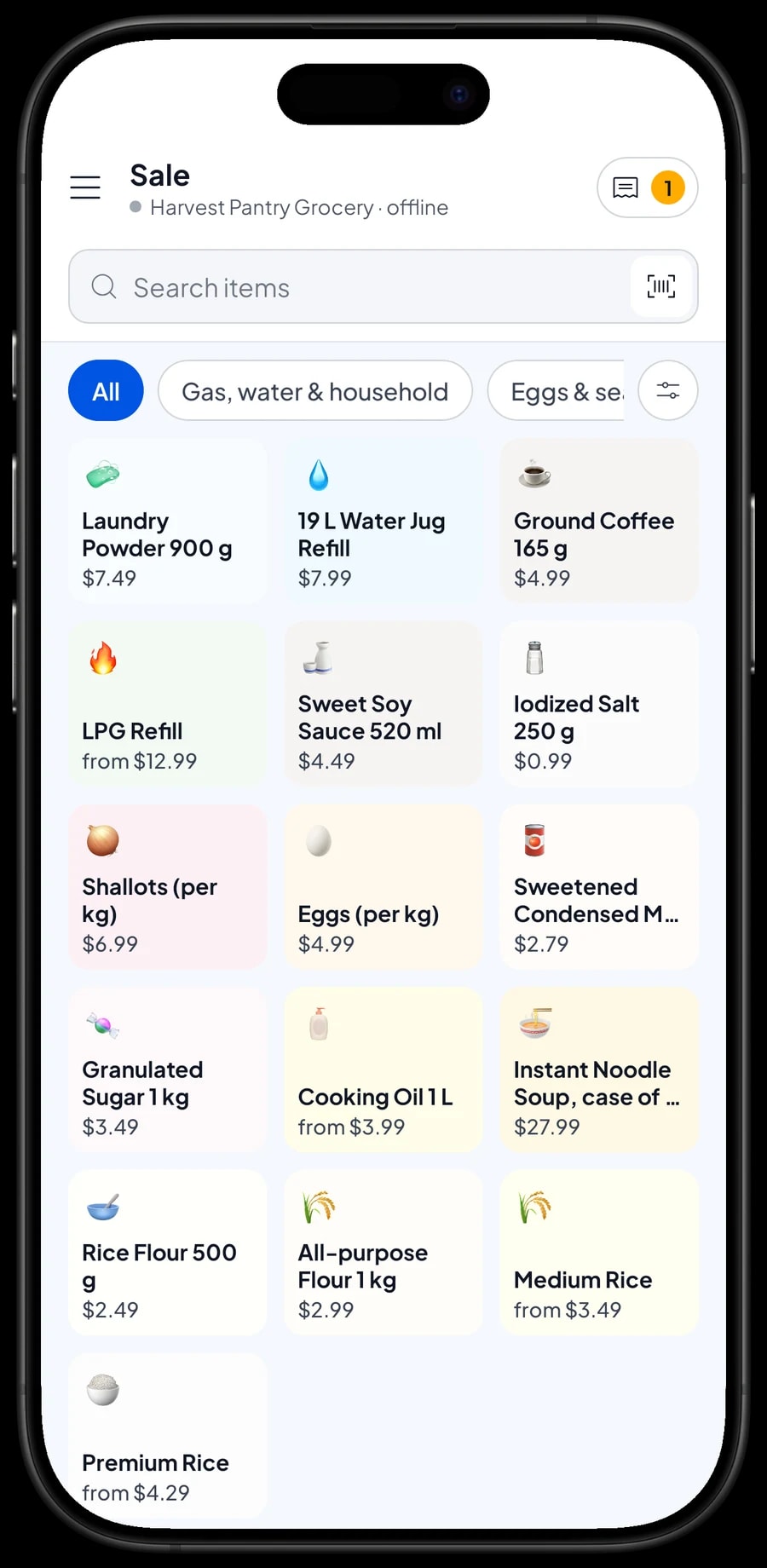
Group products the way customers ask for them. For example: Rice, flour & noodles; Oil, sugar & milk; Eggs & seasonings; and Gas, water & household. Categories appear as tabs across the top of the Sale screen, so the cashier is one tap away from any product.
Factory-packed goods usually carry a barcode. Enter it on the item and the cashier can scan it at checkout. Loose goods like rice, eggs or shallots have no barcode, so the cashier picks them from the grid or finds them with Search.
If you stock a lot of products, build the catalog on a laptop first (Windows or Mac) and use it on the phone or tablet at the counter. You don't need everything on day one. Start with the 20 to 30 products people buy most, and add the rest during quiet hours.
- Step 1: Open Catalog → Categories and create four or five main categories.
- Step 2: Open Catalog → List Items and add your best sellers first, with selling price and cost price.
- Step 3: Enter barcodes for packaged goods so the cashier can scan them.
- Step 4: Assign each item a category so it shows under the right tab.
Serving customers during the rush
On the Sale screen, the cashier taps a product or scans its barcode, and it lands in the cart on the right. Tap again to add another. The total updates as you go, including tax if you set it up, so there's no calculator next to the drawer.
Add the customer's name when it's a regular, so their purchase history is kept. Choose the payment method, such as cash, bank transfer or an e-wallet, enter the amount received, and Salesmaster works out the change.
Once paid, the receipt can print on a Bluetooth or USB thermal printer, or go out by WhatsApp or as a web receipt link. For someone buying a single pack of salt you don't have to print anything; the sale is still recorded under Transaction.
Keeping an eye on rice, gas and eggs
Turn on stock tracking for the products you want to watch. Every sale takes stock off automatically, and Inventory → Stock shows what is left, so you can see what is running low before a customer asks for it.
When a delivery arrives from the mill or the gas agent, record the stock that came in. Keep your suppliers in Inventory → Supplier too, such as the gas agent, the rice mill and the oil distributor, so you know who to call when stock gets low.
If you buy rice in big sacks and sell it by the kilo, do a stock count now and then. Weigh or count what is left in the storeroom and correct the number in the app. That way, losses from spillage or shrinkage are recorded instead of quietly disappearing.
- Step 1: Open Catalog → List Items and make sure stock tracking is on for the products you want to watch.
- Step 2: Open Inventory → Stock to see how much of each product is left.
- Step 3: When goods arrive, add the incoming stock to the product.
- Step 4: Add your agents and distributors under Inventory → Supplier.
Orders collected later: Save order
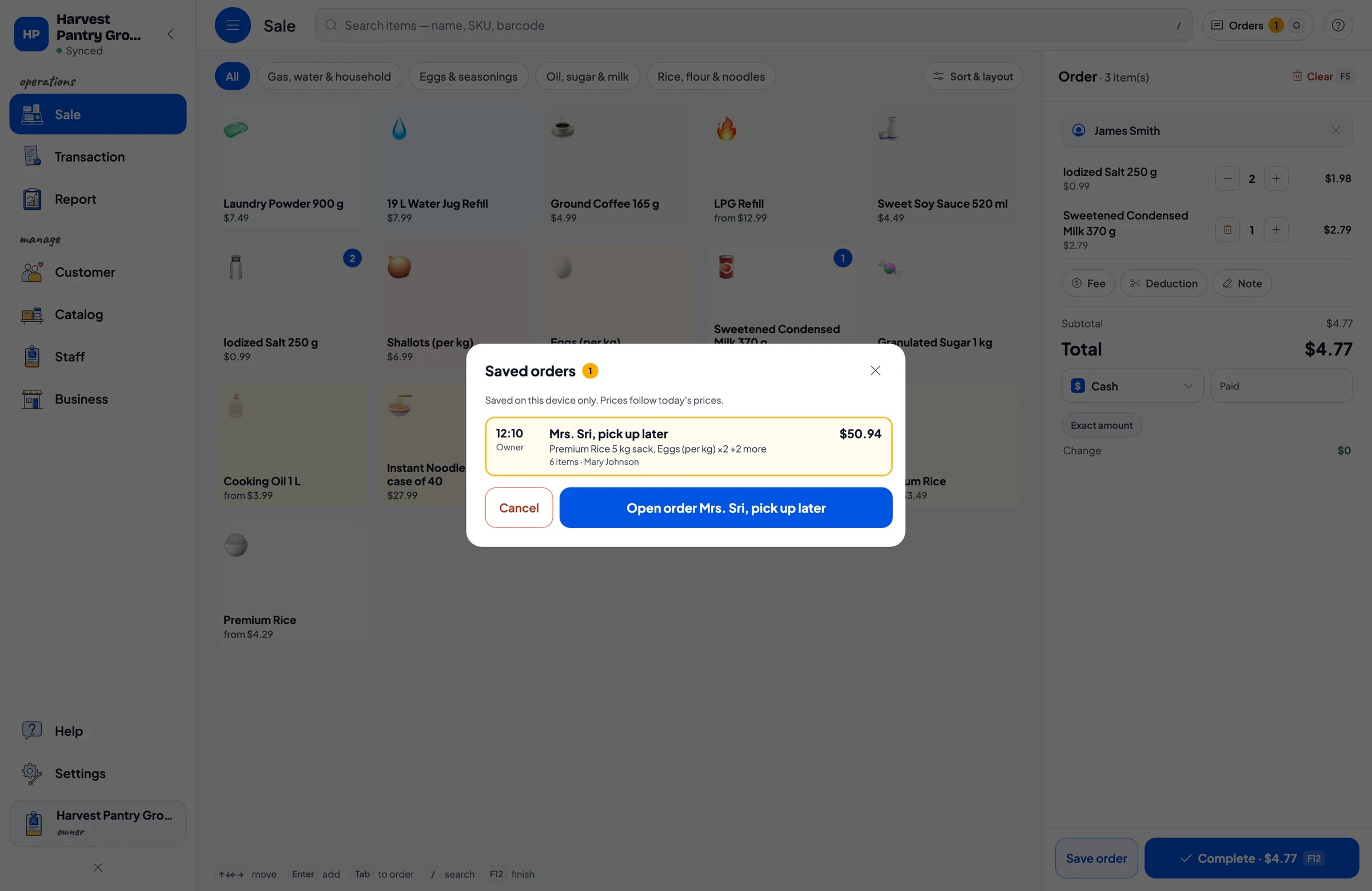
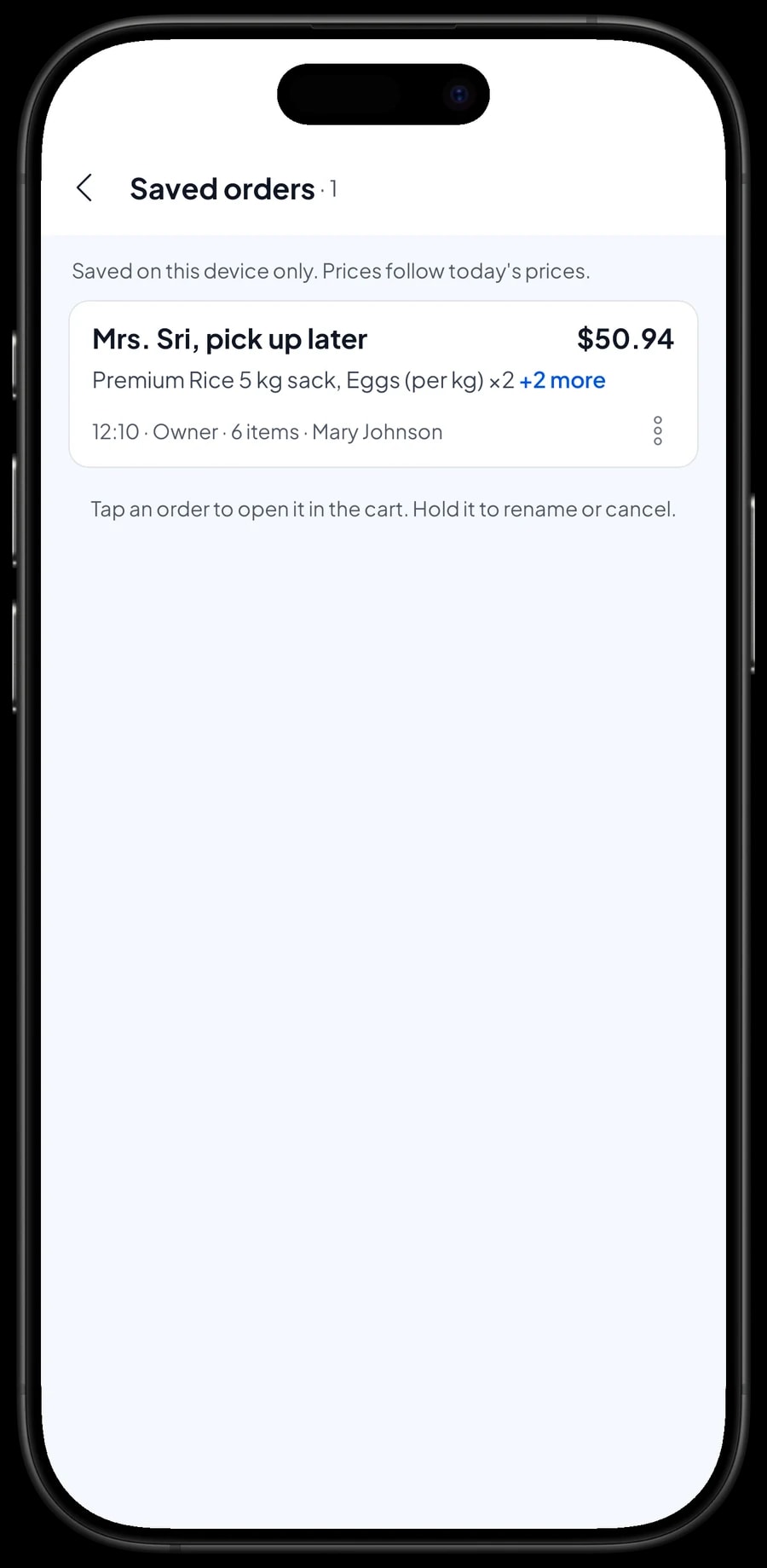
Customers at a staple-food shop often phone ahead: "Please put aside a 5 kg sack of rice, two kilos of eggs and two bottles of oil, I'll pick them up this afternoon." That's what Save order is for. Put the goods in the cart, tap Save order and give it a name, such as "Mrs. Sri, pick up later". The cashier can go straight on to the next customer.
When Mrs. Sri arrives, open Saved orders, pick her order, add anything else she wants, and take the payment. Saved orders use today's prices, so keep your catalog prices up to date.
A saved order is not counted as a sale and doesn't take stock off until it is paid. It is saved on the device that created it, so open and finish it on that same device. Because stock only comes off at payment, set the goods aside physically so they aren't sold to someone else.
Shop assistants and cashier devices
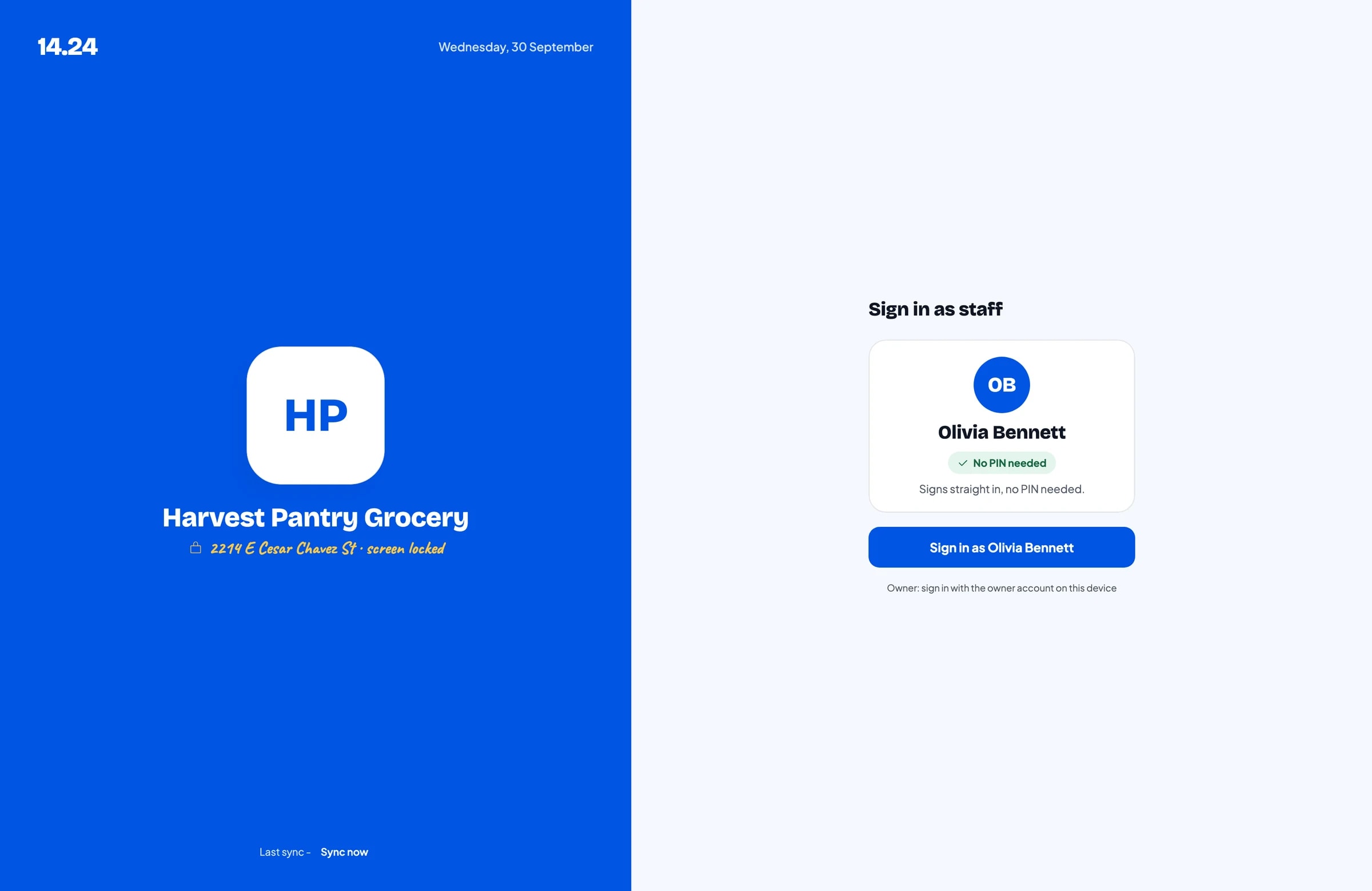
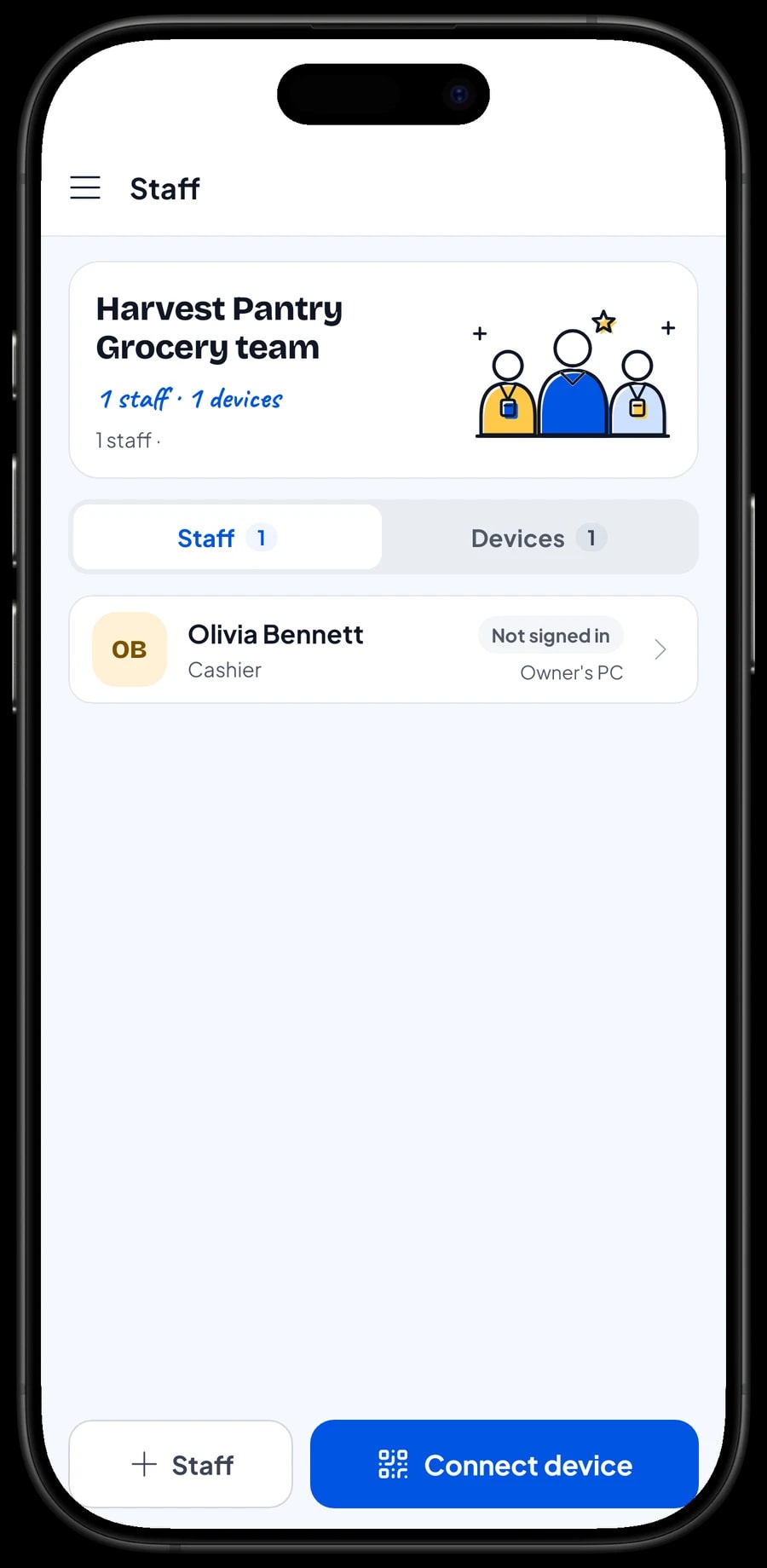
Many staple-food shops are run in turns: the owner in the morning, a family member or assistant in the afternoon. The owner signs in with the main account. Assistants don't need your account: add them as staff, register a cashier device for them, and they sign in with a PIN. Staff accounts come with Bronze Pro (1 staff) and Silver Pro (2 staff).
An account signs in on one device at a time. If you want two people selling on two devices at once, the second device is used by a staff account.
Restocking, running costs and net profit
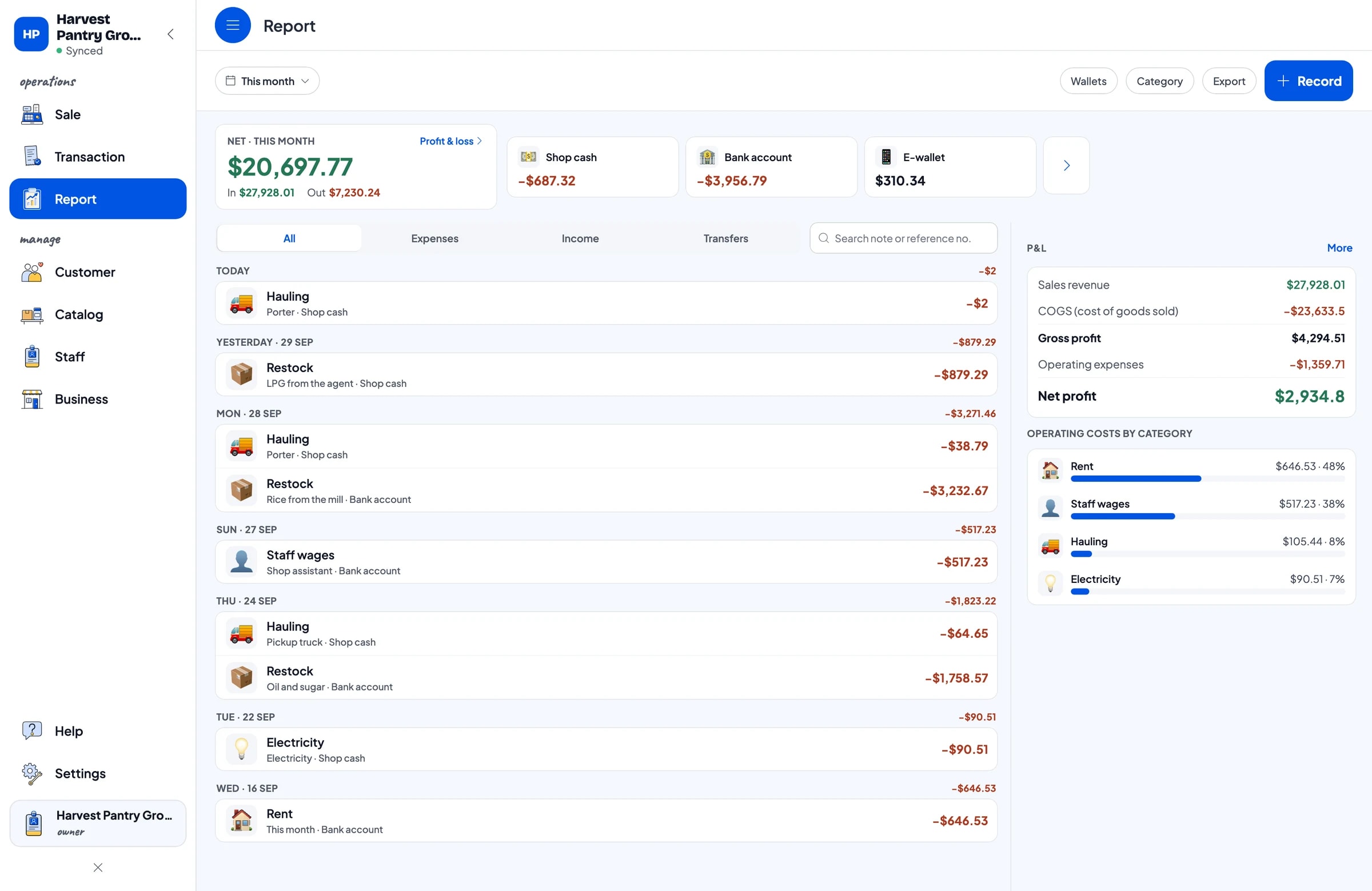
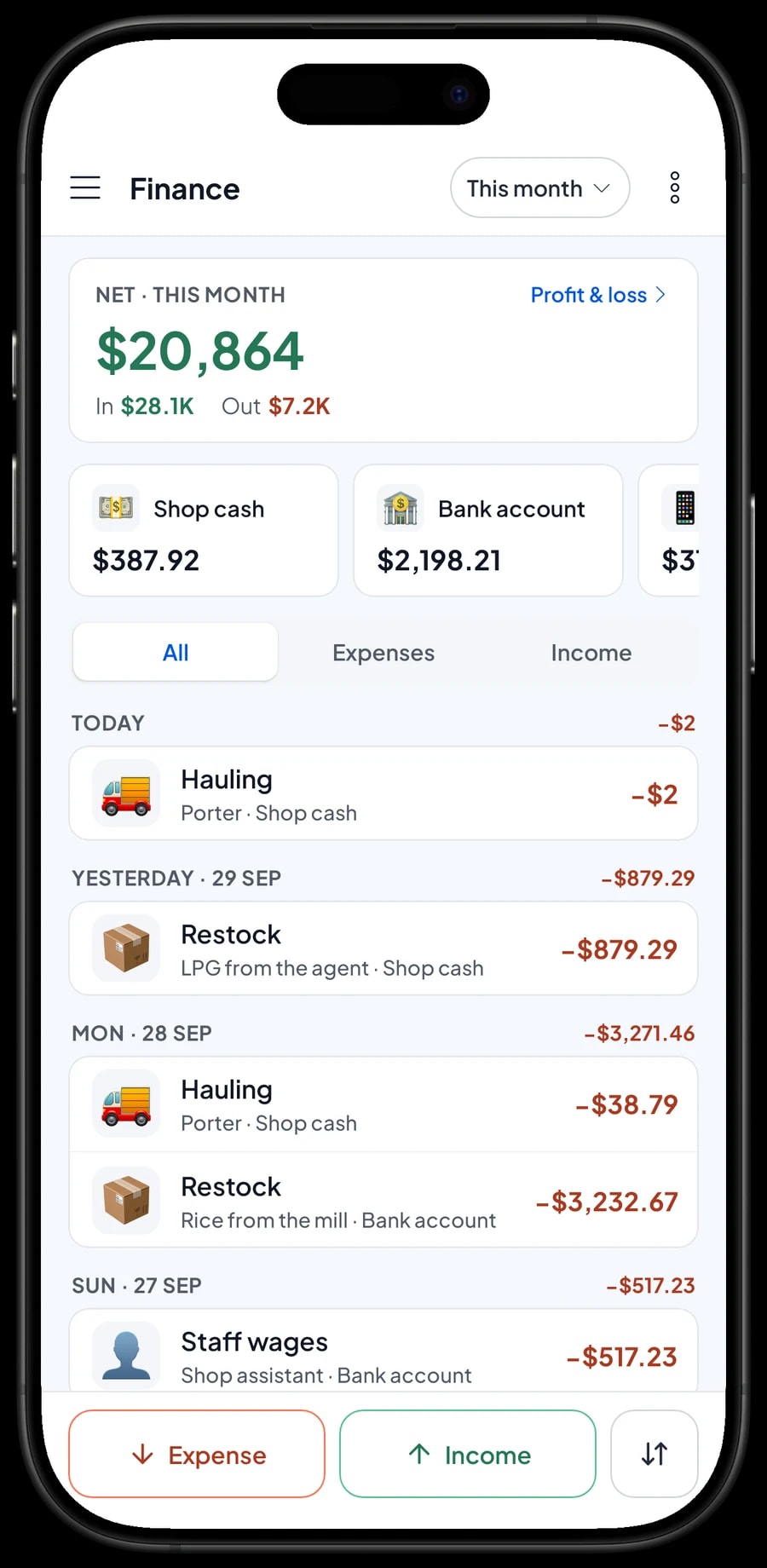
Staple foods earn thin margins, so every cost needs to be written down. In Finance, record each expense with a category and the wallet it came from. For example: Restock for rice from the mill or gas from the agent, Hauling for the pickup truck and porter, Staff wages, Rent and Electricity. Wallets can be Shop cash, Bank account or E-wallet.
The Finance summary then shows cash in and out, and your profit: revenue minus cost of goods sold and operating costs. Because each product's cost price is stored in the catalog, cost of goods is based on what actually sold, not an estimate.
With those numbers you can see whether a supplier's price rise has been passed on to your shelf price, and whether this month's hauling costs are too high for the sales they support.
- Step 1: Open Finance and create expense categories such as Restock, Hauling, Staff wages, Rent and Electricity.
- Step 2: Record each expense with its amount, category and wallet, plus a short note.
- Step 3: Open the Finance summary and choose This Month to see revenue, cost of goods, operating costs and profit.
Sales reports and transaction history
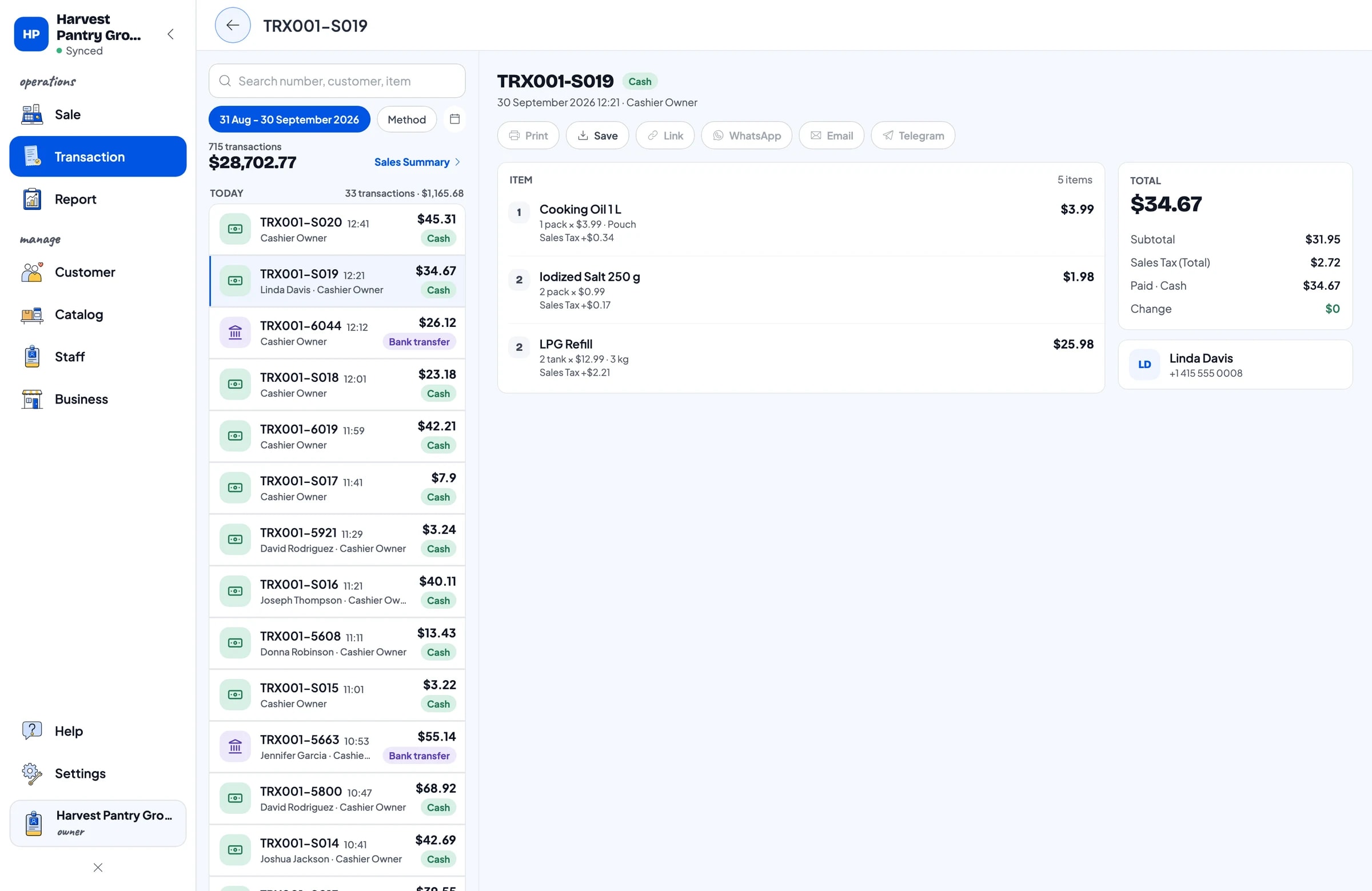
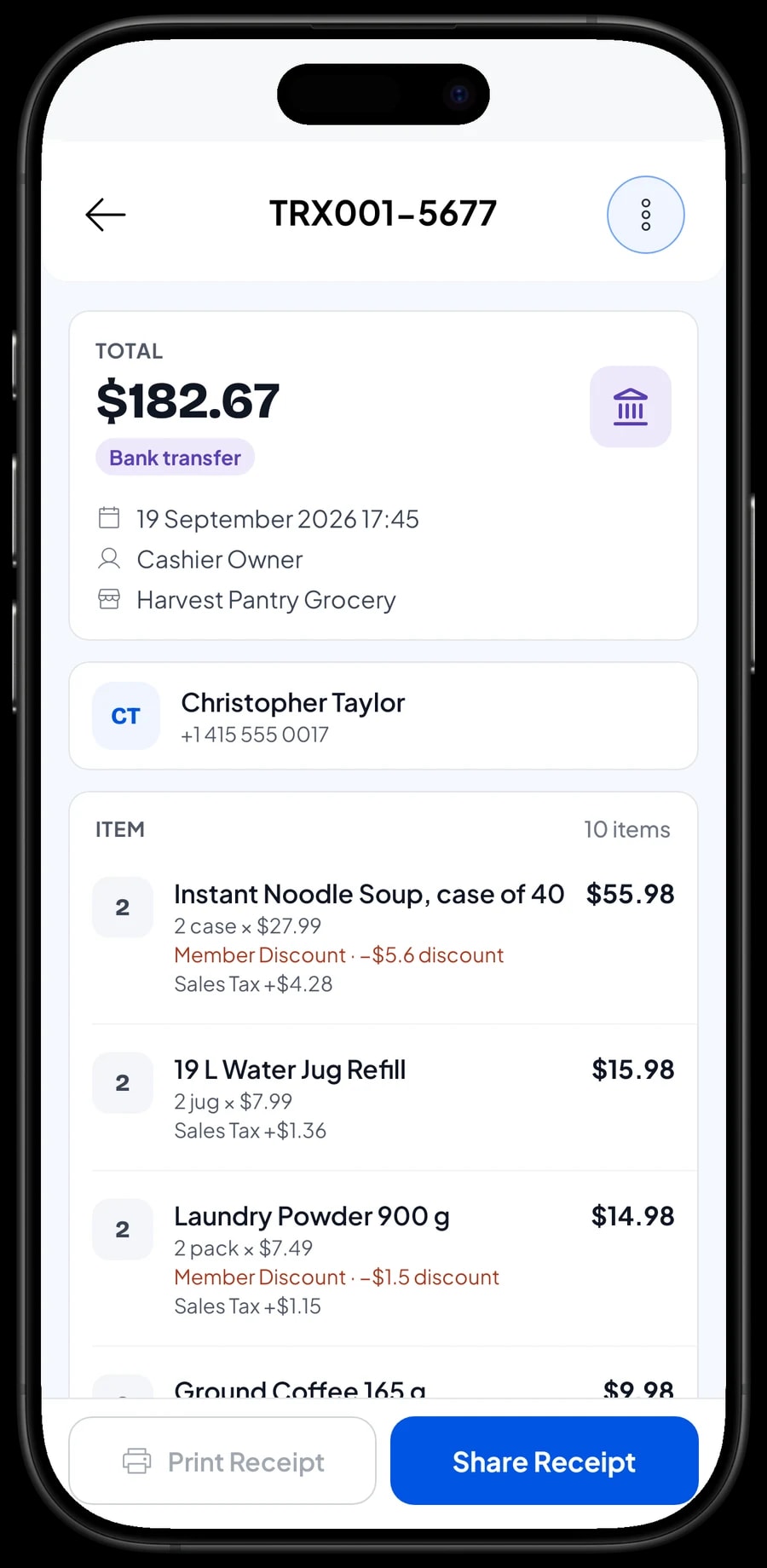
Under Transaction you see every sale with its date, customer, products, variants, discounts, tax and payment method. When a customer comes back asking about yesterday's purchase, it takes seconds to find.
Under Report you get daily, weekly, monthly and yearly summaries: total revenue, gross and net sales, discounts, tax, payment methods, and which products bring in the most revenue. It shows at a glance whether rice, gas or oil is what really keeps the shop going.
Reports can be exported to Excel or PDF, or printed on the thermal printer, to check against your cash book or share with the family members who help run the shop.
Keep selling when the signal drops
Mobile signal isn't reliable in every neighbourhood. Every sale in Salesmaster is saved on the device first and sent to the cloud when the connection returns. Offline mode works for up to 7 days; after that the app needs to connect briefly to sync and verify your account. Signing up and the first sync need internet.
Because your data lives in your account, not only on one phone, nothing is lost if a device breaks or is replaced. Install Salesmaster on the new device, sign in with the same account, and your shop's data comes with it.
An example staple-food shop catalog
Use this table as a starting point and replace the names, sizes and prices with your own products.
| Category | Product | Variants | Unit | Barcode |
|---|---|---|---|---|
| Rice, flour & noodles | Premium Rice | Per kg, 5 kg sack, 10 kg sack | bag | - |
| Rice, flour & noodles | Medium Rice | Per kg, 5 kg sack | bag | - |
| Rice, flour & noodles | Instant Noodle Soup, case of 40 | - | case | Yes |
| Oil, sugar & milk | Cooking Oil 1 L | Pouch, Bottle | pack | Yes |
| Oil, sugar & milk | Granulated Sugar 1 kg | - | pack | - |
| Oil, sugar & milk | Sweetened Condensed Milk 370 g | - | can | Yes |
| Eggs & seasonings | Eggs (per kg) | - | kg | - |
| Eggs & seasonings | Shallots (per kg) | - | kg | - |
| Gas, water & household | LPG Refill | 3 kg, 12 kg | tank | - |
| Gas, water & household | 19 L Water Jug Refill | - | jug | - |
Factory-packed goods usually already have a barcode, so enter it and let the cashier scan. Loose goods and anything sold in several sizes use variants, each with its own price.
Which plan fits your shop
Start by counting customers per day. A staple-food shop serving about 50 customers a day records roughly 1,500 transactions a month.
| Plan | Price | Transactions / month | Staff accounts | Good for |
|---|---|---|---|---|
| Free | Free | 30 | Owner only | To try the checkout and build your catalog before using it for real. |
| Solo Pro | $4.90/month | 3,000 | Owner only | Shops the owner runs alone on one device. |
| Bronze Pro | $6.90/month | 5,000 | 1 staff | Shops with one assistant who sells on their own device. |
| Silver Pro | $9.90/month | 8,000 | 2 staff | Busier shops with two staff on separate devices. |
Every plan includes checkout, catalog, receipts, reports and offline mode. You can change plans at any time. See pricing →
Frequently asked questions
- Can I sell rice by the kilo and by the sack at different prices?
- Yes, with variants. Create one rice item and add variants such as Per kg, 5 kg sack and 10 kg sack, each with its own price. The cashier picks the variant at checkout.
- Does this POS for grocery shops scan barcodes?
- Yes. Enter the barcode on packaged items and the cashier scans it at checkout. Loose goods without a barcode, such as rice or eggs, are picked from the Sale screen or found with Search.
- Can I hold an order that a customer will collect and pay for later?
- Yes, with Save order. Name the order, for example "Mrs. Sri, pick up later", and open it from Saved orders when she arrives. It is saved on the device that created it, isn't counted as a sale, and doesn't take stock off until it is paid.
- Can I use Save order as a customer credit book?
- No. Salesmaster has no customer credit book. Save order is a saved cart for orders that will be paid soon: it lives on one device and stock only comes off at payment. If the goods have already left the shop, it's better to complete the sale right away so stock and reports stay correct.
- What happens when my supplier raises the price of rice or oil?
- Change the selling price and cost price on the item or variant in Catalog → List Items. The next sale uses the new price, and past sales keep the price they were sold at.
- Can the shop keep selling when the internet is down?
- Yes. Sales are saved on the device and sync when the internet is back. Offline mode works for up to 7 days before the app needs to connect to sync.
- Can two people sell on two phones at the same time?
- Yes, through staff accounts. An account signs in on one device at a time, so the owner uses the main account and the assistant uses a staff account on their own device. Staff accounts come with Bronze Pro (1 staff) and Silver Pro (2 staff).
Need help setting up your catalog? Chat with our team on WhatsApp →



