
Salesmaster is a point-of-sale (POS) app for florists and plant shops on Android, iPhone & iPad, Windows and Mac. Bouquets are items with size variants, every bouquet and arrangement has a recipe that takes stems, wrapping paper and ribbon off stock, potted plants are products with their own stock, and orders collected later are kept with Save order. Loyalty points and the Finance report round it out with your shop's net profit.
Problems every florist knows
If any of these sound familiar, this page is for you.
- 01
Graduation and Valentine's hit at once
In a few days, bouquet orders pile up. The arrangers are busy, orders are scribbled on paper, and sooner or later a bouquet is forgotten or made in the wrong size.
- 02
Fresh stems wilt, and nobody counts them
Roses bought at the flower market in the morning have to sell within days. Without records, you don't know how many stems went into bouquets and how many went in the bin.
- 03
The cost of a bouquet is a guess
One bouquet holds roses, baby's breath, paper and ribbon. When market prices rise, you can't tell whether your bouquet price still makes money.
- 04
Orders for later get lost
A graduation order for Saturday, a standing spray for a grand opening tomorrow morning. Kept in a notebook or chat, they're easy to miss, and so is the payment.
Building your catalog: bouquets, arrangements, stems and plants
Group products the way customers order them, such as Bouquets, Arrangements, Loose stems, and Plants & delivery. On the Sale screen, the cashier taps a category and then the bouquet, with no price list to look up.
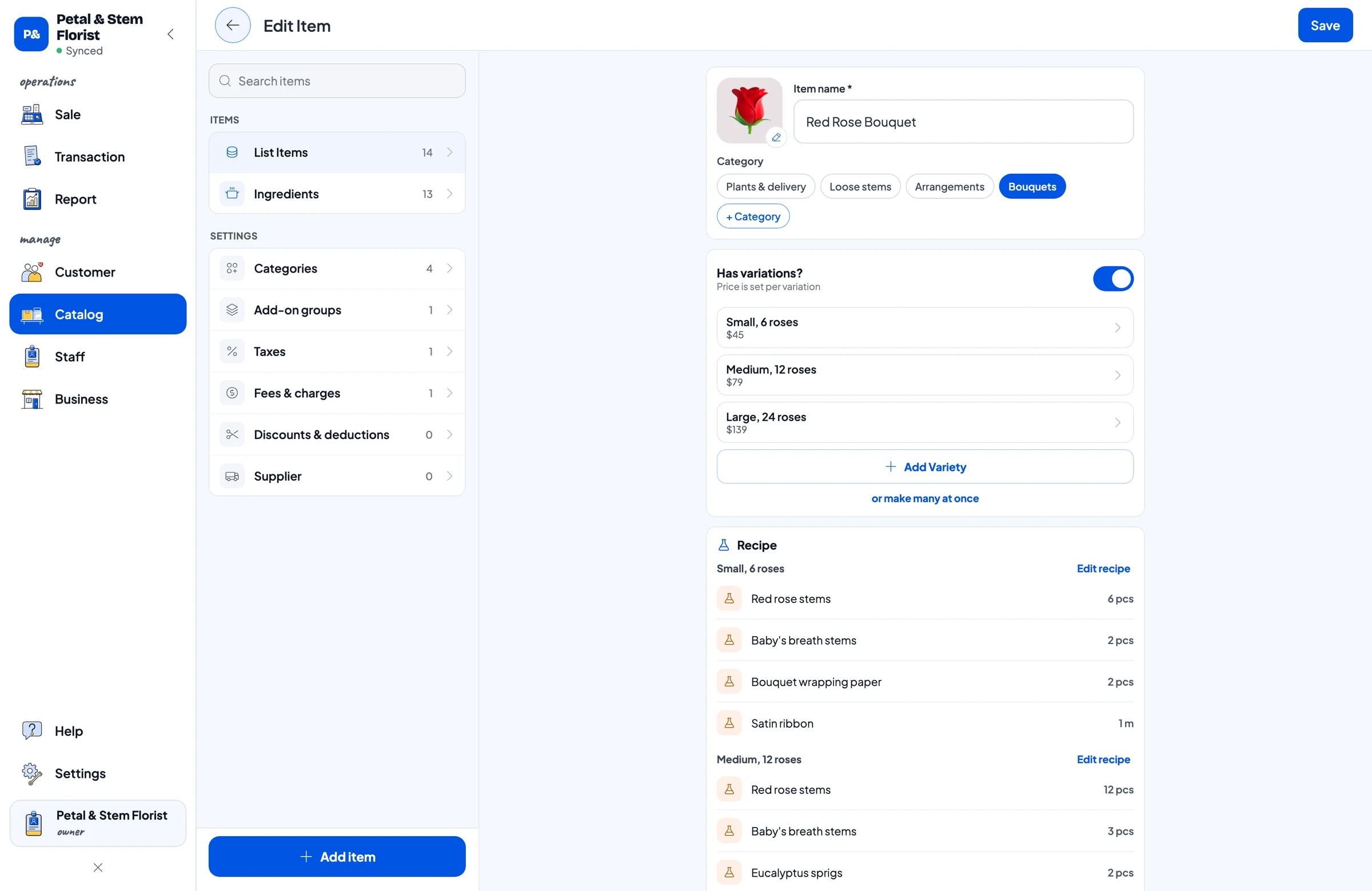
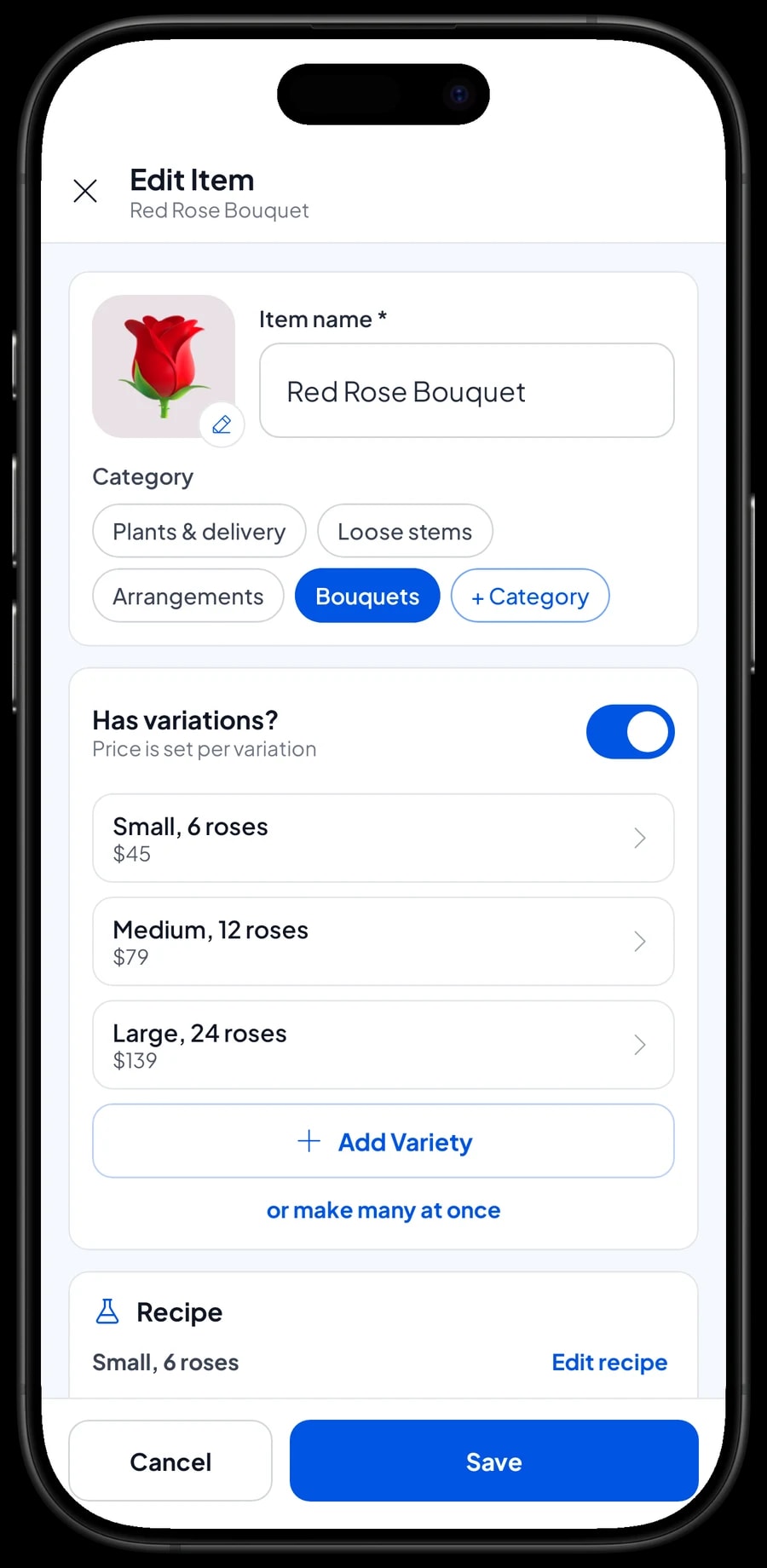
A bouquet that comes in several sizes is one item with variants. The Red Rose Bouquet can have Small (6 roses), Medium (12 roses) and Large (24 roses), each with its own price. The cashier picks the size and the price follows. The same works for single rose stems in Red and White, or a sunflower bouquet with 1 or 3 stems.
Potted plants sold as they are, like mini succulents, moth orchids or a monstera, are regular products with their own price, cost and stock. Plant shops can run their whole catalog this way, with pot sizes as variants.
- Step 1: Open Catalog → Categories and create categories such as Bouquets, Arrangements and Loose stems.
- Step 2: Open Catalog → List Items and add each bouquet with its name and category.
- Step 3: Add size variants such as Small, Medium and Large, each with its price.
- Step 4: Add potted plants as regular products with their opening stock.
Stems, wrapping paper and ribbon as ingredients
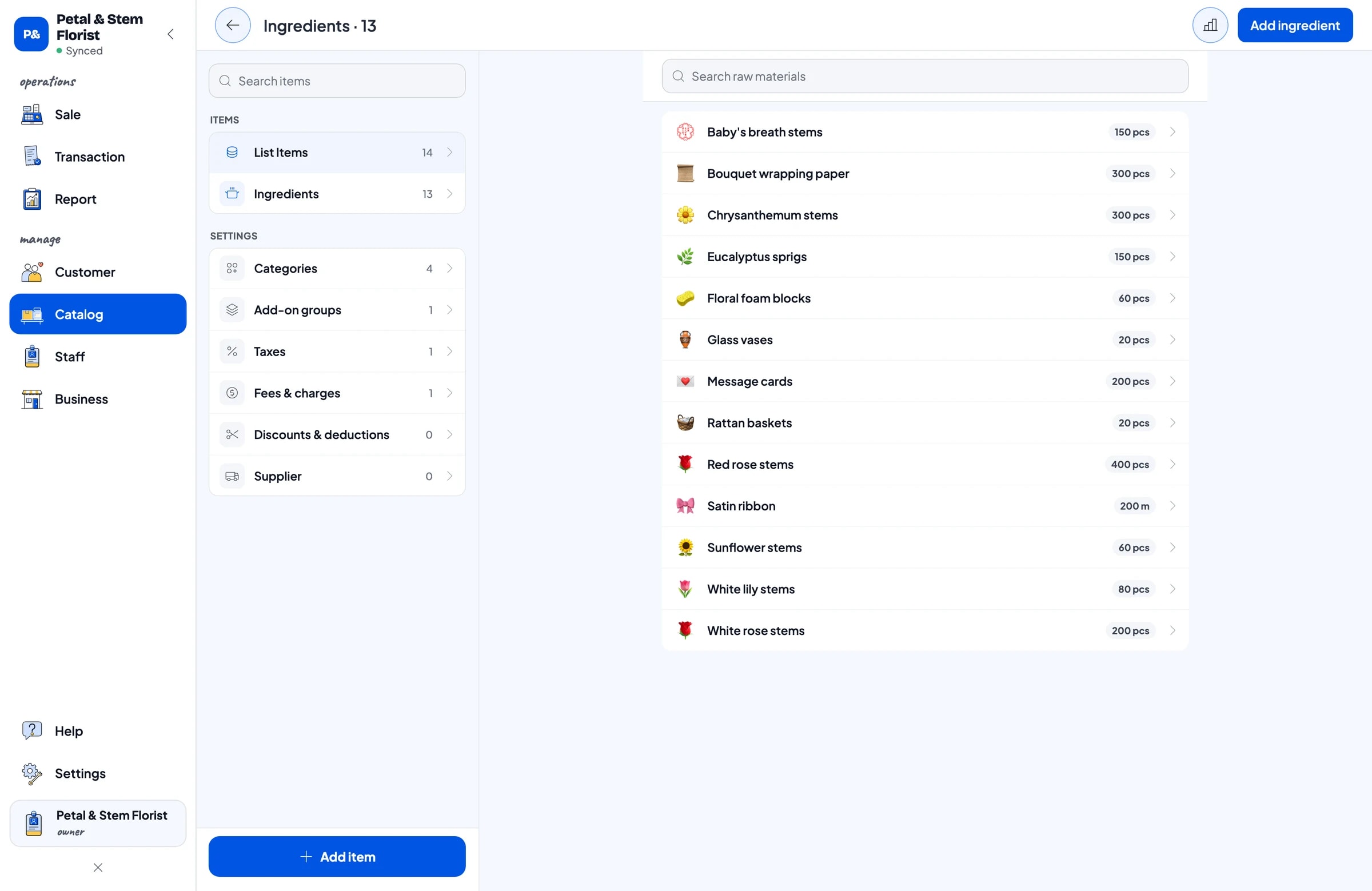
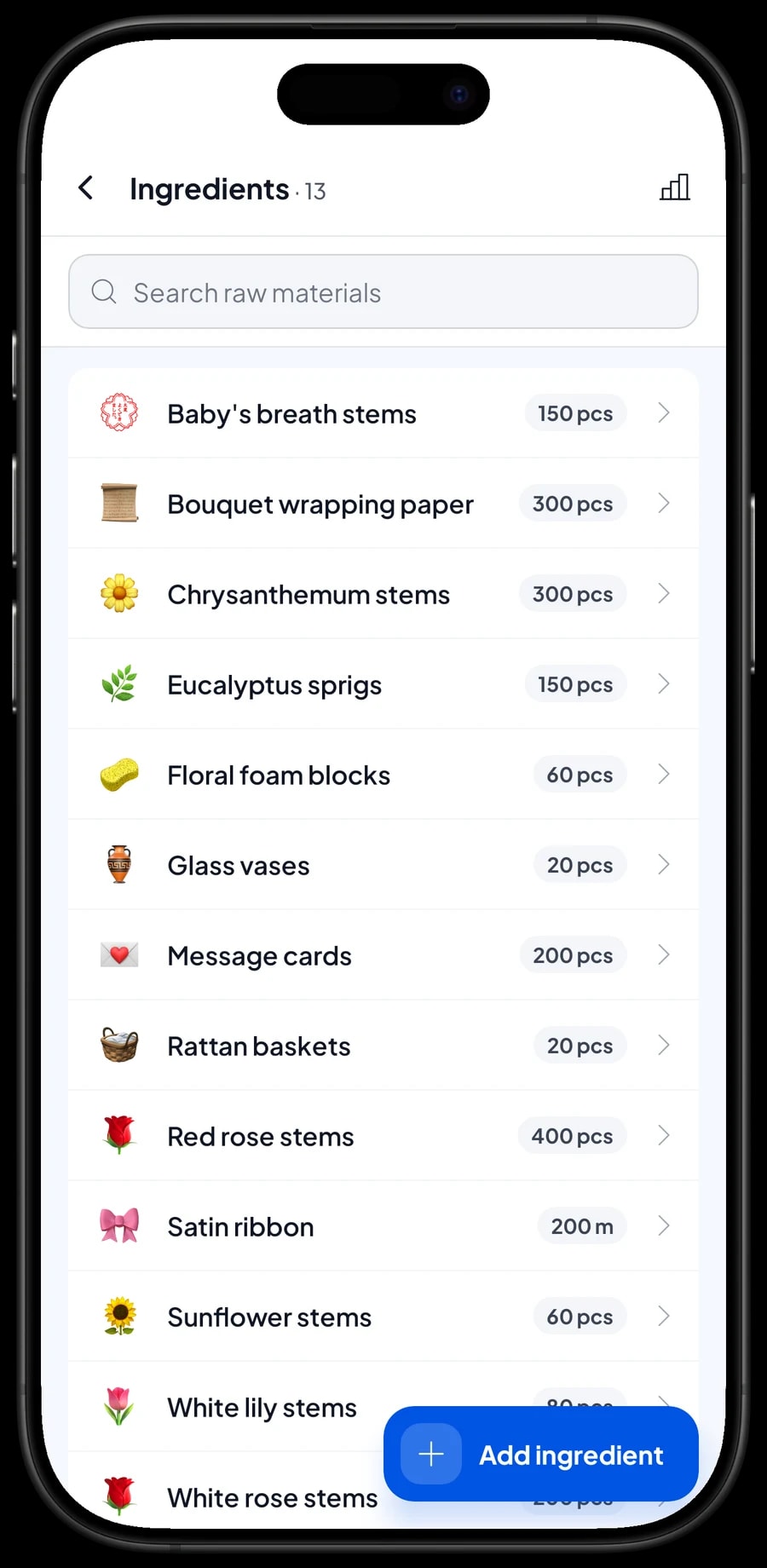
Florists rarely sell flowers exactly as they come in. What they sell is an arrangement: a bouquet is made of stems, greenery, wrapping paper and ribbon. In Salesmaster, each of these is an ingredient with its unit, such as red roses by the stem, satin ribbon by the metre, and floral foam by the block.
Record the opening stock and purchase price of each ingredient. Each time you buy at the flower market or from a grower, record the purchase with its price, so stock goes up and the cost per stem follows the latest price.
Fresh flowers can wilt before they're used. Stems you throw away don't come off stock on their own, so record them as a stock adjustment. That keeps the app in step with the buckets in your cooler, and shows you how much you're losing to waste each week.
- Step 1: Turn on made-to-order items, then open Catalog → Inventory → Raw materials.
- Step 2: Add ingredients such as red roses, baby's breath, wrapping paper and satin ribbon with their units.
- Step 3: Enter the opening stock and purchase price of each one.
- Step 4: Record every flower purchase, and record wilted stems as a stock adjustment.
Bouquet recipes: stock comes off, cost adds up
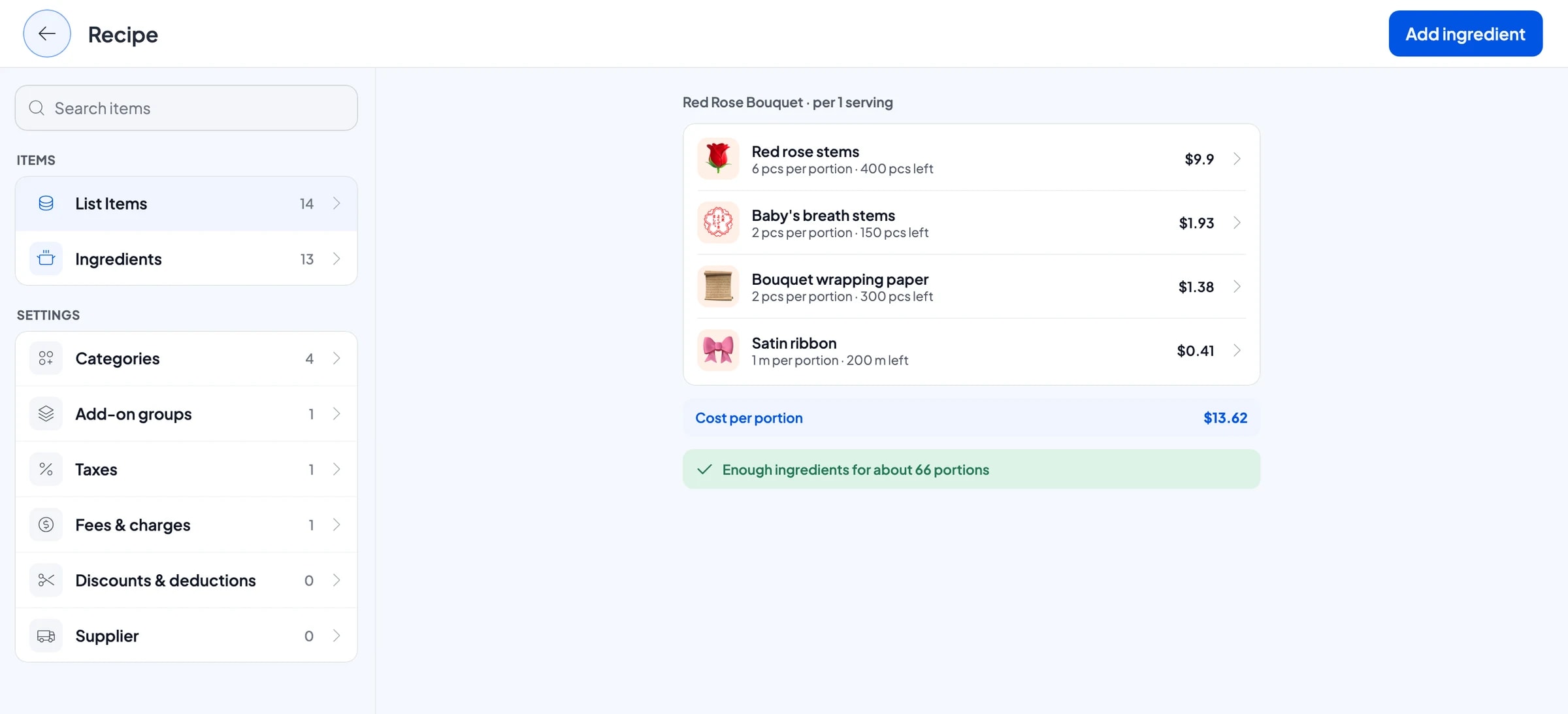
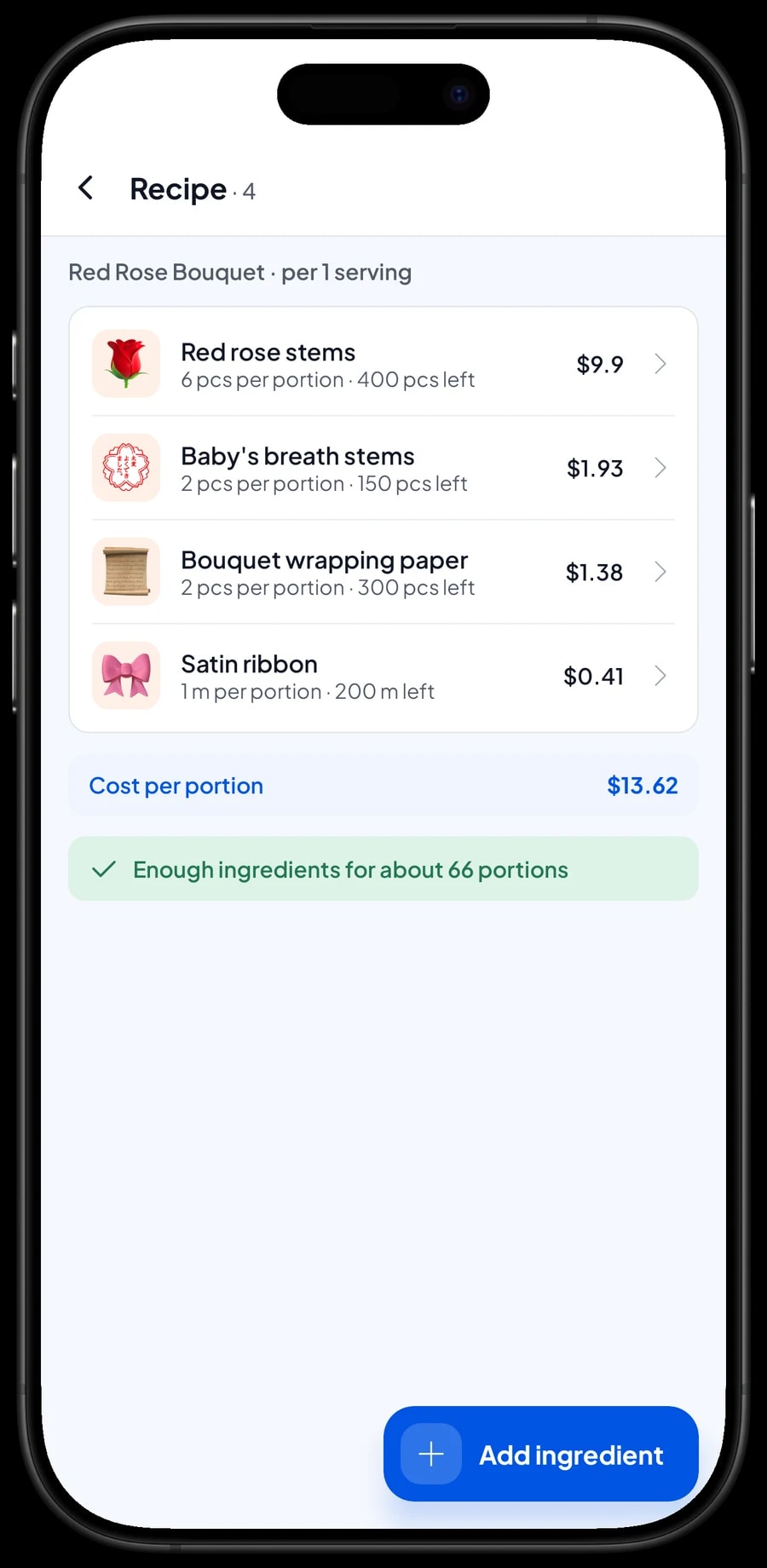
Once your ingredients are in, create bouquets and arrangements as Made-to-order items with a recipe. The recipe says what one bouquet uses. A Small Red Rose Bouquet, for example, uses 6 red roses, 2 stems of baby's breath, 2 sheets of wrapping paper and 1 metre of satin ribbon. The Medium and Large variants have recipes of their own.
Every bouquet sold takes its ingredients off stock according to the recipe. Salesmaster uses ingredient purchase prices to work out the cost of goods for each bouquet, so the profit report uses real costs. When rose prices go up at the market, the bouquet's cost goes up too, and you can see right away whether the selling price needs to change.
Larger pieces like a standing spray or a basket arrangement work the same way, including floral foam, rattan baskets or glass vases. For arrangements that are different every time, use an average recipe and record the difference as a stock adjustment.
- Step 1: Open Catalog → List Items and create the bouquet as a Made-to-order item.
- Step 2: Pick a variant and fill in its recipe: which ingredients and how much.
- Step 3: Repeat for each size variant.
- Step 4: Check the bouquet's cost of goods in reports after a few sales.
Message cards, chocolates and plush toys as add-ons
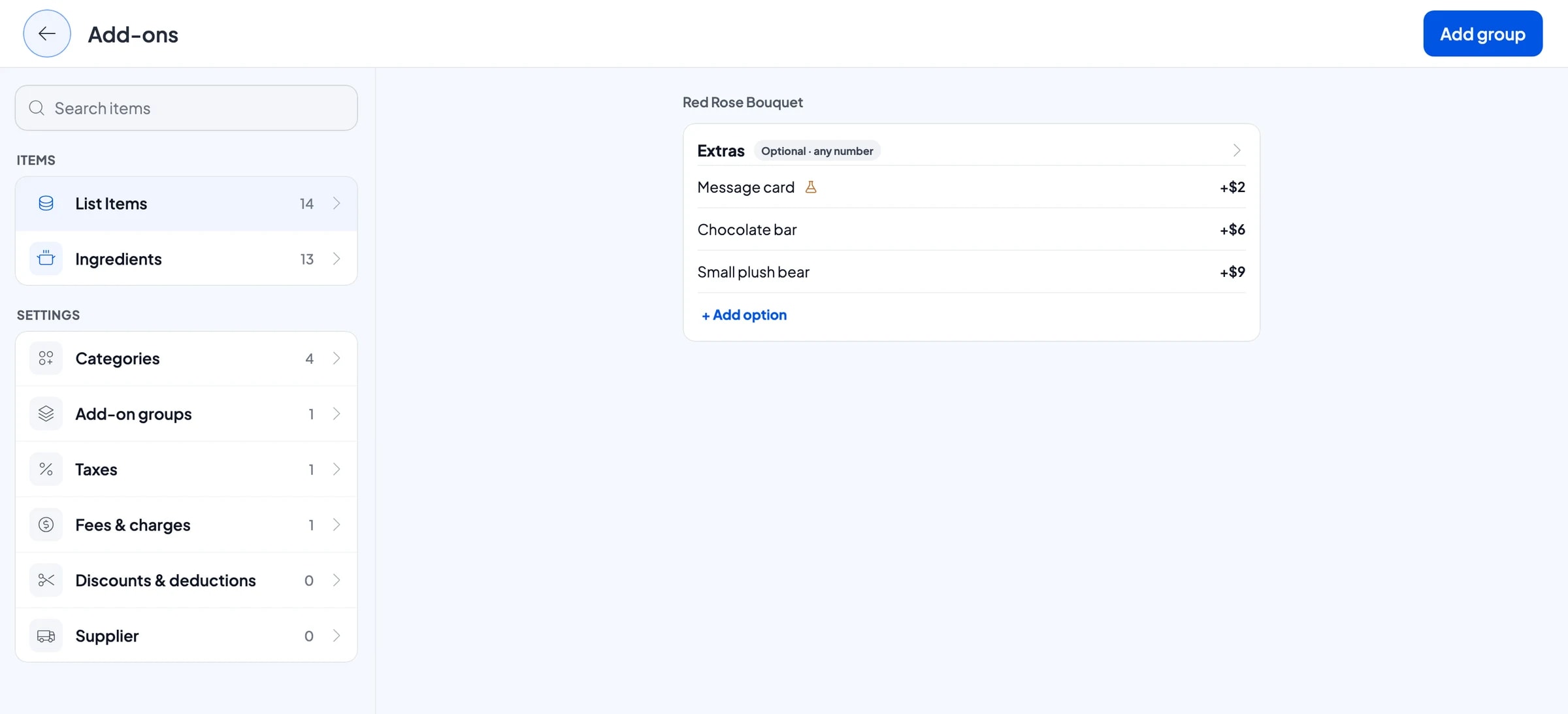
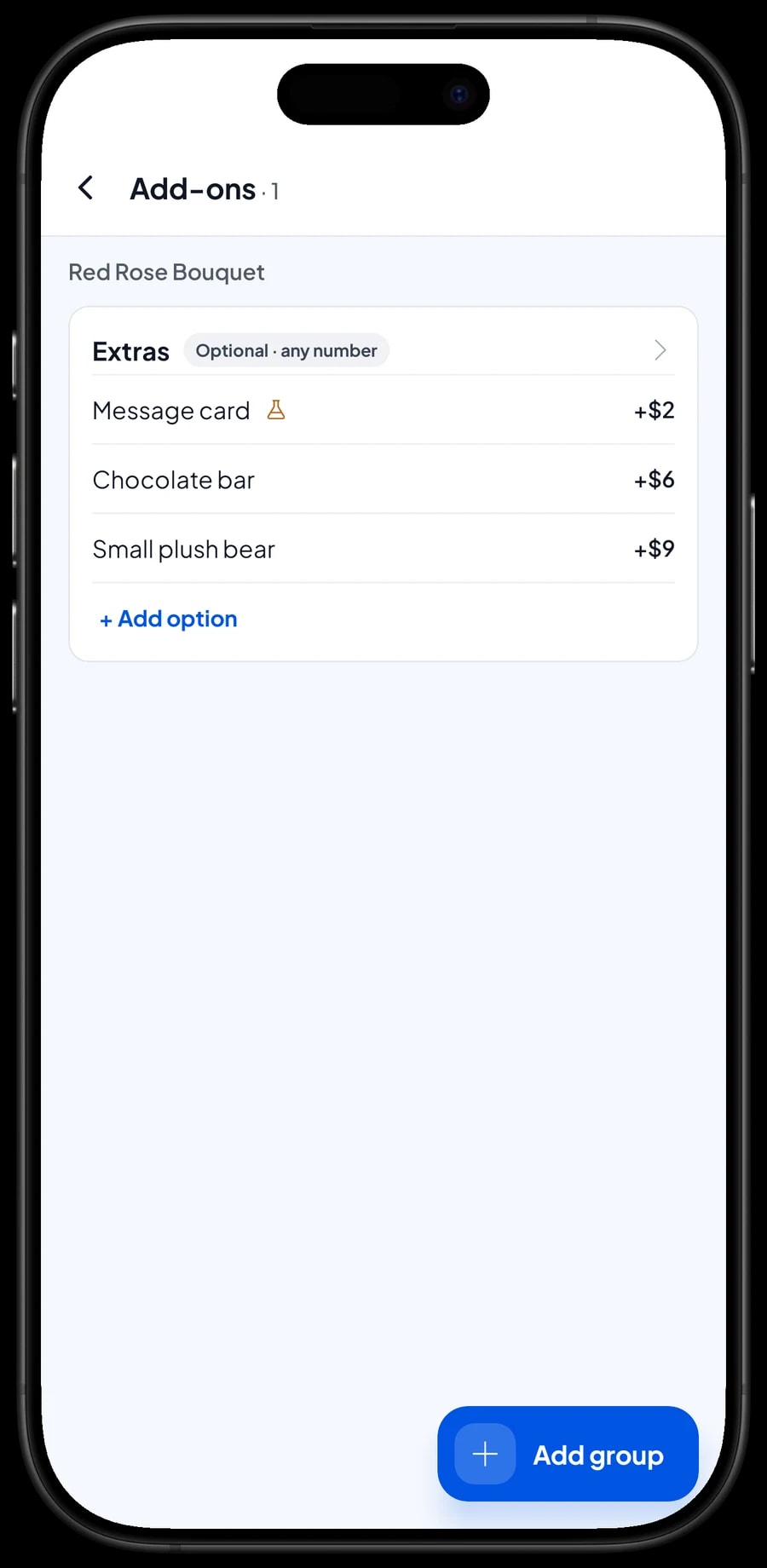
Bouquet buyers often add something: a message card, a chocolate bar or a small plush bear. Instead of creating "bouquet + chocolate" as its own item, create an Extras add-on group, managed from the item with Manage add-ons. One group can be attached to every bouquet and arrangement at once.
The cashier picks the extras while adding the bouquet to the cart, and the price goes straight onto the total. An add-on can carry its own ingredients too, so a message card takes a card off stock. The message itself, such as "Congratulations, Dina", goes in the line note so the arranger knows what to write.
Graduation, grand-opening and pickup orders
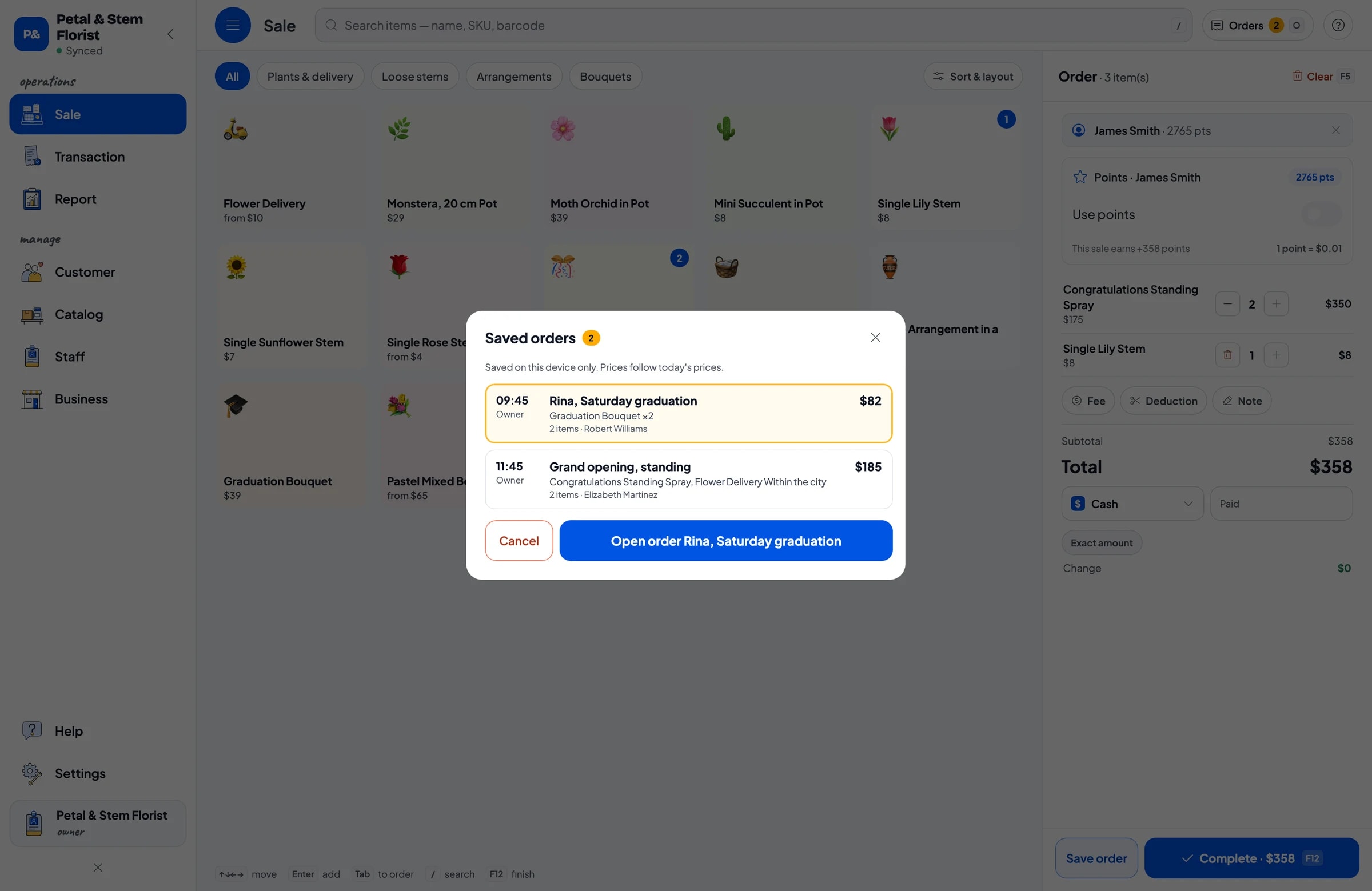
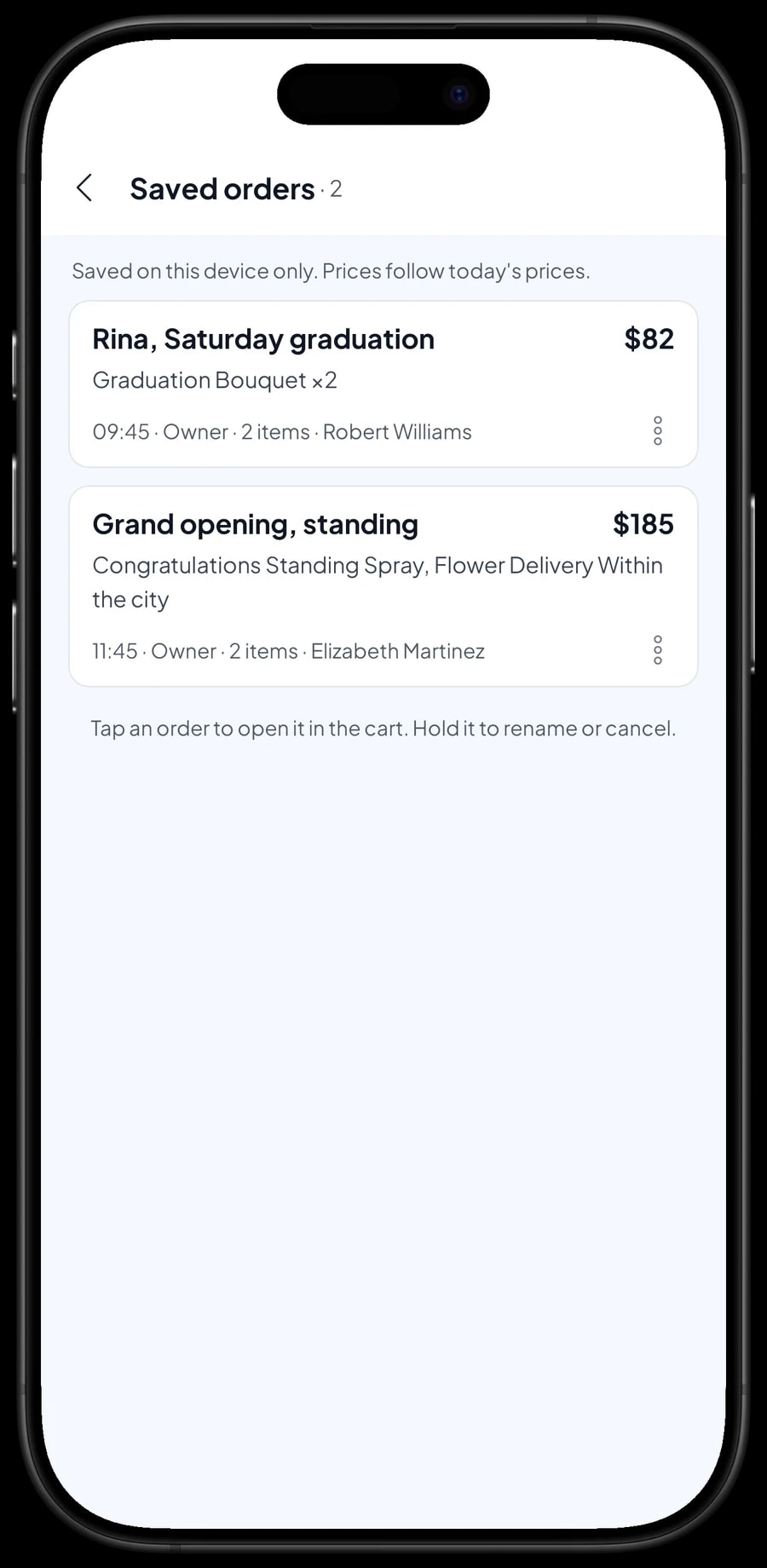
Most florist orders are taken today and collected or delivered later. That's what Save order is for. Put the bouquet in the cart, add a message card, and save it under a clear name, such as "Rina, Saturday graduation". Instructions like "Pays on pickup" or "Deliver by 8 AM" go in the order note.
For deliveries, create a Flower Delivery service with variants such as Within the city and Outside the city. Services have no stock, so the cashier adds delivery to the cart like any other item and the fee is recorded with the sale.
Salesmaster doesn't record deposits or partial payments on a sale. If a customer pays something up front, sell it right away as a separate Service item called "Down payment" for the amount received; when the order is paid off, it keeps its full price and you tap Add Deduction for the down payment, so the drawer and reports match on both days. A saved order isn't a sale and doesn't take flowers off stock until it's paid, and it lives on the device that created it, so complete it on that same device.
- Step 1: Add the bouquet, extras and Flower Delivery to the cart on the Sale screen.
- Step 2: Tap Save order and name it after the customer and the occasion.
- Step 3: Write the pickup time or delivery address in the order note, and sell any deposit as a separate Down payment item.
- Step 4: When the order goes out, open Saved orders and complete the payment.
Payments, receipts and regular customers
Create the payment methods you accept, such as cash, card, bank transfer or an e-wallet. Orders from delivery apps or online marketplaces don't flow in automatically, so record them with a payment method of their own to keep them separate in reports. Sales tax, if you collect it, is set once in Fees or Tax.
Receipts can print on a Bluetooth or USB thermal printer, or go out by WhatsApp, email or a web receipt link with your shop's logo and colours. Customers who order for someone far away like getting proof straight to their phone.
Florists have plenty of customers who come back for every birthday, Mother's Day and anniversary. Save their name and phone number at checkout, then turn on Loyalty points. You set the amount spent per point, the value of a point, the minimum to redeem and the maximum share of a bill points can cover. Points are added automatically, and each customer's purchase history is kept.
Arrangers and cashiers
An account is signed in on one device at a time. If a cashier or arranger also serves customers, add them as staff and register a cashier device for them. Staff sign in with a PIN, and you decide what they can see and change. Staff accounts come with Bronze Pro (1 staff) and Silver Pro (2 staff).
Reports and your shop's net profit
Daily, weekly, monthly and yearly reports show total revenue, gross and net sales, discounts, tax, payment methods and revenue by item. You can see which bouquets sell in graduation season and which sizes customers pick most.
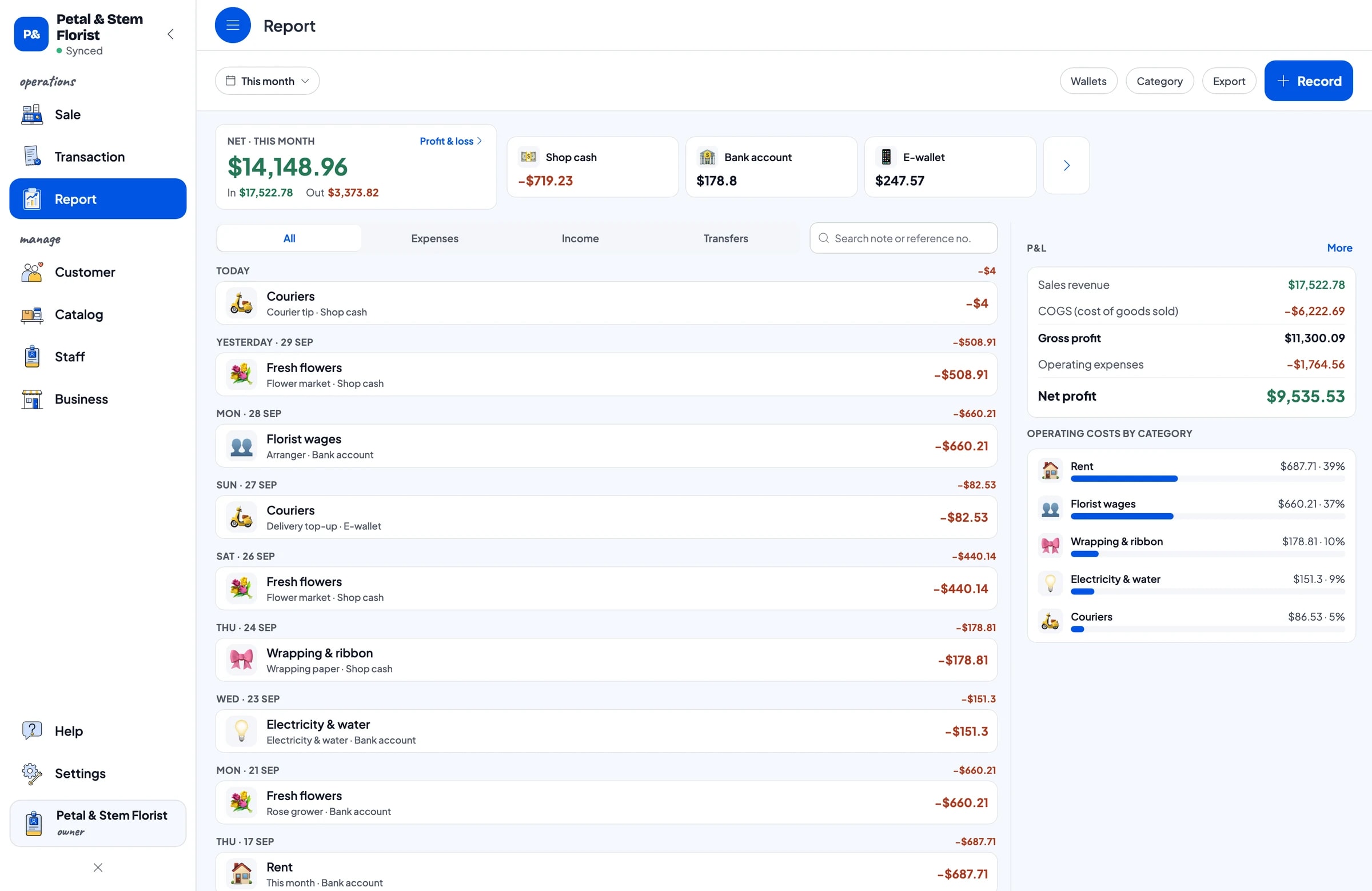
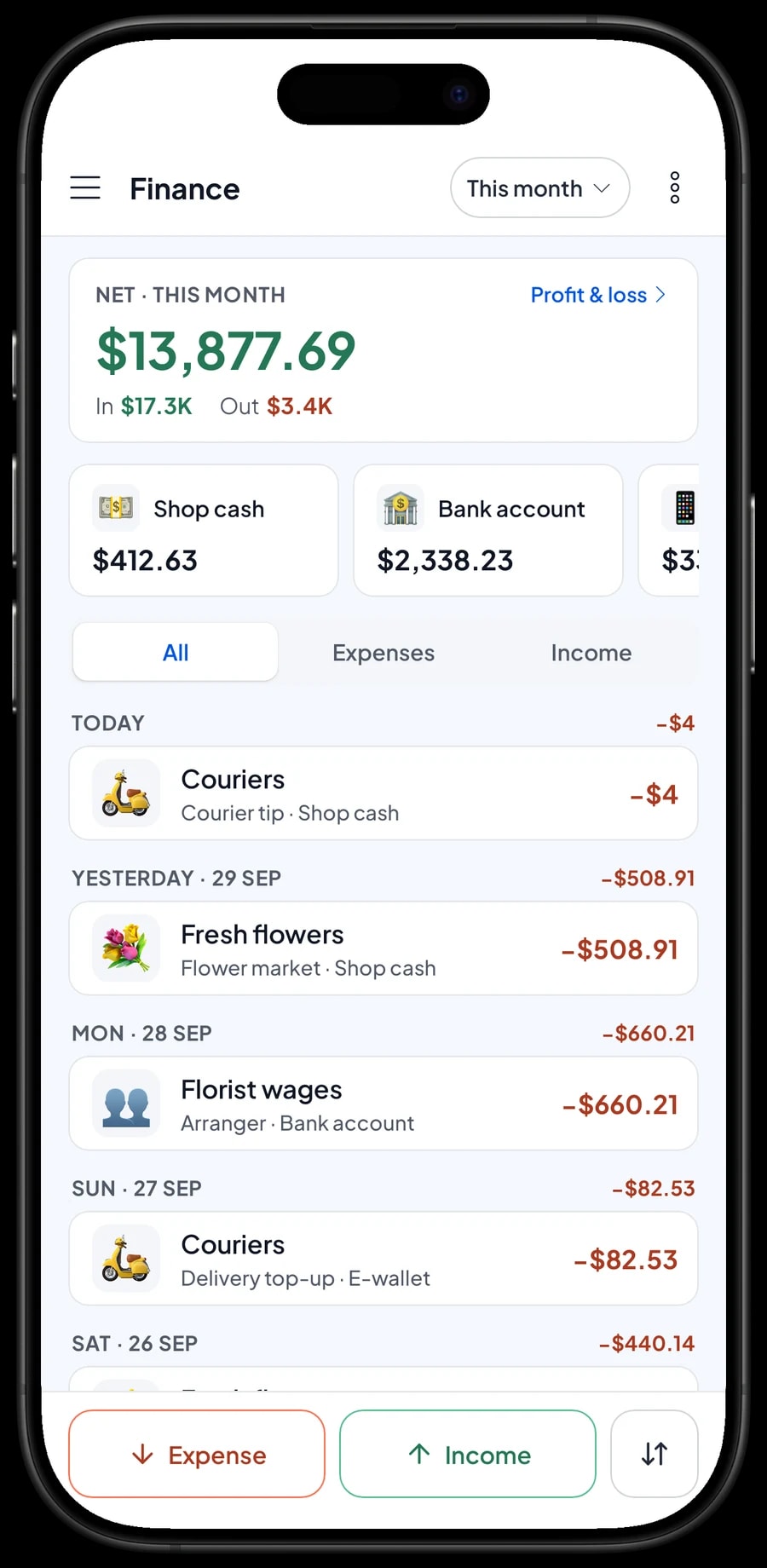
Record expenses in Finance: flower market runs, rose growers, arranger wages, rent, electricity and water, wrapping and ribbon, and courier costs. Each expense has a category and the wallet it came from. The Finance report shows revenue minus cost of goods from recipes and operating costs: your shop's net profit. Reports export to Excel or PDF.
Get started in a week
On day one, install the app, create an account and enter your best-selling bouquets and plants with their size variants. Run the till as usual and keep orders for later with Save order. Sales are saved even when the internet drops, with offline mode for up to 7 days.
Once the cashier is comfortable, enter your ingredients and fill in recipes for the best sellers. Start with three to five bouquets and add more over time. At the end of the week, record expenses in Finance and look at your first profit figure. Guides for every feature are in the Salesmaster Help Centre, and our team is on WhatsApp if you need help.
An example florist catalog
Use this table as a starting point and replace the names, sizes and prices with your own.
| Category | Item | Variants | Add-ons | Item type |
|---|---|---|---|---|
| Bouquets | Red Rose Bouquet | Small 6 roses, Medium 12, Large 24 | Extras | Made-to-order |
| Bouquets | Sunflower Bouquet | 1 sunflower, 3 sunflowers | Extras | Made-to-order |
| Bouquets | Graduation Bouquet | - | Extras | Made-to-order |
| Arrangements | Table Arrangement in a Vase | - | Extras | Made-to-order |
| Arrangements | Congratulations Standing Spray | - | Extras | Made-to-order |
| Loose stems | Single Rose Stem | Red, White | - | Made-to-order |
| Plants & delivery | Moth Orchid in Pot | - | - | Product |
| Plants & delivery | Monstera | 15 cm pot, 20 cm pot | - | Product |
| Plants & delivery | Flower Delivery | Within the city, Outside the city | - | Service |
Bouquets and arrangements are Made-to-order items, so it's their stems, paper and ribbon that come off stock. Potted plants are sold as they are with their own stock, and delivery is a service with no stock.
Which plan fits your flower shop
Start by counting sales per day. A florist selling about 4 bouquets a day records roughly 120 transactions a month, with sharp peaks around graduations and Valentine's Day.
| Plan | Price | Transactions / month | Staff accounts | Good for |
|---|---|---|---|---|
| Free | Free | 30 | Owner only | To try the bouquet catalog and checkout flow. |
| Solo Pro | $4.90/month | 3,000 | Owner only | Home florists and flower stalls run by the owner. |
| Bronze Pro | $6.90/month | 5,000 | 1 staff | Flower and plant shops with one cashier or arranger on their own device. |
| Silver Pro | $9.90/month | 8,000 | 2 staff | Larger shops with two staff on separate devices. |
Every plan includes checkout, catalog, receipts, reports and offline mode. You can change plans at any time. See pricing →
Frequently asked questions
- Can the Salesmaster POS take flowers off stock by the stem?
- Yes. Record stems, wrapping paper and ribbon as ingredients, then create bouquets as Made-to-order items with a recipe. Every bouquet sold takes its ingredients off stock, and its cost of goods comes from ingredient purchase prices.
- How do I record wilted flowers?
- Wilted stems don't come off stock on their own. Record them as a stock adjustment on the ingredient so the app matches what's really in your cooler.
- Can one bouquet come in several sizes?
- Yes, with variants. For example, a Red Rose Bouquet in Small, Medium and Large, each with its own price and recipe.
- How do I handle orders collected on another day?
- Keep them with Save order under the customer's name and the occasion, such as "Rina, Saturday graduation". The order stays on the device that created it and becomes a sale when it's paid. Partial payments aren't recorded on one sale, so sell a deposit as a separate Service item called "Down payment", then at pickup sell the order at full price with an Add Deduction equal to the deposit.
- Can I charge for flower delivery?
- Yes. Create a Flower Delivery service with variants such as Within the city and Outside the city and add it to the cart. A delivery fee can also be set in Fees or Tax.
- Do orders from delivery apps or marketplaces come in automatically?
- No, Salesmaster doesn't connect to those apps. Ring the orders up at the till and create a payment method for each app, so that revenue shows separately in reports.
Need help setting up your catalog? Chat with our team on WhatsApp →



