
Salesmaster is a point-of-sale (POS) app for guesthouses, homestays, B&Bs and small inns, on Android, iPhone & iPad, Windows and Mac. Rooms are items sold by the night with weeknight and weekend variants, guest services and the café live in the same catalog, a guest's bill can be kept open with Save order until check-out, and net profit shows in the Finance report. Salesmaster has no reservation calendar, so bookings stay in your guest book or booking site.
Problems every guesthouse knows
If any of these sound familiar, this page is for you.
- 01
Guest charges scattered until check-out
A guest stays three nights, rents a scooter for two days, sends laundry and has breakfast every morning. When all of it is on separate slips, something always goes unbilled at check-out.
- 02
Rates change on the weekend
Friday and Saturday cost more than weeknights, and the family room is different again. A new front-desk person quotes the wrong rate more often than you'd like.
- 03
A small café nobody tracks
Coffee, tea, eggs and bananas for breakfast run out without warning. You can't tell whether the café makes money or just makes work.
- 04
Full house, unclear profit
Room money comes in as cash, transfers and booking-site payouts. After wages, electricity, water, linen and commissions, what is left? Without records, profit is a guess.
Rooms as items by the night, with weeknight and weekend rates
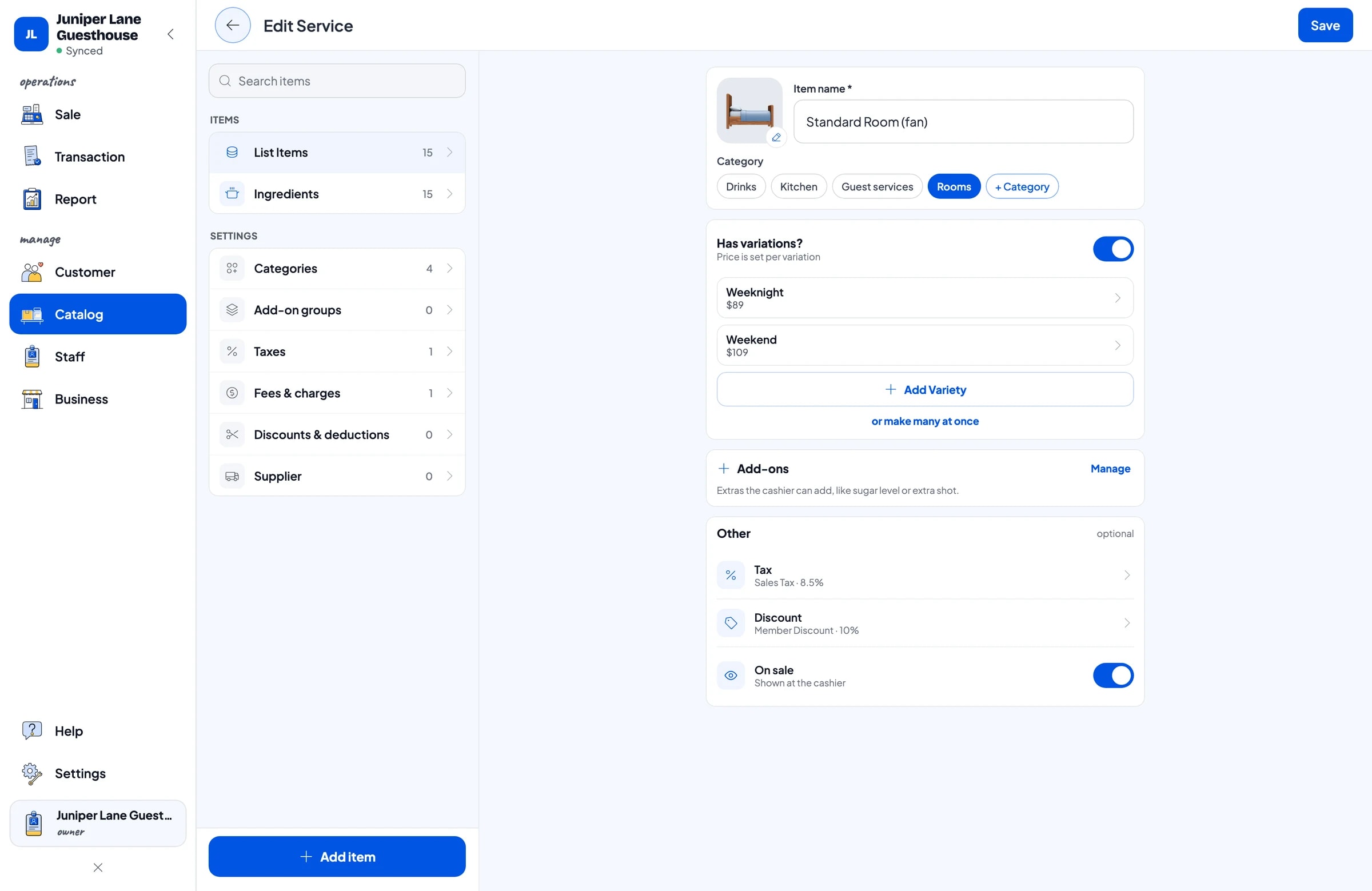
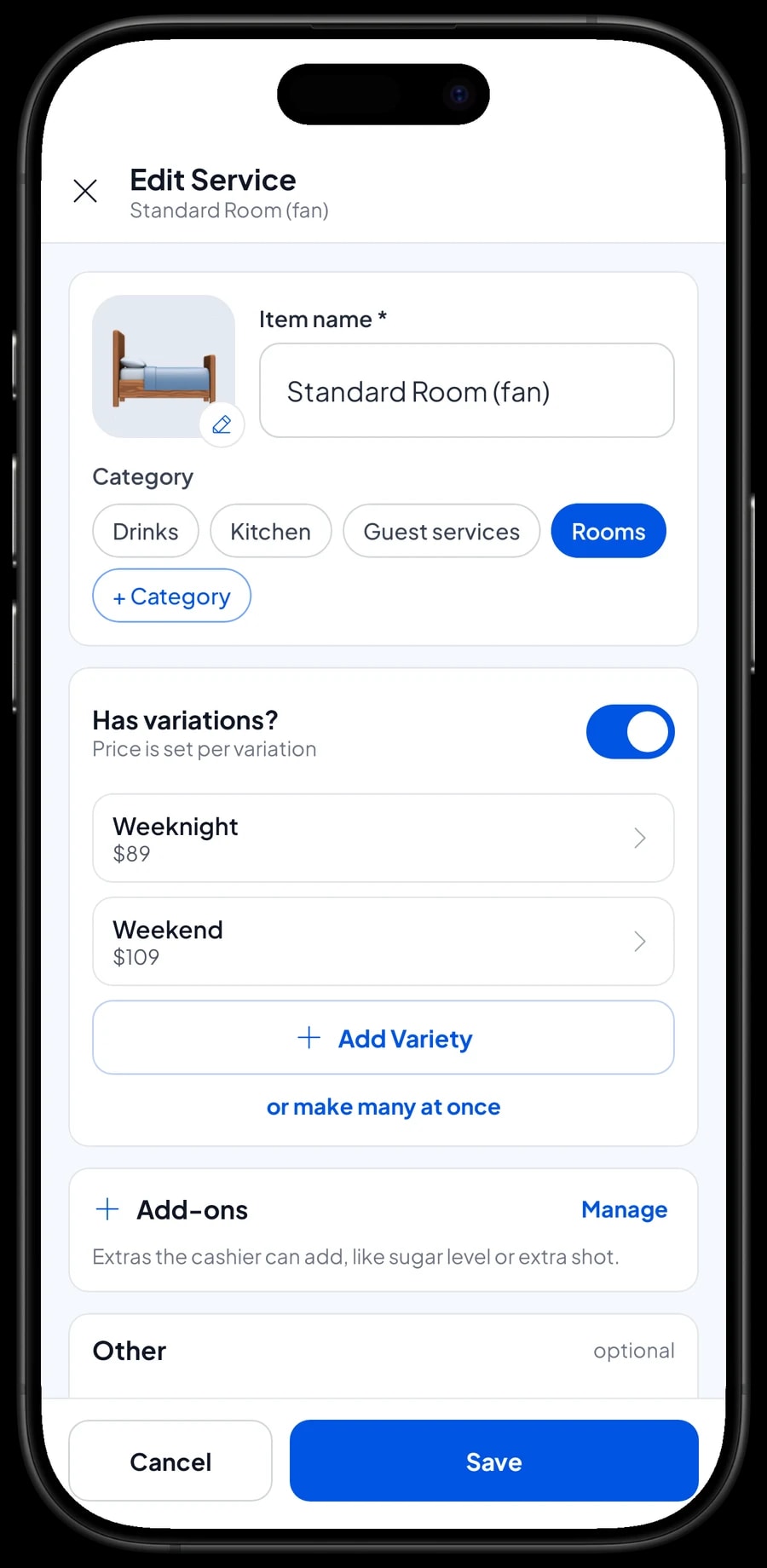
In Salesmaster, each room type is one item in the Catalog with night as its unit. Standard Room, Deluxe Room and Family Room are one item each, with Weeknight and Weekend variants at their own prices. For a three-night stay, the front desk picks the variant and enters a quantity of 3.
Rooms are service items without stock, because what you sell is a night's stay, not goods. A guest staying two weeknights and one weekend night is simply two lines: 2 × Weeknight and 1 × Weekend. The total adds itself up.
Guest services work the same way: extra bed per night, late check-out, guest laundry by the pound, scooter rental by the day and airport transfers by the trip. Cart quantities are whole numbers, so guest laundry is charged by the full pound. With every price in the catalog, the front desk never has to call you to ask what to charge.
- Step 1: Open Catalog → Categories and create Rooms, Guest services, Kitchen and Drinks.
- Step 2: Open Catalog → List Items and add each room type with night as the unit.
- Step 3: Add the Weeknight and Weekend variants, each with its nightly rate.
- Step 4: Add services such as extra bed, guest laundry and scooter rental as service items.
About bookings: what it does and doesn't do
To be clear from the start: Salesmaster is a point-of-sale app, not a property management system. There is no reservation calendar, no room availability view, and no automatic connection to online booking sites. Keep your bookings in the guest book, a spreadsheet, or the booking-site dashboard you already use.
What Salesmaster handles is the money side: charging rooms, services and food at the right price, recording how guests paid, printing or sending receipts, and building your reports and profit. Many guesthouses use both side by side: a booking tool for the room schedule, Salesmaster for the till.
Guests who already paid through a booking site can still be recorded in Salesmaster, so your revenue is complete. Create a payment method such as “Booking site” and record the room sale with it. The commission the site keeps goes into Finance as an expense.
Room bills paid at check-out
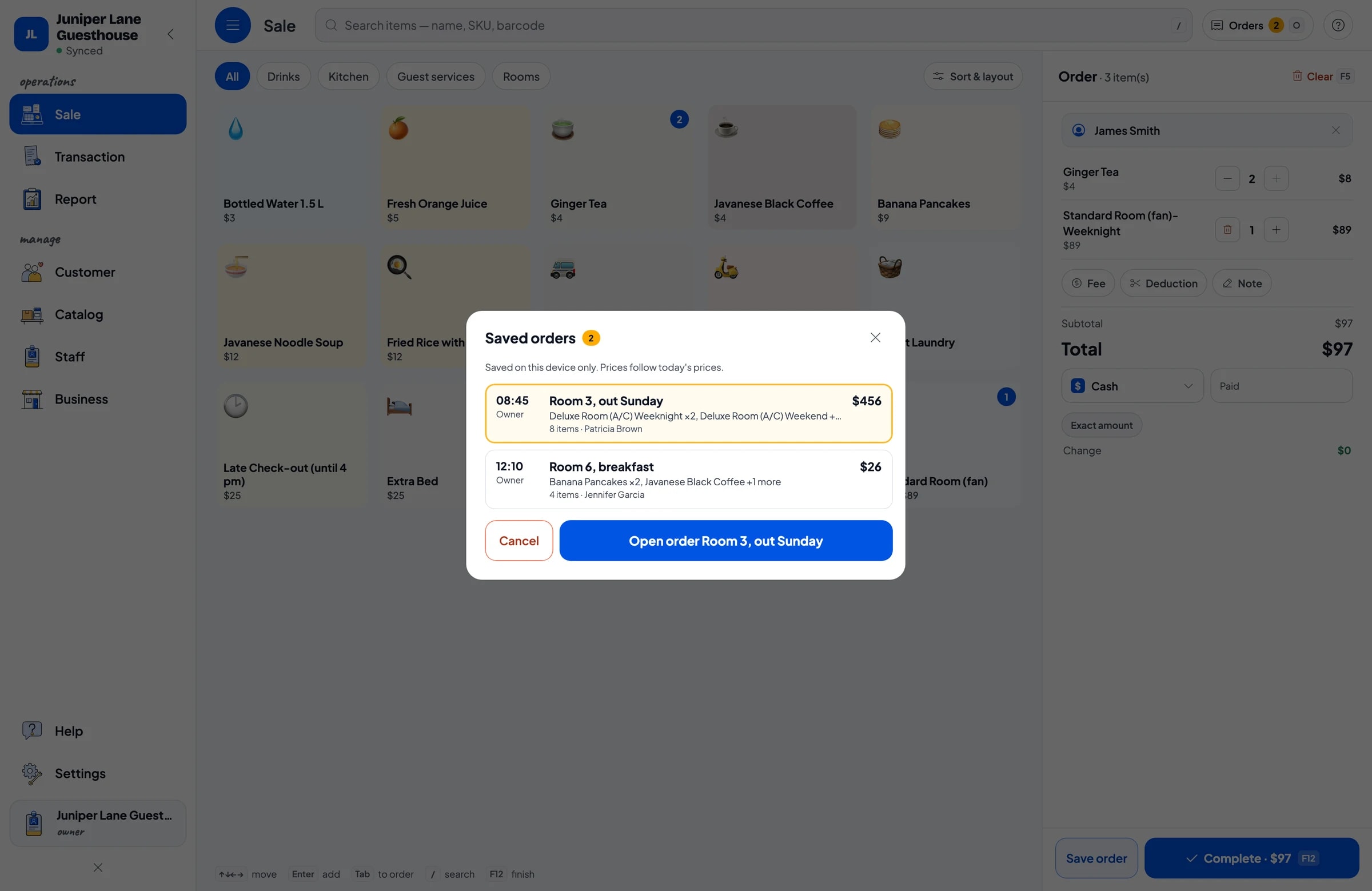
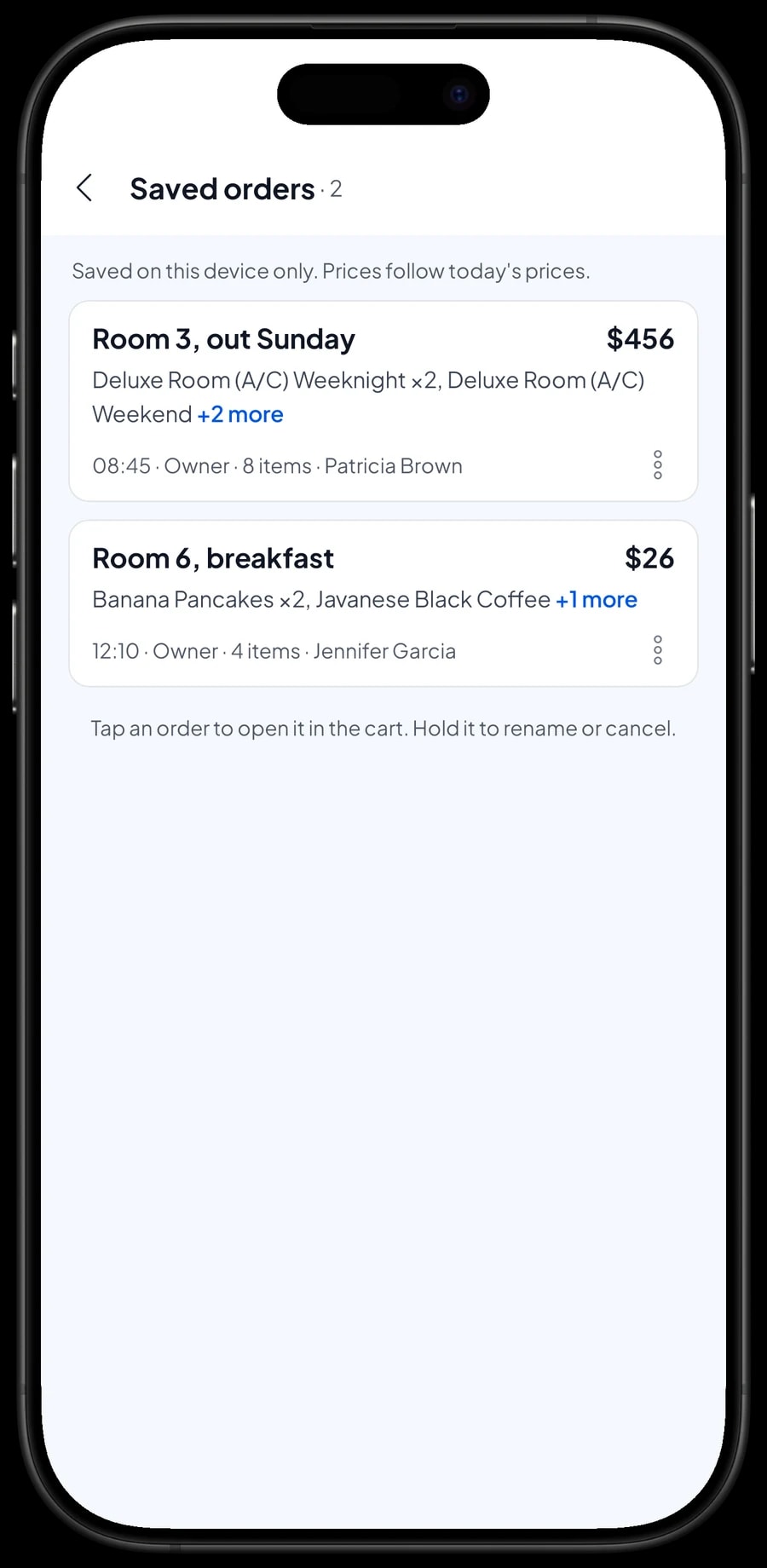
Most guests pay at the end of their stay. That is what Save order is for: the cart is kept as a saved order under the name you give it, for example “Room 3, out Sunday”. Every time the guest in room 3 rents a scooter, sends laundry or has breakfast, open that order and add the item.
At check-out, open Saved orders, pick room 3, go through the charges with the guest, and complete the payment with the method they use. The receipt can print or go out by WhatsApp, with every night and service on it.
Two things to keep in mind. Saved orders live on the device that created them, so keep all room bills on one front-desk device and settle them on that same device. And a saved order is not a sale and doesn't take stock off until it is paid, so your daily report only shows bills that have actually been settled.
Café and breakfast with ingredient stock by recipe
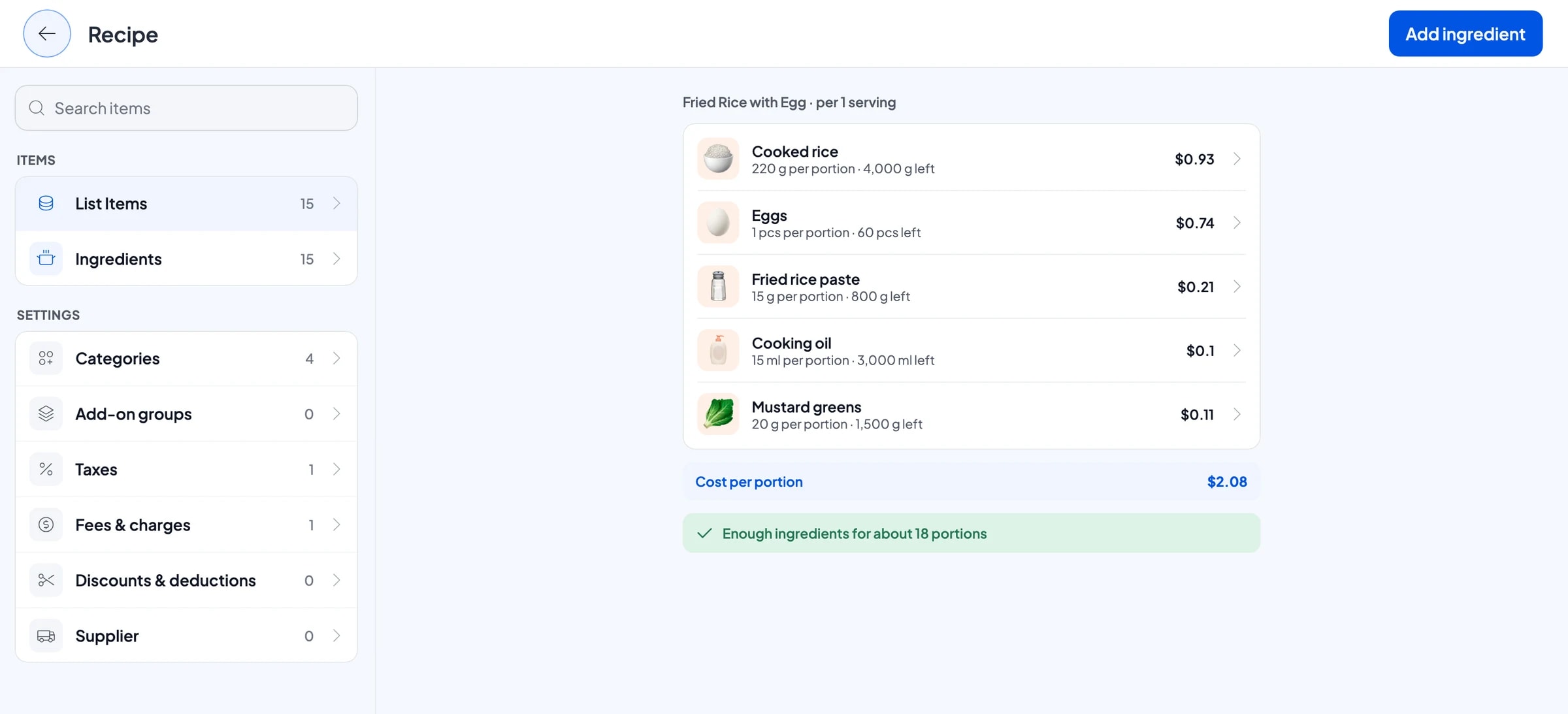
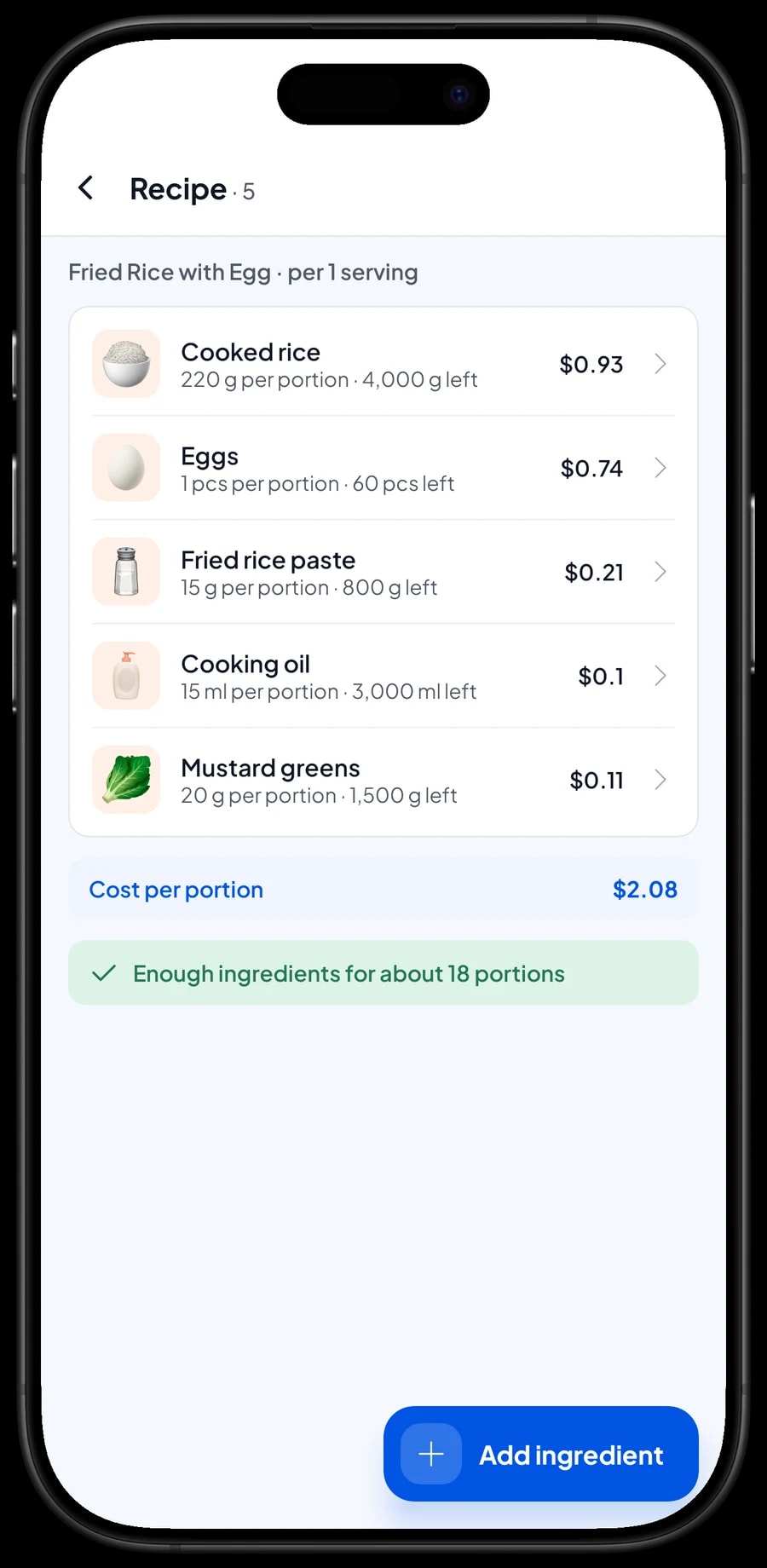
Many guesthouses have a small kitchen for breakfast, afternoon coffee or a simple dinner. Dishes such as fried rice with egg, noodle soup, banana pancakes, black coffee and ginger tea are Made-to-order items with a recipe. You enter the ingredients once, like cooked rice in grams, eggs by the piece and cooking oil in milliliters, and then how much one serving uses.
Every serving sold takes its ingredients off stock. Before the market run, you can see what is running low. Packaged drinks such as bottled water are regular products with their own stock.
Because purchase prices are recorded, Salesmaster works out the cost of each serving. Breakfast or dinner paid separately is simply added to the guest's saved room order, so everything is settled at once at check-out.
- Step 1: Turn on made-to-order items, then open Catalog → Inventory → Raw materials.
- Step 2: Add ingredients such as cooked rice, eggs, cooking oil and coffee, with opening stock and purchase price.
- Step 3: Create Fried Rice with Egg as a Made-to-order item and fill in its recipe per plate.
- Step 4: Record every market run as a purchase so stock and costs stay accurate.
Payments, tax and receipts for guests
Set up the payment methods you accept: cash, card, bank transfer, a QR payment or a booking site. You create these yourself. Salesmaster isn't connected to card terminals or booking sites, so those payments are recorded as a payment method once the money has arrived.
If you charge a lodging or sales tax, set it once in Fees or Tax and it is added to every sale. Discounts, such as a weekly-stay rate or a returning-guest discount, are set up in Deductions.
Travelers and business guests often ask for a receipt. It can print on a Bluetooth thermal printer, or go out by WhatsApp, email or a web receipt link with your guesthouse's logo and contact details. No more handwritten receipts.
Front-desk staff and separate devices
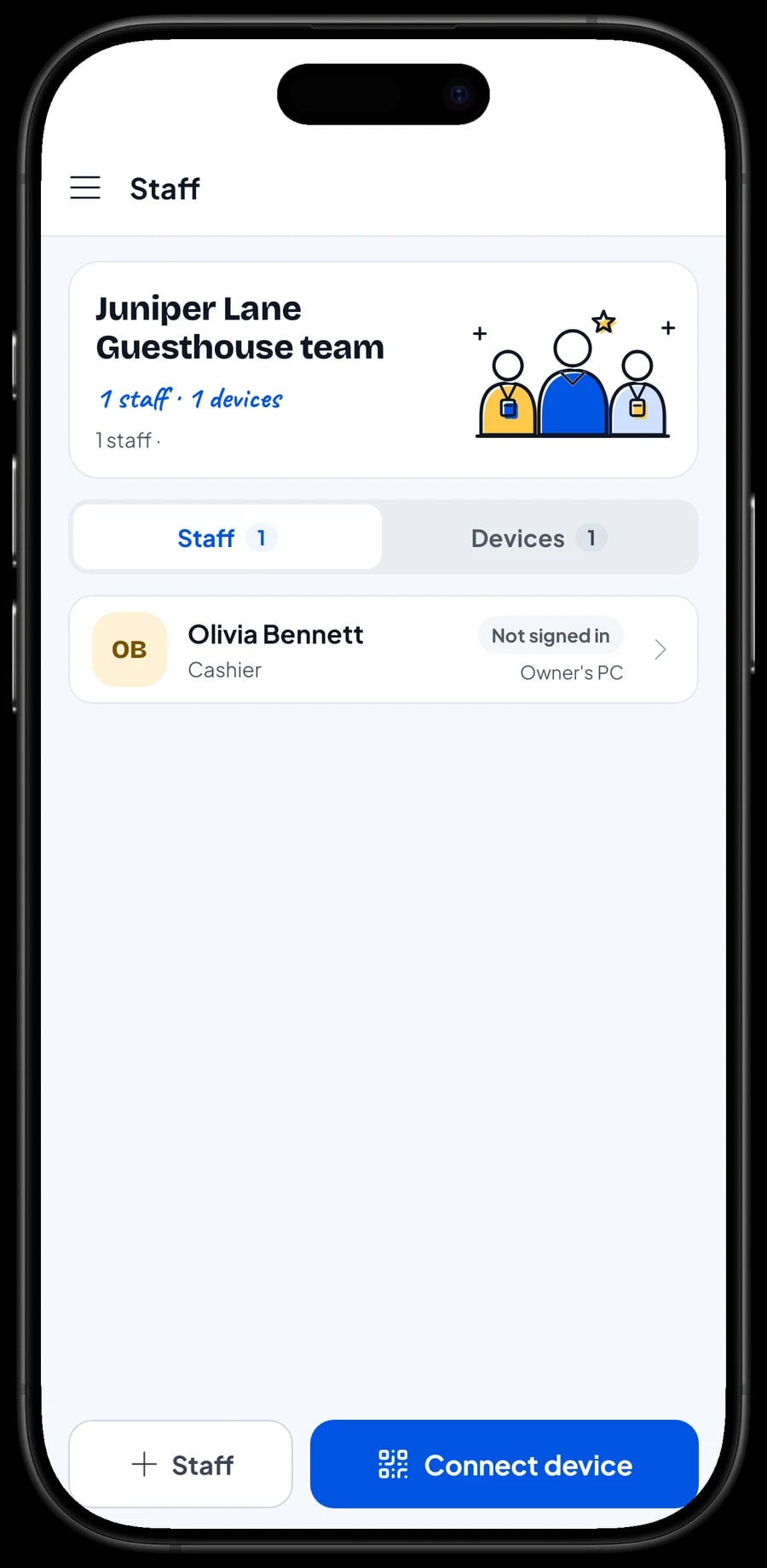
A Salesmaster account signs in on one device at a time. If you aren't always on site, the front-desk person uses a staff account on the desk device. Add them as staff with a role, then register the device. Staff sign in with a PIN, and you decide what they can see and change. Staff accounts come with Bronze Pro and Silver Pro.
Every sale syncs to the owner's account, so you can see sales from your own device, even when you are away from the property.
Operating costs and your guesthouse's net profit
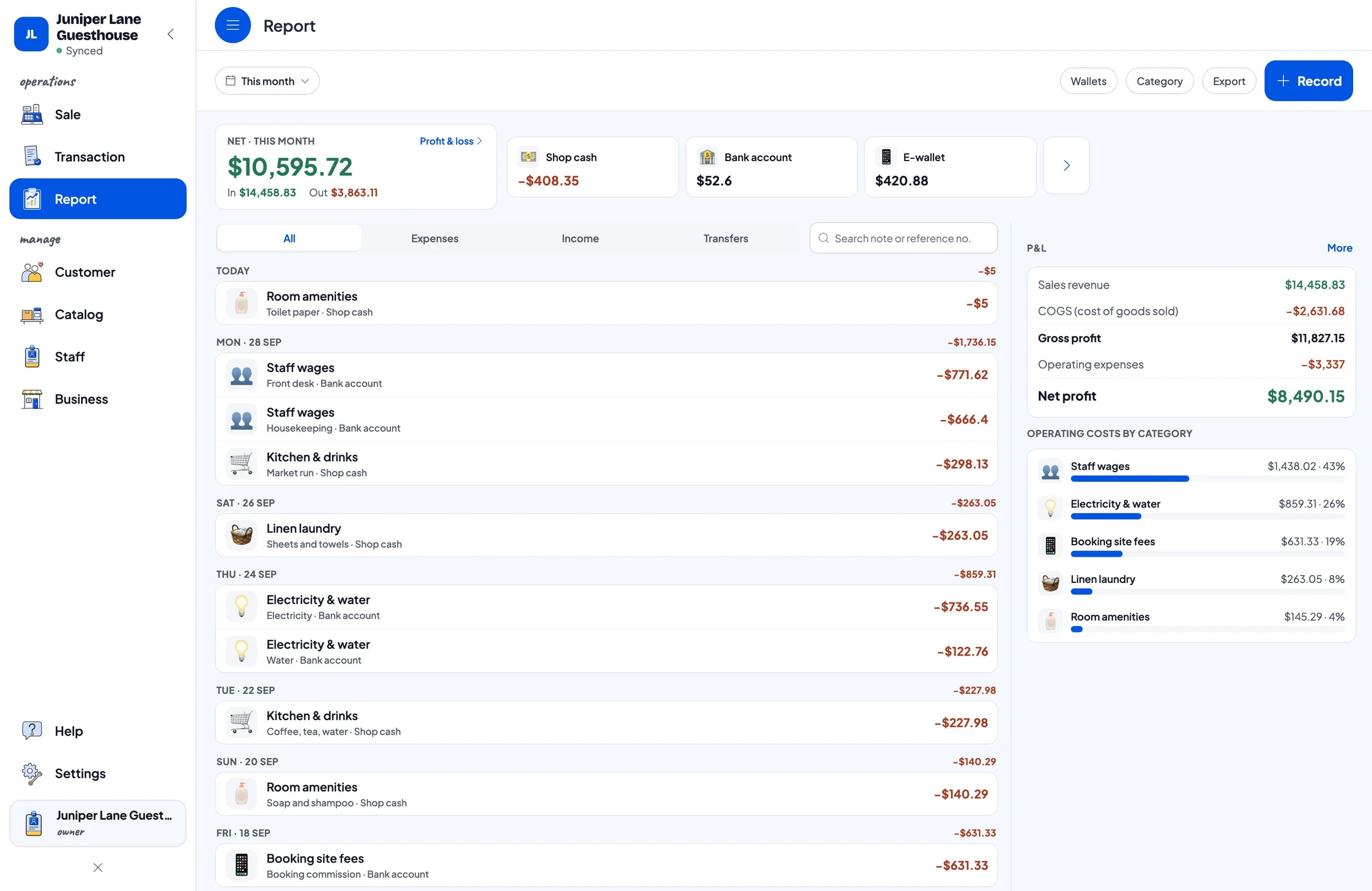
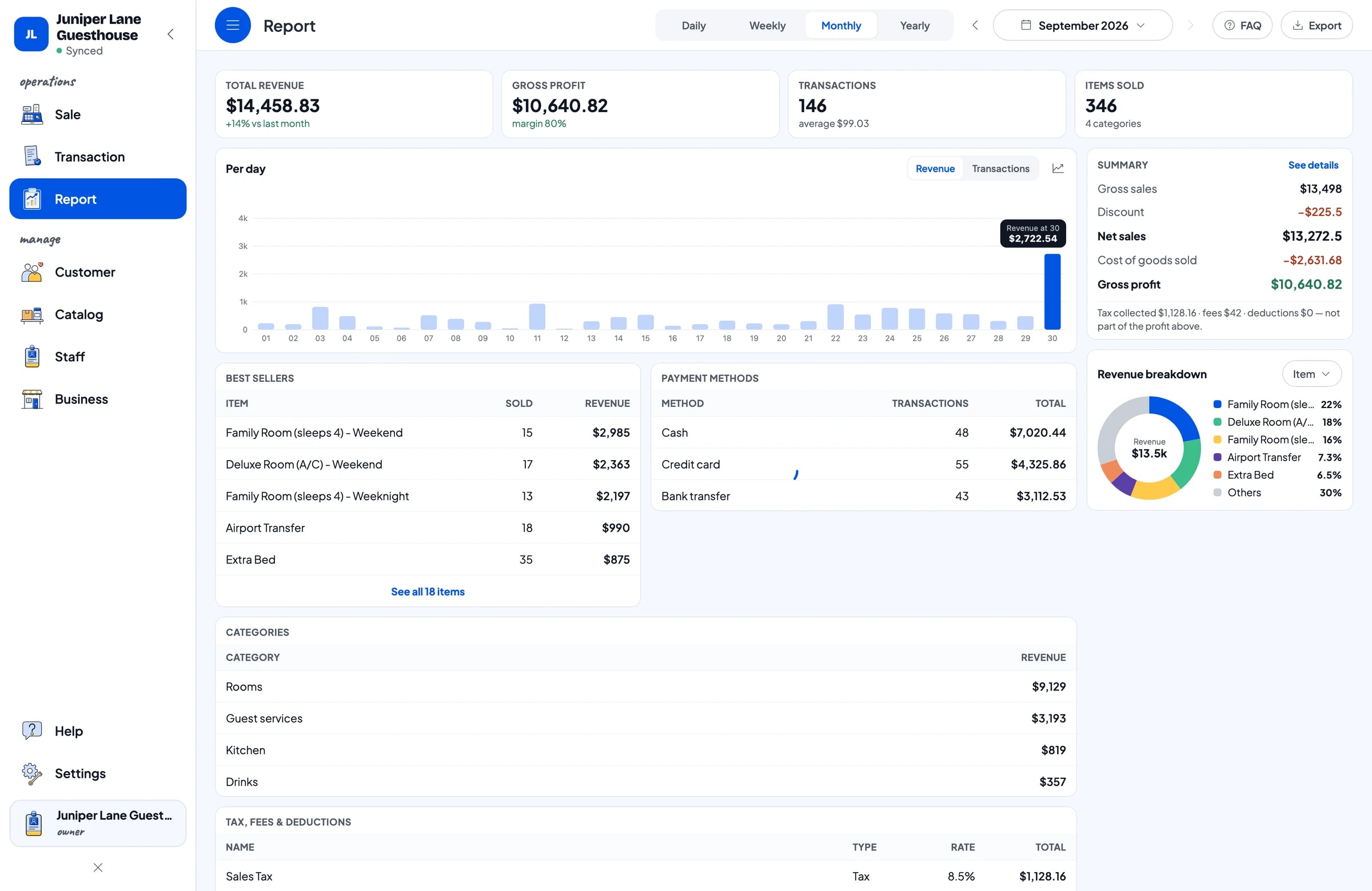
Profit only shows once costs are recorded. In Finance, record expenses under categories that fit: kitchen and drinks, front-desk and housekeeping wages, electricity and water, linen laundry, room amenities such as soap and shampoo, and booking-site fees. Each expense has the wallet it was paid from, such as the cash drawer, a bank account or an e-wallet.
The Finance report shows revenue minus café cost of goods and operating costs: your guesthouse's net profit. Tax collected from guests is shown separately and isn't counted as profit.
With these records, questions you used to answer by feel get real numbers: how much of your revenue goes to booking commissions, whether to do the linen in-house, and whether the café is worth keeping.
Reports for rooms, services and the café
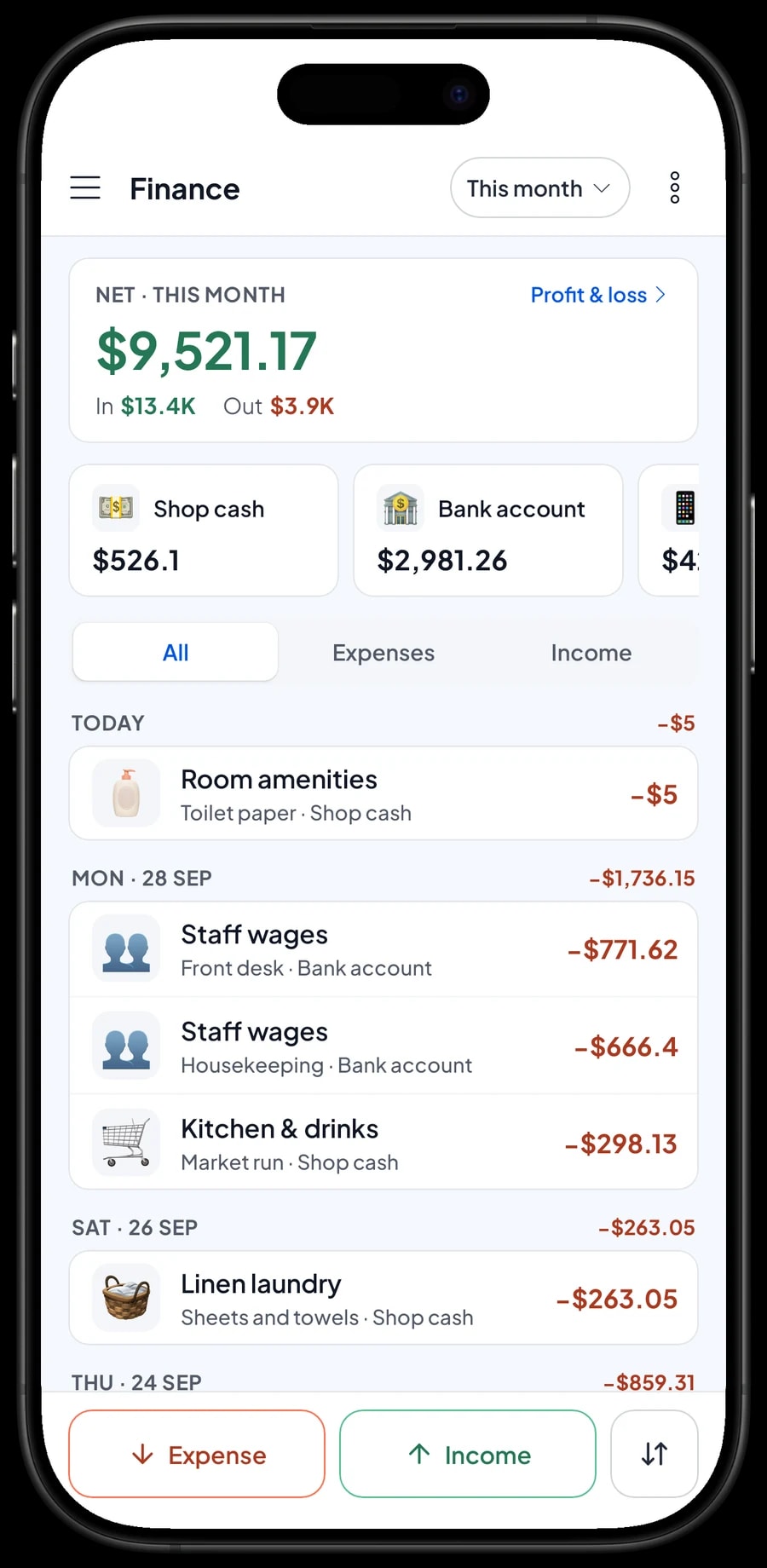
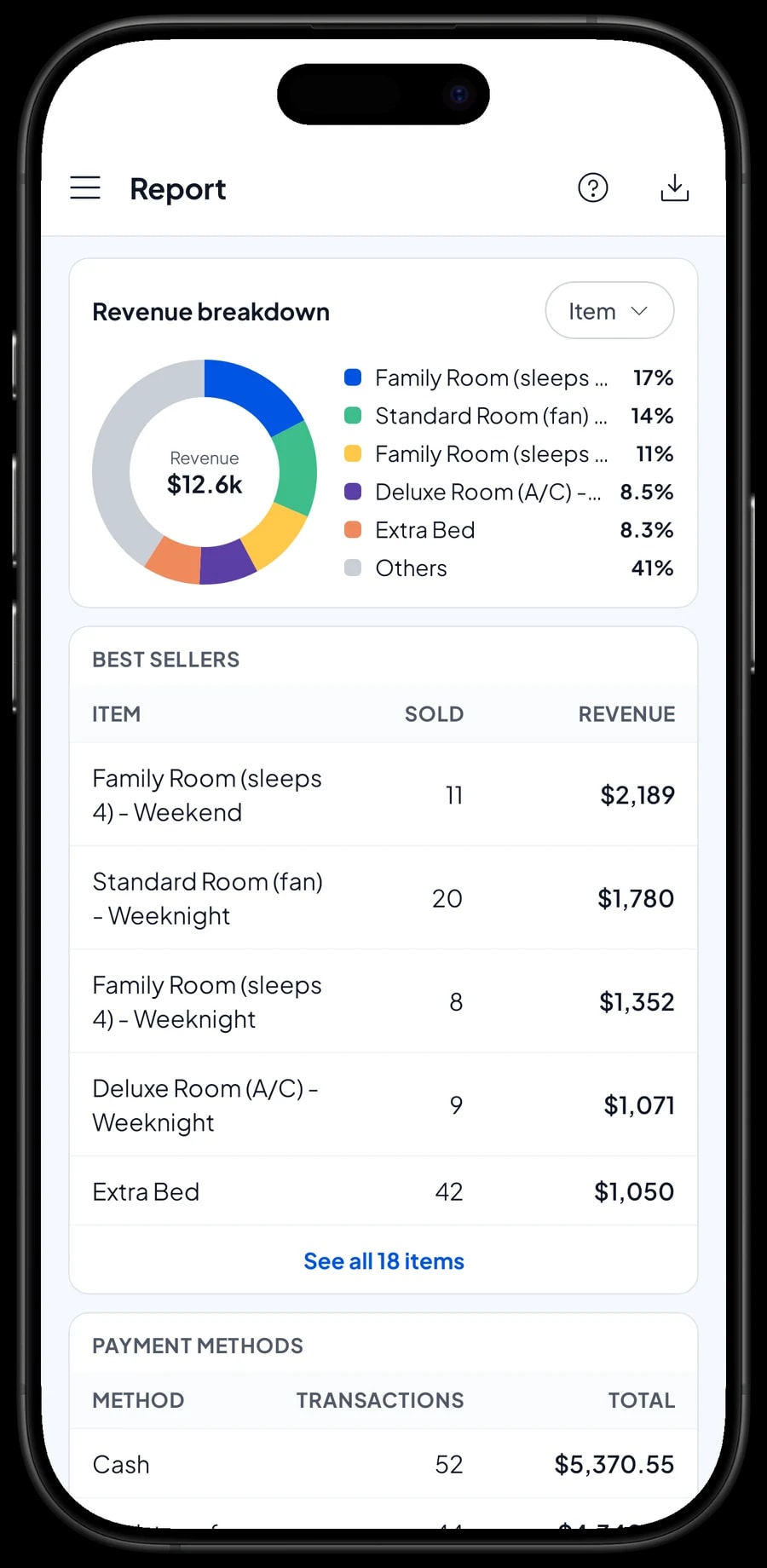
Reports are available by day, week, month and year. You see total revenue, gross and net sales, discounts, tax, and money in by payment method. The revenue split by item shows which room types bring in the most, and how much guest services and the café add.
Compare a peak holiday month with a quiet one to decide on weekend rates or a long-stay offer. Reports can be exported to Excel or PDF, or printed on the thermal printer, to send to your accountant or the family members who help run the place.
Get started in one afternoon
You don't need to close to get started. Install Salesmaster on the front-desk phone, tablet or laptop, create an account, and enter your room types with their rates, your guest services, and the café items guests order most. Create the payment methods you take, including your booking site if you use one.
Start with today's check-ins: create a saved order named after each room and add charges as the stay goes on. At the first check-out, compare the bill with your old records. Sales keep saving even when the guesthouse Wi-Fi is down, and offline mode works for up to 7 days.
Once the till feels natural, move on to café ingredients and recipes, then to recording expenses in Finance. Within a week or two, you have complete records of revenue and profit. Our team is on WhatsApp if you need help setting up your catalog.
An example guesthouse catalog
Use this table as a starting point and replace the names and prices with your own rooms and services.
| Category | Item | Unit | Variants | Item type |
|---|---|---|---|---|
| Rooms | Standard Room (fan) | night | Weeknight, Weekend | Service |
| Rooms | Deluxe Room (A/C) | night | Weeknight, Weekend | Service |
| Rooms | Family Room (sleeps 4) | night | Weeknight, Weekend | Service |
| Guest services | Extra Bed | night | - | Service |
| Guest services | Guest Laundry | lb | - | Service |
| Guest services | Scooter Rental | day | - | Service |
| Guest services | Airport Transfer | trip | - | Service |
| Kitchen | Fried Rice with Egg | plate | - | Made-to-order |
| Drinks | Javanese Black Coffee | cup | - | Made-to-order |
| Drinks | Bottled Water 1.5 L | bottle | - | Product |
Rooms and services are service items without stock. Café dishes are Made-to-order items so their ingredients come off stock, and packaged drinks are products with their own stock.
Which plan fits your guesthouse
Count sales, not guests. A guesthouse with around eight rooms, whose guests also order breakfast and services, records roughly 140 transactions a month.
| Plan | Price | Transactions / month | Staff accounts | Good for |
|---|---|---|---|---|
| Free | Free | 30 | Owner only | To try room bills and check-out before using it for real. |
| Solo Pro | $4.90/month | 3,000 | Owner only | Guesthouses where the owner runs the front desk. |
| Bronze Pro | $6.90/month | 5,000 | 1 staff | Lodging with one front-desk person on the desk device. |
| Silver Pro | $9.90/month | 8,000 | 2 staff | Lodging with a front desk and a café run by two staff on separate devices. |
Every plan includes checkout, catalog, receipts, reports and offline mode. You can change plans at any time. See pricing →
Frequently asked questions
- Does Salesmaster have a reservation calendar or a room availability view?
- No. Salesmaster is a point-of-sale app, with no reservation calendar and no availability view. Keep your room schedule in a guest book or booking site, and use Salesmaster to charge rooms, services and the café.
- How do I keep a guest's bill open until check-out?
- Use Save order and name the order after the room, for example “Room 3, out Sunday”. Add services and meals during the stay, then complete the payment at check-out. Saved orders live on the device that created them, so settle them on that same device.
- Can I charge different rates for weeknights and weekends?
- Yes. Set up each room type as one item with Weeknight and Weekend variants, each with its own nightly rate. The front desk picks the variant and enters the number of nights.
- Can I record a booking deposit or a key deposit?
- Salesmaster doesn't take partial payments on one sale and doesn't track deposits. Sell a booking deposit right away as a separate Service item called “Down payment” for the amount received; at check-out, settle the room bill at its full price with an Add Deduction equal to the deposit. A refundable key deposit can go in the sale note.
- How do I record guests who paid through a booking site?
- Create a payment method such as “Booking site” and record the room sale with it. Salesmaster doesn't connect to booking sites automatically. Record the commission they keep as an expense in Finance.
- Does Salesmaster keep working when the Wi-Fi goes down?
- Yes. Sales are saved on the device and sync when the connection is back. Offline mode works for up to 7 days before the app needs to connect to sync.
- Can I keep an eye on the guesthouse when I'm away?
- Yes. The front desk uses a staff account on the desk device, and every sale syncs to the owner's account. Staff accounts come with Bronze Pro and Silver Pro.
Need help setting up your catalog? Chat with our team on WhatsApp →



